As @egreg says, it is not a very good idea to do this automatically: sometimes you need a period rather than comma or nothing at all.
Nevertheless as a TeX exercise, here is a solution. LaTeX has the definition
\def\endequation{\eqno \hbox{\@eqnnum}$$\@ignoretrue}
Thus let us redefine it:
\documentclass{article}
\makeatletter
\def\endequation{\unskip,\eqno \hbox{\@eqnnum}$$\@ignoretrue}
\makeatother
\begin{document}
\thispagestyle{empty}
\begin{equation}
\label{Eq:SomeEquation}
P = \theta_{C} - \theta_{Y}
\end{equation}
\end{document}

A better solution is to make the sign at the end of equation a variable:
\documentclass{article}
\makeatletter
\def\endequation{\eqend\eqno \hbox{\@eqnnum}$$\@ignoretrue}
\makeatother
\newcommand{\eqend}{\unskip,}
\begin{document}
\thispagestyle{empty}
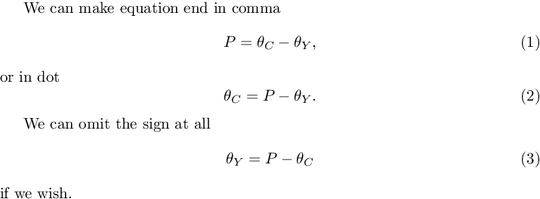
We can make equation  end in comma
\begin{equation}
\label{Eq:SomeEquation}
P = \theta_{C} - \theta_{Y}
\end{equation}
or in dot \renewcommand{\eqend}{\unskip.}
\begin{equation}
\theta_{C} =P - \theta_{Y}
\end{equation}

We can omit the sign at all
\renewcommand{\eqend}{}
\begin{equation}
\theta_{Y} =P - \theta_{C}
\end{equation}
if we wish.
\end{document}