Something has to give here unfortunately as amsmath doesn't support that kind of partial vertical+horizontal alignment out of the box, but only with some manual gymnastics. So on the whole I would do something similar to you, i.e. stick mainly with a basic alignment environent of amsmath, especially if you really try to align all four rows on the equation signs.
What I would do differently is a) move the large lbrace into a macro definition like this:
\newcommand\smashedlbrace[2][0]{\
   \smash{\raisebox{#1\baselineskip}%
                   {\mathsurround 0pt     % <- extra
                    $\left\{\rule{0cm}{#2cm}\right.$}}\ }
and make use of the fact that you have 3 equations to overlay, thus it is best placed after the \implies because then there is no need to raise or lower anything :-) but I made provisions for that via the optional argument.
b) Add some \phantom into the last equation to open it up matching the others
c) your extended \jot is matter of taste ... I like it as the whole thing otherwise looks quite cramped
d) probably a good idea to use a def like \dd as well to make things more readable; or even better use the esdiff package as @Bernard in his anser suggested
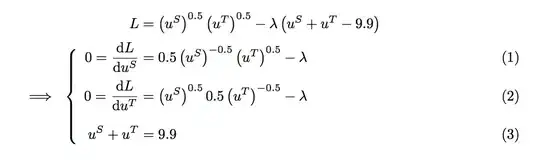
That gives us
\documentclass{article}
\usepackage{amsmath}

\newcommand\dd{\mathrm{d}}

\newcommand\smashedlbrace[2][0]{\
  \smash{\raisebox{#1\baselineskip}%
                  {\mathsurround 0pt     % <- extra for safety
                    $\left\{\rule{0cm}{#2cm}\right.$}}\ }

\begin{document}

\addtolength{\jot}{0.5ex}

\begin{flalign*}
     L&= \left(u^S\right)^{0.5}\left(u^T\right)^{0.5} - \lambda \left(u^S+u^T-9.9\right)\\
0=\dfrac{\textrm d L}{\dd u^S}&= 0.5\left(u^S\right)^{-0.5}\left(u^T\right)^{0.5}-\lambda \tag{1} \\
\implies
\smashedlbrace{1.3}
   0=\dfrac{\dd L}{\dd u^T}&= \left(u^S\right)^{0.5}0.5\left(u^T\right)^{-0.5}-\lambda \tag{2} \\
u^S + u^T &= 9.9 \tag{3}
\phantom{\dfrac{L}{u^T}}         % to open up last equation
&\end{flalign*}

\end{document}
and compiled


\empheqpackage. – barbara beeton Apr 02 '17 at 23:36