25

It seems that a common operation needed when defining new commands is to scan over a list of arguments (separated e.g. by a comma, but maybe by something else) and do something with each argument in the list, find the last one, or whatever.

For example to write commands that look like \Command{a,b,c} or \Command{c.d.e} and do something with each a, b, and c. See e.g. questions on defining a list of operators and ignoring even numbered inputs.

Some solutions have been posted there, but what would be the best idiom to perform such kind of operations? LaTeX's \@for looks very nice, but is it possible to use it to scan anything other than comma-separated lists?

Juan A. Navarro
  • 62,139
  • 32
  • 140
  • 169

8 Answers8

20

I have not progressed to the level of processing a list myself but I have been using etoolbox by Philipp Lehman for some other TeX programming tasks I am doing. I believe 3.7 List processing should give you a good solution.

For example (on a recent version of etoolbox) you can write:

\DeclareListParser*{\myfor}{;}
\myfor{\fbox}{item1; item2; item3}
Juan A. Navarro
  • 62,139
  • 32
  • 140
  • 169
Leo Liu
  • 5,445
11

I was hoping someone to post a better/nicer solution, but so far this seems to be the best one I've seen.

\def\do@scan#1:{%
  \ifx#1\relax
    \let\next\relax
  \else
    \DoSomethingWith{#1}\let\next\do@scan
  \fi\next
}
\newcommand{\scanlist}[1]{\do@scan#1:\relax:}

Of course instead of : one can use , or any other sensible separator.

Juan A. Navarro
  • 62,139
  • 32
  • 140
  • 169
  • I agree that this is a very good solution, since it does not require any other package at all and needs very few lines of code nevertheless. – Mathias Soeken Mar 25 '11 at 14:32
6

Since Morbusg's answer pushed that question to the top, let me add a LaTeX3 answer. The idea is to convert the list to an internal structure called a sequence, and then map over that sequence \l_MyMap_seq.

\documentclass{article}
\usepackage{expl3, xparse}
\ExplSyntaxOn
\seq_new:N \l_MyMap_seq
\NewDocumentCommand{\MyMap}{O{,}mm}
  {
    \seq_set_split:Nnn \l_MyMap_seq {#1} {#2}
    \seq_map_inline:Nn \l_MyMap_seq {#3}
  }
\ExplSyntaxOff
\begin{document}
  \MyMap{a,b,c}{\fbox{#1} }
  \begin{tabular}{c}
    \MyMap[:]{a:b:c}{#1\\}
  \end{tabular}
\end{document}

The first (optional) argument is the delimiter, by default a comma. The second argument is the list, and the third is a function, taking each item of the list as #1.

The xparse package also provides \SplitList, which can be used as

\NewDocumentCommand {\foo} { >{\SplitList{.}} m m } { \tl_map_inline:nn {#1}{#2} }

hard-coding the delimiter in the definition of \foo.

5

In ConTeXt, list processing is done using \processcommalist. Suppose you want to apply the macro \doCommand over each list element passed to \Command. The following definition of \Command does this:

\def\Command#1{\processcommalist[#1]\doCommand}

If the list may contain macros, like

\def\Arguments{a,b,c}
\Command{\Arguments,d,e,f}

then you can use \processcommacommand, like

\def\Command#1{\processcommalistcommand[#1]\doCommand}

There are a some faster alternatives, \rawprocesscommalist and \rawprocesscommacommand but they have certain limitations. See the ConTeXt wiki page on list processing for details.

To process a list with an arbitrary separator, \processlist may be used. \processlist takes 5 arguments: beginning of list marker, end of list marker, element separator, command to apply to each element, and the list. For example, a command \Command[a:b:c] that uses colon as the separator, can be defined as

\def\Command{\processlist[]:}
Aditya
  • 62,301
5

Here is an LPEG based solution. This is written in ConTeXt, but should be easy to modify for LuaLaTeX

\unprotected\def\ProcessListWithDelim#1[#2]#3% delim list command
  {\ctxlua{userdata.ProcessListWithDelim(\!!bs#1\!!es, \!!bs#2\!!es, \!!bs\noexpand#3\!!es)}} 

\startluacode
  userdata = userdata or {}

  function userdata.ProcessListWithDelim(delim, list, command)
    local splitter = lpeg.Ct(lpeg.splitat(lpeg.P(delim)))
    local items    = lpeg.match(splitter, list)

    for i=1,#items do
      tex.sprint(tex.ctxcatcodes, command .. '{' .. items[i] .. '}')
    end
  end
\stopluacode

\def\ShowItem#1{>>>#1<<&lt\crlf}

\def\CommandA#1{\ProcessListWithDelim,[#1]\ShowItem}

\def\CommandB#1{\ProcessListWithDelim{:}[#1]\ShowItem}

\starttext
\CommandA{A,Comma,Separated,List}


\CommandB{A:Colon:Separated:List}
\stoptext
Aditya
  • 62,301
4

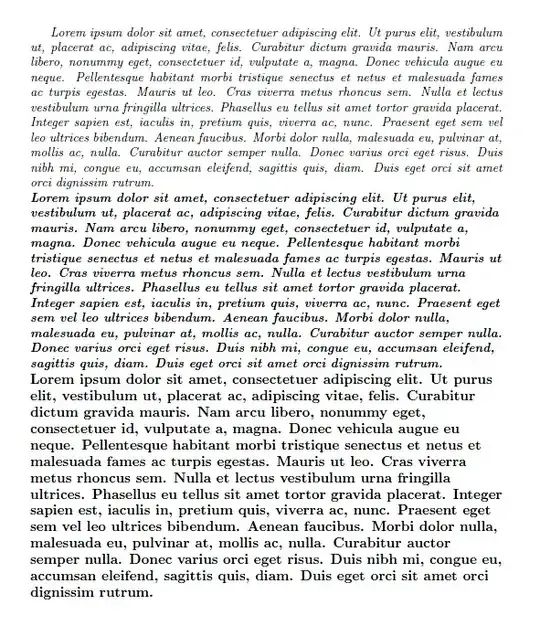
Here's a complete example using the \docsvlist command provided by etoolbox. The example introduces a package called csvfont and its usecsvfont environment. The font and formatting of this environment can be set using the package/environment options font (which resets the font definition) and font+ (which appends the font definition). Both options may take a comma-separated list of values; as individual values one may specify the names (without preceding backslash) of LaTeX's font-switching/formatting commands. (This syntax is used in the upcoming version 0.1b of my quoting package.)

\RequirePackage{filecontents}

\begin{filecontents}{csvfont.sty}
\ProvidesPackage{csvfont}

\RequirePackage{etoolbox,kvoptions}
\SetupKeyvalOptions{family=csf,prefix=csf@}

\newcommand*{\csvfont}{}

\define@key{csf}{font}{%
  \def\csvfont{}%
  \renewcommand*{\do}[1]{\appto{\csvfont}{\csname ##1\endcsname}}%
  \docsvlist{#1}%
}
\define@key{csf}{font+}{%
  \renewcommand*{\do}[1]{\appto{\csvfont}{\csname ##1\endcsname}}%
  \docsvlist{#1}%
}

\ProcessKeyvalOptions*

\newenvironment{usecsvfont}[1][]{\setkeys{csf}{#1}\csvfont}{}

\endinput
\end{filecontents}

\documentclass{article}

\usepackage[font={small,itshape}]{csvfont}

\usepackage{lipsum}

\begin{document}

\begin{usecsvfont}
\lipsum[1]
\end{usecsvfont}

\begin{usecsvfont}[font+={bfseries,raggedright}]
\lipsum[1]
\end{usecsvfont}

\begin{usecsvfont}[font={bfseries,raggedright}]
\lipsum[1]
\end{usecsvfont}

\end{document}

enter image description here

lockstep
  • 250,273
2

Here's my solution (borrowed form Kevin Walker):

% tricky way to iterate macros over a list
\def\semicolon{;}
\def\applytolist#1{
    \expandafter\def\csname multi#1\endcsname##1{
        \def\multiack{##1}\ifx\multiack\semicolon
            \def\next{\relax}
        \else
            \csname #1\endcsname{##1}
            \def\next{\csname multi#1\endcsname}
        \fi
        \next}
    \csname multi#1\endcsname}

And some examples of its use:

% \def\cA{{\cal A}} for A..Z
\def\calc#1{\expandafter\def\csname c#1\endcsname{{\mathcal #1}}}
\applytolist{calc}QWERTYUIOPLKJHGFDSAZXCVBNM;

% \DeclareMathOperator{\pr}{pr} etc.
\def\declaremathop#1{\expandafter\DeclareMathOperator\csname #1\endcsname{#1}}
\applytolist{declaremathop}{pr}{im}{gl}{ev}{coinv}{tr}{rot}{Eq}{obj}{mor}{ob}{Rep}{Tet}{cat}{Maps}{Diff}{Homeo}{sign}{supp}{Nbd}{res}{rad};
Scott Morrison
  • 7,553
  • 6
  • 33
  • 32
  • This is very similar to the proposed solutions posted in the original threads (see the question), I wanted to know if there is anything better. Moreover, I would like to process lists of arguments given as \Command{a,b,c} or \Command{a:b:c}. – Juan A. Navarro Jul 27 '10 at 16:39
2

Plain example of “Lists in TeX's mouth”, lambda.sty (TUGboat article):

\catcode`@=11
\input lambda.sty
\catcode`@=12
\def\csnameafter#1#2{\expandafter#1\csname#2\endcsname}
\def\MathOp#1{\csnameafter\def{#1}{\mathop{\it #1}}%
  #1} % show it, too
\def\Odd#1{\TeXif{\ifodd#1 }}

\Show\Filter\Odd[1,2,3,4,5,6,7,8,9,10,11,12,13] % => [1,3,5,7,9,11,13]

\Show\Map\MathOp[Rep,Tet,Maps,Diff] $ \Rep\Tet\Maps\Diff $
\bye
morbusg
  • 25,490
  • 4
  • 81
  • 162