Since I have too large a table to show during a presentation, I would like to insert a landscape pdf page between slides.
Asked
Active
Viewed 5,017 times
4


-
So you don't want to show that table in the presentation, but only have it in your handouts? – Jake Dec 01 '11 at 02:28
-
Since you are doing a slide presentation, doesn't it make sense to just scale the page to fit the slide? You can use pdfpages to insert pdf. – Peter Grill Dec 01 '11 at 02:29
-
Can you use \resizebox (or \adjustbox) commands? Look at shrinking tables for presentations – Ignasi Dec 01 '11 at 08:44
2 Answers
3
You can create a PDF landscape document (let's call it table.pdf for the example) containing the table and then use \href inside a frame to launch the table when you click on some predefined text:
\documentclass{beamer}

\begin{document}

\begin{frame}
And here I present \href{table.pdf}{a table}.
\end{frame}

\end{document}

Gonzalo Medina
- 505,128
-
-
@justin: My example requires the file
table.pdfto be in the same directory as the.texfile of your presentation. What viewer do yo use? – Gonzalo Medina Dec 01 '11 at 13:28 -
Is it possible to highlight the link in some way, maybe underline it or bold or blue color for links ? Thanks. – Anusha Nov 08 '14 at 22:47
-
@Anusha you can add something like
\hypersetup{colorlinks=true,filecolor=red}to the preamble. – Gonzalo Medina Nov 09 '14 at 00:36
3
If the existing table forms part of an external file, and you just which to include it as-is, you can use pdfpages. Here how, by means of an example.
Assume table.tex contains your large-format, landscape, letterpaper table (formatting provided by booktabs and layout by geometry):

\documentclass{article}
\usepackage{booktabs}% http://ctan.org/pkg/booktabs
\usepackage[landscape,letterpaper]{geometry}% http://ctan.org/pkg/geometry
\pagestyle{empty}% No page headers/footers
\begin{document}
  \begin{tabular}{ll}
    \toprule
    Sequence & Wide column \\
    \midrule
    First & Vestibulum porta ultricies felis. In nec mi. \\
    Second & Nam vestibulum auctor nibh. In eleifend, lacus id tristique ullamcorper, mauris urna convallis elit. \\
    Third & Ut luctus nisi quam lobortis magna. Aenean sit amet odio et sapien rutrum lobortis. \\
    Fourth & Integer dictum accumsan purus. Nullam erat ligula, dictum sed, feugiat nec, faucibus id, ipsum. \\
    \bottomrule
  \end{tabular}
\end{document}
Now, your beamer presentation beamer.tex looks like this:
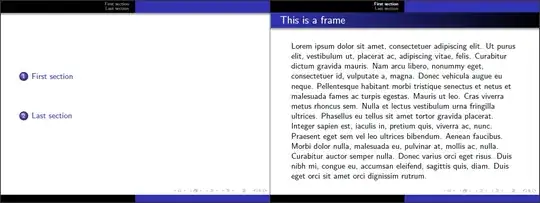
\documentclass{beamer}% http://ctan.org/pkg/beamer
\usepackage{lipsum}% http://ctan.org/pkg/lipsum
\usetheme{Warsaw}
\begin{document}
\begin{frame}
  \tableofcontents
\end{frame}

\section{First section}
\begin{frame}
  \frametitle{This is a frame}
  \lipsum[1]
\end{frame}

\section{Last section}
\begin{frame}
  \frametitle{This is another frame}
  \lipsum[2]
\end{frame}
\end{document}
(The above beamer example creates a 3-frame presentation with Table of Contents which is hyperlinked. lipsum was used to create dummy text.) Now you create your final document, presentation.tex:

\documentclass{article}
\usepackage{pdfpages}% http://ctan.org/pkg/pdfpages
% Default beamer presentation paper size
%\newlength\beamer@paperwidth
%\beamer@paperwidth 12.80cm%
%\newlength\beamer@paperheight%
%\beamer@paperheight 9.60cm%
\usepackage[paperwidth=12.8cm,paperheight=9.6cm]{geometry}% http://ctan.org/pkg/geometry
\pagestyle{empty}
\begin{document}
\includepdf[pages={1-2},noautoscale]{beamer}% presentation BEFORE table
\includepdf[pages=1,fitpaper]{table}% large-format table
\includepdf[pages=3,noautoscale]{beamer}% presentation AFTER table
\end{document}
This includes the beamer.tex presentation pages and interleaves the required large-format table.tex where needed. The disadvantage is that you loose the hyperlinking inherent in beamer.tex.
If you would like to look at ways of including the table as part of your existing beamer code, consider reading Including large tables in a beamer frame. Three different ways include using

