The initial code is
\documentclass{article}
\usepackage{tikz}
\usetikzlibrary{decorations}
\usetikzlibrary{decorations.markings}
\begin{document}

\pgfkeys{
/pgf/decoration/.cd,
pre fraction/.style={pre length=#1*\pgfmetadecoratedpathlength},
post fraction/.style={post length=#1*\pgfmetadecoratedpathlength}
}

\begin{tikzpicture}
\coordinate (A) at (0,0);
\coordinate (B) at (4,2);

\draw [
decoration={
curveto,
pre=moveto, pre fraction=0,
post=moveto, post fraction=0.3}, decorate, red, ultra thick] (A) to[out=0,in=-90](B);

\draw [decoration={curveto,
                   pre=moveto, pre fraction=0.7,
                   post=moveto, post fraction=0},%
       decorate, blue, ultra thick,dotted] (A) to [out=0,in=-90](B);

\path [
decoration={
     markings, mark=at position .7  with {\arrow[red,line width=2pt]{>}}},
     decorate  ] (A) to[out=0,in=-90](B);
\end{tikzpicture}

\end{document}
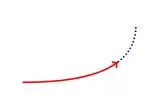
There is a problem if I want to replace to by edge . In some cases, the replacement is useful.
Is it possible to use making with edge ? and how ?
I think that the problem comes from that the edge operation works like a to operation that is added after the main path has been drawn. I get often the error that marking does not work on an empty path !


