13

Using the MWE below:

\documentclass{standalone}
\usepackage{tikz}
\usepackage{tikz-qtree}
\usepackage{tikz-qtree-compat}
\usepackage{ textcomp }

\begin{document}
\begin{tikzpicture}
\Tree [ 
  .TP [ 
      .T' \node(C){T+verb}; [
          .vP \qroof{`ana}.DP [
             .v' \node(B){v+{\textlangle}verb{\textrangle}}; [
                 .VP [
                     .V' \node(A){V+{\textlangle}verb{\textrangle}}; \qroof{taalib}.DP 
                 ]
             ]
          ]
      ]
  ]
]
\draw [semithick,->] (A) to[out=270,in=180] (B);
\draw [semithick,->] (B) to[out=270,in=180] (C);
\end{tikzpicture}
\end{document}

I get output like this:
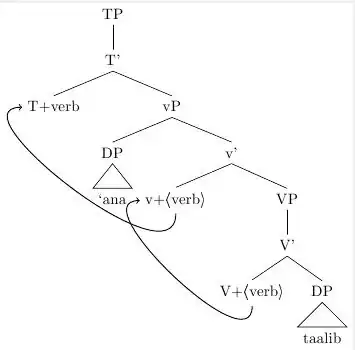
End of first arrow and beginning of second arrow don't match

The tree would look a lot better and I think be more intuitionally correct if the endpoint of the arrow from "V+" and the starting point of the arrow from "v+" were in the same place, perhaps with a small black dot to connect them. That would better show that the same verb is doing both movements. Does anyone know how to accomplish this?

Nate Glenn
  • 1,614
  • Not sure if I understand correctly but I think you can send the arrows to/from the same point of the node i.e. something like \draw [semithick,->] (A) to[out=270,in=-150] (B.-150);\draw [semithick,->] (B.-150) to[out=-150,in=180] (C); – percusse Dec 04 '11 at 07:06

2 Answers2

10

You can add a node with a dot and instead of using in and out angles, use the bend parameter.

\documentclass{standalone}
\usepackage{tikz}
\usepackage{tikz-qtree}
\usepackage{tikz-qtree-compat}
\usetikzlibrary{positioning}
\newcommand\TR[1]{\textlangle#1\textrangle}
\usepackage{ textcomp }

\begin{document}
\begin{tikzpicture}
\Tree [ 
  .TP [ 
      .T\1 \node(C){T+verb}; [
          .vP \qroof{`ana}.DP [
             .v\1 \node(B){v+\TR{verb}}; [
                 .VP [
                     .V\1 \node(A){V+\TR{verb}}; \qroof{taalib}.DP 
                 ]
             ]
          ]
      ]
  ]
]
\draw [semithick] (A.south) edge [bend left=70,->,shorten >=.2em] (B.south) 
    node (D) [draw, fill, circle, minimum size=2pt,below = -.25em of B.south,
       inner sep=0pt] {} ;
\draw [semithick] (D) edge [bend left=70,->,shorten <=.5em] (C);
\end{tikzpicture}
\end{document}

I also made a couple of other changes (\1 instead of `'' for primes, and a command to mark traces, which will save you a lot of typing.

output of code

Alan Munn
  • 218,180
5

You already have a solution with a black dot, but you can also play with start and final anchors. With B.240 syntax you select point on node border at angle 240. Look at the example

\documentclass{standalone}
\usepackage{tikz}
\usepackage{tikz-qtree}
\usepackage{tikz-qtree-compat}
\usepackage{ textcomp }

\begin{document}
\begin{tikzpicture}
\Tree [ 
  .TP [ 
      .T' \node(C){T+verb}; [
          .vP \qroof{`ana}.DP [
             .v' \node(B){v+{\textlangle}verb{\textrangle}}; [
                 .VP [
                     .V' \node(A){V+{\textlangle}verb{\textrangle}}; \qroof{taalib}.DP 
                 ]
             ]
          ]
      ]
  ]
]
\draw [semithick,->] (A) to[out=270,in=270] (B.south);
\draw [semithick,->] (B.240) to[out=240,in=180] (C);
\end{tikzpicture}
\end{document}

enter image description here

Ignasi
  • 136,588