12

When I include a PDF diagram, it forces a new page, so I have one blank page and then this diagram, can somebody help me please? I need to remove that blank page.

My document looks like this

\documentclass[11pt]{article}
\usepackage[utf8]{inputenc}
\usepackage{multirow}
\usepackage{graphicx}
\usepackage{a4wide}
\usepackage{pdfpages}
\usepackage[total={17cm,25cm}, top=2.0cm, bottom=1cm, left=0.0cm, right=0.0cm, includefoot]{geometry}

\begin{document}
\newgeometry{total={17cm,25cm}, top=2.0cm, bottom=1cm, left=2.0cm, right=2.0cm, includefoot}
\section*{Diagram případů užití}
\includegraphics[width=\textwidth]{diagram.pdf}
\end{document}

and the resulting output is
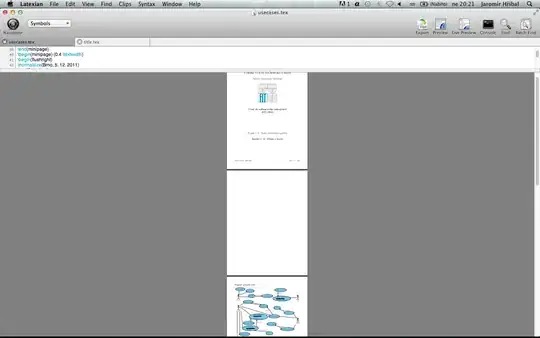
output result with blank page

  • Reduce the width of the image. It seems that the pdf is to height. – Marco Daniel Dec 04 '11 at 18:55
  • I don't think so, because it inserts blank page and on the next page it seems to be ok. – designerrr Dec 04 '11 at 19:07
  • Welcome to TeX.sx! Please add a minimal working example (MWE) that illustrates your problem. Without further information we can't help you. – Martin Scharrer Dec 04 '11 at 19:11
  • 1
    There is a completely blank page inserted? Or does the \section* simply stands on its own? Also what do you mean with "seems to be ok"? This is not the normal behavior of \includegraphics, so you either doing something funny or the PDF is too large or maybe defect. – Martin Scharrer Dec 04 '11 at 19:12
  • link Here you can see, what i mean by "seems to be ok". What is on site 3 i expected on site 2, but instead 2 is blank page. – designerrr Dec 04 '11 at 19:24
  • `\documentclass[11pt]{article} \usepackage[utf8]{inputenc} \usepackage{multirow} \usepackage{graphicx} \usepackage{a4wide} \usepackage{pdfpages} \usepackage[total={17cm,25cm}, top=2.0cm, bottom=1cm, left=0.0cm, right=0.0cm, includefoot]{geometry}

    \begin{document}

    \newgeometry{total={17cm,25cm}, top=2.0cm, bottom=1cm, left=2.0cm, right=2.0cm, includefoot}

    \section*{Diagram případů užití} \includegraphics[width=\textwidth]{diagram.pdf}

    \end{document}`

    – designerrr Dec 04 '11 at 19:29
  • You can edit the question to add the additional link and code. – Martin Scharrer Dec 04 '11 at 19:30
  • 1
    The section + the image is to large. As no page break is allowed after the section title, TeX moves both to the next page, realize that there isn't enough place there too and then TeX gives up, puts both on the page and complains in the log about an overfull vbox. If the image is only a bit too large you can use \enlargethispage{1cm} to add a bit space on the page. – Ulrike Fischer Dec 04 '11 at 19:40
  • Your minimal only shows one image, whereas the images show two. Me thinks it is caused by the newgeometry, which always issues a new page. – yannisl Dec 04 '11 at 20:31
  • 3
    theres a LaTex stack exchange, might be worth getting this moved over there ? –  Dec 04 '11 at 16:36
  • 1
    BTW: You don't need package a4wide while you are using geometry. And l2tabu says: a4.sty. a4wide.sty: Do not use these two packages any longer. – Schweinebacke Dec 07 '11 at 09:56

1 Answers1

12

The image is too large to fit on current page, because there is not much place left. It is also too large to fit on a page of its own, therefore moving to the next (last?) page, where it is apparently placed using some emergency rule even if it doesn't fit there either.

You should include the image using the following options instead:

\includegraphics[width=\textwidth,height=\textheight,keepaspectratio]{diagram.pdf}

This tries to scale it to the textwidth but not larger than the textheight while keeping the aspect-ratio.

To allow enough space for a caption you should reduce the height a little, e.g. either take only .9\textheight or subtract two lines or so from it.

\includegraphics[width=\textwidth,height=\dimexpr\textheight-2\baselineskip\relax,keepaspectratio]{diagram.pdf}

From the look of it it might also belong into a figure environment. There you should add a \centering before the \includegraphics to have it centered.

Martin Scharrer
  • 262,582