1

How can I draw a line straight down the middle of a node?

Essentially I'm looking for a division of a node into two hemispheres (left and right) as well as a way to draw the line up and down.

I'm working from a demo:

\documentclass{article}

\usepackage{tikz}
\begin{document}
\pagestyle{empty}

\def\layersep{2.5cm}

\begin{tikzpicture}[shorten >=1pt,->,draw=black!50, node distance=\layersep]
    \tikzstyle{every pin edge}=[<-,shorten <=1pt]
    \tikzstyle{neuron}=[circle,fill=black!25,minimum size=17pt,inner sep=0pt]
    \tikzstyle{input neuron}=[neuron, fill=green!50];
    \tikzstyle{output neuron}=[neuron, fill=red!50];
    \tikzstyle{compute neuron}=[neuron, fill=blue!50];
    \tikzstyle{annot} = [text width=4em, text centered]

    % Draw the input layer nodes
    \foreach \name / \y in {1,...,4}
    % This is the same as writing \foreach \name / \y in {1/1,2/2,3/3,4/4}
        \node[input neuron, pin=left:Input \#\y] (I-\name) at (0,-\y) {};

    % Draw the compute layer nodes
    \foreach \name / \y in {1,...,5}
        \path[yshift=0.5cm]
            node[compute neuron] (C-\name) at (\layersep,-\y cm) {};

    % Draw the output layer node
    \node[output neuron,pin={[pin edge={->}]right:Output}, right of=C-3] (O) {};

    % Connect every node in the input layer with every node in the
    % compute layer.
    \foreach \source in {1,...,4}
        \foreach \dest in {1,...,5}
            \path (I-\source) edge (C-\dest);

    % Connect every node in the compute layer with the output layer
    \foreach \source in {1,...,5}
        \path (C-\source) edge (O);

    % Annotate the layers
    \node[annot,above of=C-1, node distance=1cm] (hl) {compute layer};
    \node[annot,left of=hl] {Input layer};
    \node[annot,right of=hl] {Compute layer};
\end{tikzpicture}
% End of code
\end{document}

I want each neuron to be divided in half.

  • I think it would be easier to do this using a matrix of nodes. However, whether you want to go that route probably depends on how close you are to completing the diagram using manual placement methods and tweaks. – cfr Jun 01 '17 at 16:08

2 Answers2

3

like this: enter image description here

without use of obsolete \tikzstyle{...}:

\documentclass{article}
\usepackage{tikz}
\newcommand\ppbb{path picture bounding box}

\begin{document}
\pagestyle{empty}

\def\layersep{2.5cm}

\begin{tikzpicture}[shorten >=1pt, ->, draw=black!50, 
        node distance = \layersep,
every pin edge/.style = {<-, shorten <=1pt},
        neuron/.style = {circle,minimum size=17pt,inner sep=0pt,
                         path picture={%
                         \path[draw=black!75,semithick,-]   (\ppbb.north)  -- (\ppbb.south);},
                         },
  input neuron/.style = {neuron, fill=green!50},
 output neuron/.style = {neuron, fill=red!50},
compute neuron/.style = {neuron, fill=blue!50},
         annot/.style = {text width=4em, text centered},
                    ]

    % Draw the input layer nodes
    \foreach \name / \y in {1,...,4}
    % This is the same as writing \foreach \name / \y in {1/1,2/2,3/3,4/4}
        \node[input neuron, pin=left:Input \#\y] (I-\name) at (0,-\y) {};

    % Draw the compute layer nodes
    \foreach \name / \y in {1,...,5}
        \path[yshift=0.5cm]
            node[compute neuron] (C-\name) at (\layersep,-\y cm) {};

    % Draw the output layer node
    \node[output neuron,pin={[pin edge={->}]right:Output}, right of=C-3] (O) {};

    % Connect every node in the input layer with every node in the
    % compute layer.
    \foreach \source in {1,...,4}
        \foreach \dest in {1,...,5}
            \path (I-\source) edge (C-\dest);

    % Connect every node in the compute layer with the output layer
    \foreach \source in {1,...,5}
        \path (C-\source) edge (O);

    % Annotate the layers
    \node[annot,above of=C-1, node distance=1cm] (hl) {compute layer};
    \node[annot,left of=hl] {Input layer};
    \node[annot,right of=hl] {Compute layer};
\end{tikzpicture}
% End of code
\end{document}

Edit: Your request in comment below is not very clear where are label(s) ... so far see, if you mean something like this:

enter image description here

Now I slightly clean-up your code:

\documentclass{article}
\usepackage{tikz}
\usetikzlibrary{positioning}
\newcommand\ppbb{path picture bounding box}

\begin{document}
\pagestyle{empty}

\def\layersep{2.5cm}

\begin{tikzpicture}[shorten >=1pt, ->, draw=black!50, 
        node distance = \layersep,
every pin edge/.style = {<-, shorten <=1pt},
        neuron/.style = {circle, minimum size=17pt, inner sep=0pt,  
                         path picture={%
                         \path[draw=black!75,semithick,-]   (\ppbb.north)  -- (\ppbb.south);},
                         },
  input neuron/.style = {neuron, fill=green!50},
 output neuron/.style = {neuron, fill=red!50},
compute neuron/.style = {neuron, fill=blue!50},
         annot/.style = {text width=4em, text centered},
                    ]
% Draw the input layer nodes
\foreach \y in {1,...,4}
    \node[input neuron, pin=left:Input \#\y] (I-\y) at (0,-\y) {};
\node[above=0pt of I-1] {$h_0$};

% Draw the compute layer nodes
\foreach \y in {1,...,5}
    \node[yshift=0.5cm,compute neuron] (C-\y) at (\layersep,-\y cm) {};

% Draw the output layer node
\node[output neuron,pin={[pin edge={->}]right:Output}, right=of C-3.west] (O) {};

% Connect every node in the input layer with every node in the
% compute layer.
\foreach \source in {1,...,4}
    \foreach \dest in {1,...,5}
        \path (I-\source) edge (C-\dest);

% Connect every node in the compute layer with the output layer
\foreach \source in {1,...,5}
    \path (C-\source) edge (O);

% Annotate the layers
    \begin{scope}[node distance=0pt]
\node[annot,above=3mm of C-1] (hl)          {compute layer};
\node[annot,above=of hl.south -| I-1]   {Input layer};
\node[annot,above=of hl.south -| O]     {Compute layer};
    \end{scope}
\end{tikzpicture}
% End of code
\end{document}
cfr
  • 198,882
Zarko
  • 296,517
  • Both this and @Andrew's solution both exhibit a problem with labelling. If I have an individual label for a neuron, it moves away from the node. For example:
    `% Draw the input layer nodes
    \foreach \name / \y in {1,...,4}
    % This is the same as writing \foreach \name / \y in {1/1,2/2,3/3,4/4}
    \node[input neuron, pin position=-90, rotate=90] (I-\name) at (0,-\y) {};
    
    \node[left=1pt of I-1]{$h_0$};`
    
    – StatsSorceress Jun 01 '17 at 03:39
2

You can just replace circle in the tikz style for the neurons with circle split -- and you will need to add \usetikzlibrary{shapes} to the preamble. This produces:

enter image description here

I also added draw=block because the split was difficult to see inside the purple neurons, however, this also adds a border that you may not want.

Also, rather than using \tikzstyle{...} commands I would just put these inside the tikzpicture options -- or put them all inside \tikz{...} in your preamble if there will be than one of the environments. Here's your modified MWE:

\documentclass{article}

\usepackage{tikz}
\usetikzlibrary{shapes}
\begin{document}
\pagestyle{empty}

\def\layersep{2.5cm}

\begin{tikzpicture}[
      shorten >=1pt,->,draw=black!50, node distance=\layersep,
      every pin edge/.style={<-,shorten <=1pt},
      neuron/.style={circle split,fill=black!25,minimum size=17pt,inner sep=0pt,draw=black},
      input neuron/.style={neuron, fill=green!50},
      output neuron/.style={neuron, fill=red!50},
      compute neuron/.style={neuron, fill=blue!50},
      annot/.style={text width=4em, text centered}
    ]

    % Draw the input layer nodes
    \foreach \name / \y in {1,...,4}
    % This is the same as writing \foreach \name / \y in {1/1,2/2,3/3,4/4}
        \node[input neuron, pin=left:Input \#\y] (I-\name) at (0,-\y) {};

    % Draw the compute layer nodes
    \foreach \name / \y in {1,...,5}
        \path[yshift=0.5cm]
            node[compute neuron] (C-\name) at (\layersep,-\y cm) {};

    % Draw the output layer node
    \node[output neuron,pin={[pin edge={->}]right:Output}, right of=C-3] (O) {};

    % Connect every node in the input layer with every node in the
    % compute layer.
    \foreach \source in {1,...,4}
        \foreach \dest in {1,...,5}
            \path (I-\source) edge (C-\dest);

    % Connect every node in the compute layer with the output layer
    \foreach \source in {1,...,5}
        \path (C-\source) edge (O);

    % Annotate the layers
    \node[annot,above of=C-1, node distance=1cm] (hl) {compute layer};
    \node[annot,left of=hl] {Input layer};
    \node[annot,right of=hl] {Compute layer};
\end{tikzpicture}
% End of code
\end{document}

EDIT

To have a vertical split it is almost enough to add rotate=90 to the nodes, as mentioned in TikZ: circle split vertical. Unfortunately, this messes up the relative node placement. Getting around this is a little tricky, but the following is one way of doing this:

\documentclass{article}

\usepackage{tikz}
\usetikzlibrary{shapes}
\begin{document}
\pagestyle{empty}

\def\layersep{2.5cm}

\begin{tikzpicture}[
      shorten >=1pt,->,draw=black!50, node distance=\layersep,
      every pin edge/.style={<-,shorten <=1pt},
      neuron/.style={circle split,fill=black!25,minimum size=17pt,inner sep=0pt},
      input neuron/.style={neuron, fill=green!50},
      output neuron/.style={neuron, fill=red!50},
      compute neuron/.style={neuron, fill=blue!50},
      annot/.style={text width=4em, text centered}
    ]

    % Draw the input layer nodes
    \foreach \name / \y in {1,...,4}
    % This is the same as writing \foreach \name / \y in {1/1,2/2,3/3,4/4}
    \node[input neuron, pin position=-90, pin=Input \#\y, rotate=90] (I-\name) at (0,-\y) {};

    % Draw the compute layer nodes
    \foreach \name / \y in {1,...,5}
        \path[yshift=0.5cm]
            node[compute neuron,rotate=90] (C-\name) at (\layersep,-\y cm) {};

    % Draw the output layer node
    \node[output neuron,pin={[pin edge={->}]right:Output}, right of=C-3,rotate=90] (O) {};

    % Connect every node in the input layer with every node in the
    % compute layer.
    \foreach \source in {1,...,4}
        \foreach \dest in {1,...,5}
            \path (I-\source) edge (C-\dest);

    % Connect every node in the compute layer with the output layer
    \foreach \source in {1,...,5}
        \path (C-\source) edge (O);

    % Annotate the layers
    \node[annot,above of=C-1, node distance=1cm] (hl) {compute layer};
    \node[annot,left of=hl] {Input layer};
    \node[annot,right of=hl] {Compute layer};
\end{tikzpicture}
% End of code
\end{document}

I have not added rotate=90 to the neuron style because this breaks the subsequent relative node placement. Instead, I have added rotate=90 to each node (I would have thought that this was equivalent, but it's not!). In addition I have added pin position=-90 to the nodes in the "input layer". This produces what I think is the desired output:
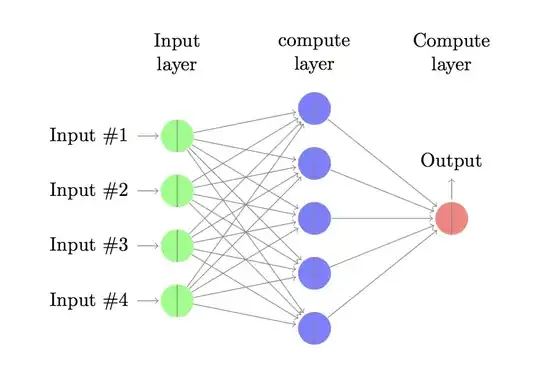
enter image description here

  • Brilliant! But what about a vertical line? – StatsSorceress Jun 01 '17 at 02:49
  • @StatsSorceress If you search on this site, you can find TikZ: circle split vertical – ebosi Jun 01 '17 at 02:55
  • @Andrew I'm having trouble with labels on individual nodes. They shift when I add the rotate part. E.g. `% Draw the input layer nodes \foreach \name / \y in {1,...,4} % This is the same as writing \foreach \name / \y in {1/1,2/2,3/3,4/4} \node[input neuron, pin position=-90, rotate=90] (I-\name) at (0,-\y) {};
    \node[left=1pt of I-1]{$h_0$};`
    
    – StatsSorceress Jun 01 '17 at 03:40
  • @StatsSorceress Did you use the code in my edit? For your MWE I found that this approach fixed the issues. Failing this, Zarko's solution looks more robust. –  Jun 01 '17 at 05:34