From the comments I take it that you downloaded the LyX bundle with MiKTeX from here or similar. I'll just give a brief outline of my suggestions.
1. Switch to an online editor
As suggested by ShreevatsaR, this is the easiest options especially if you don't have a lot of space on your computer. Along with ShareLaTeX or Overleaf which are very popular for LaTeX, there is also Authorea (LaTeX/Markdown/HTML) or even LyX Online. Each has their own caveats such as limited storage or images or document customisation unless you are willing to pay.
2. Uninstall MikTeX, Install TeXLive then Reconfigure LyX
TeXLive contains all the major packages you need. However, it comes at the cost of a very large installation (I think mine used to be in the order of 4-5Gb). Note for some specialised use, e.g. using knitr on Windows for me, MikTeX is preferred.
After uninstalled MikTeX (as simple as going to Programs & Features on Windows), you can download TeXLive here. Once it's finished installing open up LyX and go Tools > Reconfigure.
3. Turn on Automatically Download Packages
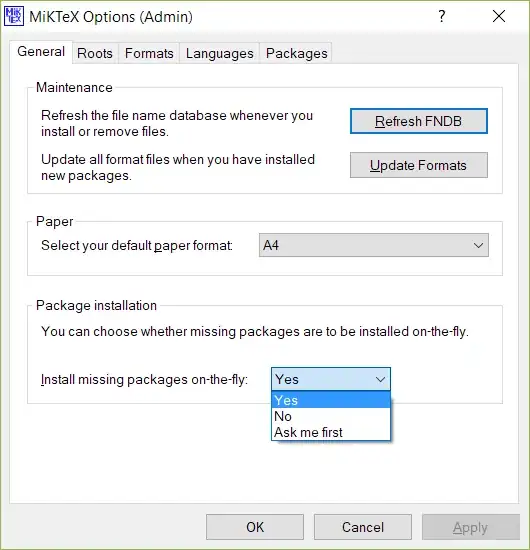
If I had to guess at the reason behind your problems with no other information, I would guess that you chose to not install missing packages on the fly or you are not connected to the internet. This means MikTeX can't automatically install missing packages.
If you make sure "yes" is selected and you are connected to the internet, your problems hopefully should go away. Note that MikTeX may ask for administrator privileges to install additional packages. Alternatively you can select exactly which packages to install, but if you're just starting to learn LaTeX it can be hard to know which packages are popular.
4. Go to the source: TeX
This is just added for completeness. I, possibly like many others, would recommend learning LaTeX first and then moving to LyX if you so wish. One reason is there are a lot more resources for LaTeX, another reason is it's difficult to collaborate on LyX documents and yet another reason is because a lot of the 'work arounds' in LyX rely on LaTeX code. TeXmaker or TeXworks (automatically bundled with MikTeX) are almost the defacto standards.
5. Stick with the Familiar
This is really for complete completeness since from the comments and your other questions you seem to be more after typesetting maths than typesetting documents. You could continue using Word/Pages/OpenOffice/LibreOffice and use an online equation generator such as this one to generate maths equations. If you're using LibreOffice you could use the TexMaths plugin.
Best of luck with that, High GPA


