4

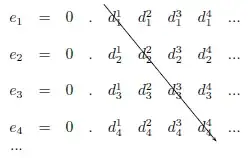
What is the best way to draw a diagonal line through the following table?

\begin{center}
\begin{tabular}{*{9}{c}}
$e_{1}$ & = & $0$ & $.$ & $d_{1}^{1}$ & $d_{1}^{2}$ & $d_{1}^{3}$ & $d_{1}^{4}$ & $...$ \\
\\
$e_{2}$ & = & $0$ & $.$ & $d_{2}^{1}$ & $d_{2}^{2}$ & $d_{2}^{3}$ & $d_{2}^{4}$ & $...$ \\
\\
$e_{3}$ & = & $0$ & $.$ & $d_{3}^{1}$ & $d_{3}^{2}$ & $d_{3}^{3}$ & $d_{3}^{4}$ & $...$ \\
\\
$e_{4}$ & = & $0$ & $.$ & $d_{4}^{1}$ & $d_{4}^{2}$ & $d_{4}^{3}$ & $d_{4}^{4}$ & $...$ \\
$...$ \\
\end{tabular}
\end{center}

I want the arrow to hit $d_{1}^{1}$, $d_{2}^{2}$, etc.

David Carlisle
  • 757,742
jamaicanworm
  • 29,114
  • 1
    A tip: If you select the entire code block and hit Ctrl + K (or click the {} button above the text field), the code will be marked as such. This also works for inline code. – Torbjørn T. Dec 09 '11 at 18:07

3 Answers3

10

Here's a TikZ variant (\tikzmark was borrowed from one of Andrew Stacey's answers):

\documentclass{article}
\usepackage{tikz}
\usetikzlibrary{calc,arrows}

\newcommand{\tikzmark}[1]{%
  \tikz[overlay,remember picture] \node (#1) {};}

\begin{document}
\[
    \begin{array}{*{9}{c}}
    e_{1} & = & 0 & . & \tikzmark{a}d_{1}^{1} & d_{1}^{2} & d_{1}^{3} & d_{1}^{4} & ... \\
    \\
    e_{2} & = & 0 & . & d_{2}^{1} & d_{2}^{2} & d_{2}^{3} & d_{2}^{4} & ... \\
    \\
    e_{3} & = & 0 & . & d_{3}^{1} & d_{3}^{2} & d_{3}^{3} & d_{3}^{4} & ... \\
    \\
    e_{4} & = & 0 & . & d_{4}^{1} & d_{4}^{2} & d_{4}^{3} & d_{4}^{4}\tikzmark{b} & ... \\
    ... \\
    \end{array}
\]
\tikz[overlay,remember picture] \draw[-triangle 45] ($(a.north east)+(-0.2,0.2)$) -- ($(b.south west)+(0.3,-0.2)$);

\end{document}

enter image description here

For other different predefined arrow tips, refer to Section 23 Arrow Tip Library of the pgf manual.

Moriambar
  • 11,466
Gonzalo Medina
  • 505,128
9

You can use pst-node and a latex -> dvips -> ps2pdf (or xelatex) compile sequence to produce the following:
enter image description here

\documentclass{article}
\usepackage{pst-node}% http://ctan.org/pkg/pst-node
\begin{document}
\[
    \begin{array}{*{9}{c}}
    e_{1} & = & 0 & . & \rnode{A}{d_{1}^{1}} & d_{1}^{2} & d_{1}^{3} & d_{1}^{4} & ... \\
    \\
    e_{2} & = & 0 & . & d_{2}^{1} & d_{2}^{2} & d_{2}^{3} & d_{2}^{4} & ... \\
    \\
    e_{3} & = & 0 & . & d_{3}^{1} & d_{3}^{2} & d_{3}^{3} & d_{3}^{4} & ... \\
    \\
    e_{4} & = & 0 & . & d_{4}^{1} & d_{4}^{2} & d_{4}^{3} & \rnode{B}{d_{4}^{4}} & ... \\
    ... \\
    \end{array}
\]
\ncline[nodesep=-1.2\baselineskip,linewidth=.4pt]{->}{A}{B}% Draw line
\end{document}

\rnode{<node>}{<stuff>} makes one able to reference <stuff> via <node>. \ncline is used to draw the node connection lines between the specified nodes. Since this draws on the rich pstricks library, you can modify the colour, width, presentation and style of the line as needed.

Note that I've changed your "entirely mathematical tabular" to an array environment, which is its intended use. Additionally, instead of centering it (via the center environment), I've place the entire array in a display math environment (using \[ and \]).


More pronounced arrow definitions is possible via some of the basic pstricks arrow head modifications. One could use the options (key-value) arrowsize=<dim> <num>, arrowlength=<dim>, arrowinset=<num> or arrowscale=<factor>. Here is some detail from the pstricks documentation (p 28, section 15 Arrowheads and such):

enter image description here

For example, try

\ncline[nodesep=-1.2\baselineskip,linewidth=.4pt,arrowsize=3pt 2]{->}{A}{B}% Draw line
Moriambar
  • 11,466
Werner
  • 603,163
1

With {NiceMatrix} of nicematrix and TikZ to draw the arrow (by using the nodes created by nicematrix in the array).

\documentclass{article}
\usepackage{nicematrix,tikz}
\usetikzlibrary{arrows.meta}

\begin{document} [ \begin{NiceMatrix} e_{1} & = & 0 & . & d_{1}^{1} & d_{1}^{2} & d_{1}^{3} & d_{1}^{4} & ... \ \ e_{2} & = & 0 & . & d_{2}^{1} & d_{2}^{2} & d_{2}^{3} & d_{2}^{4} & ... \ \ e_{3} & = & 0 & . & d_{3}^{1} & d_{3}^{2} & d_{3}^{3} & d_{3}^{4} & ... \ \ e_{4} & = & 0 & . & d_{4}^{1} & d_{4}^{2} & d_{4}^{3} & d_{4}^{4}& ... \ ... \ \CodeAfter \tikz \draw [shorten > = -2mm , ->] (1-5.north west) -- (7-8.south east) ; \end{NiceMatrix} ]

\end{document}

Output of the above code

F. Pantigny
  • 40,250