1

I am using paralist's asparaenum instead of subsections. Occasionally, though, I would like to refer to an asparaenum item. Here is a MWE:

\documentclass[11pt]{book}
\usepackage{paralist}%
\usepackage{hyperref}
\usepackage{cleveref}
\begin{document}
\chapter{The First}\label{1-0}
\section{One}\label{1-1}
\begin{asparaenum}
\item%1
Some stuff
\item%2
Important Stuff
\end{asparaenum}
Occasionally, I would like to refer to just the item Important Stuff in \Cref{1-1} \nameref{1-1} rather than to the whole section 1.
\end{document}
Andrew Swann
  • 95,762
schremmer
  • 2,107
  • 2
    try to add labels after items, something like \item\label{1-1-2}%2 Important Stuff and then referencing it for example \ref{1-1-2}. Is this what you like to achieve? – Zarko Jul 03 '17 at 20:13
  • 2
    You get the manual of paralist with texdoc paralist, and then see page 6 for exactly the example, how to label an item. Besides that, having enumerations as subsections is a bad idea. – Keks Dose Jul 03 '17 at 20:19
  • @Zarko I was so utterly convinced it couldn't be done that I did not even think of trying it. Thanks – schremmer Jul 03 '17 at 21:17
  • @KeksDose I keep forgetting that there are a lot of answers in the manuals. Thanks. Besides that, I agree with you that having enumerations as subsections is a bad idea but I have always found subsections truly UGLY. – schremmer Jul 03 '17 at 21:21
  • 4
    I'm voting to close this question as off-topic because solved by comments. – Zarko Jul 03 '17 at 22:38
  • @Zarko Alternatively, you could turn your comment into an answer which I would accept. – schremmer Jul 04 '17 at 13:52
  • @schremmer, now is to late :) question is already closed :( – Zarko Jul 04 '17 at 13:55
  • @Zarko Don't see what this has accomplished. But, for this mere user to avoid a repeat, how did the question "not fall within the scope of TeX, LaTeX. Yes, it was a "stupid" question which I should have been able to answer myself, but the "answers" let me do what I had failed to do on my own even though I have been writing mathematics in LaTeX for some fifteen years. – schremmer Jul 06 '17 at 01:28
  • @schremmer, your question is not stupid. If you like to have an answer, I will reopen your question (but I'm not sure if will succeed) and wrote answer. – Zarko Jul 06 '17 at 06:49
  • Related: https://tex.stackexchange.com/questions/111280/understanding-how-references-and-labels-work – Schweinebacke Jul 06 '17 at 07:23
  • @Schweinebacke: yes, generally it is related, but this link doesn't deal wit referencing items in numerated list. I'm pretty sure, that similar question was asked before, but now I haven't time for search for duplicate. – Zarko Jul 06 '17 at 07:41
  • @KeksDose I have finally seen the wisdom of your "having enumerations as subsections is a bad idea". I had done it only because I had not been able to reformat \subsection{} which I am only now learning how to do. As a result I must apologize to the authors of both answers which I do not know how to both accept. Nevertheless, I learned a lot from them. – schremmer Jul 31 '17 at 02:04
  • @Zarko Please see my comment to KeksDose. – schremmer Jul 31 '17 at 02:08
  • @Al-MotasemAldaoudeyeh Please see my comment to KeksDose. – schremmer Jul 31 '17 at 02:09

2 Answers2

2

Try to add labels after items, something like \item\label{1-1-2}%2 Important Stuff and then referencing it for example \ref{1-1-2}

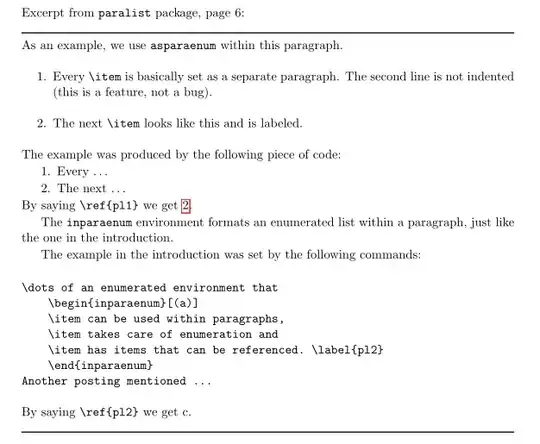
Excerpt from \verb+paralist+ package, page 6:
enter image description here

In your example:

\documentclass[11pt]{book}
\usepackage{geometry}

\usepackage{paralist}%
\usepackage{hyperref}
\usepackage{cleveref}

\usepackage{lipsum}
\begin{document}
\chapter{The First}\label{1-0}

Excerpt from \verb+paralist+ package, page 6:

\noindent\rule{\linewidth}{1pt}
As an example, we use \verb+asparaenum+ within this paragraph.
    \begin{enumerate}
\item   Every \verb+\item+ is basically set as a separate paragraph. The second
line is not indented (this is a feature, not a bug).
\item   The next \verb+\item+ looks like this and is labeled.
    \end{enumerate}
The example was produced by the following piece of code:
\begin{asparaenum}
\item Every \dots
\item The next \dots \label{pl1}
\end{asparaenum}
By saying \verb+\ref{pl1}+ we get \ref{pl1}.

The \verb+inparaenum+ environment formats an enumerated list within a paragraph, just like the one in the introduction.

The example in the introduction was set by the following commands:
\begin{verbatim}
\dots of an enumerated environment that
    \begin{inparaenum}[(a)]
    \item can be used within paragraphs,
    \item takes care of enumeration and
    \item has items that can be referenced. \label{pl2}
    \end{inparaenum}
Another posting mentioned ...
\end{verbatim}
By saying \verb+\ref{pl2}+ we get c.

\noindent\rule{\linewidth}{1pt}

\section{One}\label{1-1}
In your case:
    \begin{asparaenum}
\item   Some stuff
\item\label{item:1-1-2} Important Stuff
    \end{asparaenum}
Occasionally, I would like to refer to just the item \emph{Important Stuff}, e.g \cref{item:1-1-2} in above list \dots

\section{Two}\label{1-2}
With use referencing some list item, you should be aware that when you do again like in the following case:
    \begin{asparaenum}
\item   Some stuff second time
\item\label{item:1-2-2} Important Stuff again
    \end{asparaenum}
the  \emph{Important Stuff again} has the same \verb+\cref+ mark as before, but corect hyperlink, e.g \cref{item:1-2-2},

\lipsum[2]


\newpage\noindent
which work correctly  from any part of document, e.g see \cref{item:1-2-2} on the page \pageref{item:1-2-2}!

\lipsum[3]
\end{document}

enter image description here

Zarko
  • 296,517
  • @schremmer, I succeed with suggestion for reopening of your question. Now I add my answer. – Zarko Jul 06 '17 at 08:48
2

enter image description here

Type the following in the preamble:

\crefname{aspar}{Important Item}{Important Items}
\Crefname{aspar}{Important Item}{Important Items}
\crefformat{aspar}{Important Item #1}
\newcommand{\labelasp}[1]{\label[aspar]{#1}} % a new command for custom referncing important items

Where aspar is a new label type for cleveref package to identify. \labelasp is a new command you can use to identify important items. Note that Important Item can be changed to whatever name you like to be introduced, but make sure that you set plural and singular properly.

A complete code is shown below:

\documentclass[11pt]{report}
\usepackage{paralist}
\usepackage{hyperref}
\usepackage{cleveref}


\crefname{aspar}{Important Item}{Important Items}
\Crefname{aspar}{Important Item}{Important Items}
\crefformat{aspar}{Important Item #1}
\newcommand{\labelasp}[1]{\label[aspar]{#1}} % a new command for custom referncing important items


\begin{document}

\chapter{The First}\label{1-0}
\section{One}\label{1-1}


\begin{asparaenum}
\item Some stuff
\item \labelasp{imp1}
Important stuff 2
\item \labelasp{imp2}
Important stuff 3
\item \labelasp{imp3}
Important stuff 4


\end{asparaenum}


Now you can refer to \cref{imp1} in page \labelcpageref{imp1} or multiple \cref{imp2,,imp3,,imp1} in \cref{1-1}. 


\end{document}