4
\begin{frame}

$$\partial_t \bar{A_{ij}}= e^{-4\phi}(-(D_iD_j\alpha)^{TF}+\alpha(R_{ij}^{TF}-8\pi S_{ij}^{TF})+\alpha(K\bar{A_{ij}}-2\bar{A_{il}}\bar{A_j^l})
+\beta^k\partial_k\bar{A_{ij}} + \newline
\bar{A_{ik}}\partial_j \beta^k+\bar{A_{kj}}\partial_i \beta^k-{2 \over 3}\bar{A_{ij}}\partial_k \beta^k)$$
\end{frame}

I am trying \newline to split the equation into the second line but it is not working.

Mico
  • 506,678

4 Answers4

3

I assume your document uses the beamer document class. If so, the formula suffers from several problems.

  • First and foremost, $$ ...$$ is designed for single-line displayed equations: One cannot have line breaks in such a construct. I suggest you use a multline* environment.

  • The formula has multiple instances of things like \bar{A_{ij}}. The \bar "accent" isn't long enough to span the entire formula. Write either \bar{A}_{ij} or, if the bar accent is supposed to span the entire subformula, \overline{A_{ij}}. In the code below, I've chosen the former option.

  • Your formula contains the subformula {2 \over 3}. One should not use the Plain-TeX \over directive in a LaTeX document. You should write either \frac{2}{3} or -- if you want a smaller term, with text-style fraction term appearance -- \tfrac{2}{3}. See the posting What is the difference between \over and \frac? for more information on this specific issue.

  • There's one group of parentheses that spans (nearly) the entirely formula. To give it a bit more visual prominence, I suggest you (a) use square brackets instead of round parentheses and (b) use \bigl and \bigr to increase their size a bit.

enter image description here

\documentclass{beamer}
%\usepackage{amsmath} % is loaded automatically by "beamer" class
\begin{document}
\begin{frame}

\begin{multline*}
\partial_t \bar{A}_{ij}= e^{-4\phi}
\bigl[-(D_iD_j\alpha)^{TF}
+\alpha(R_{ij}^{TF}-8\pi S_{ij}^{TF})
+\alpha(K\bar{A}_{ij}-2\bar{A}_{il}\bar{A}_j^l)\\
+\beta^k\partial_k\bar{A}_{ij} 
+\bar{A}_{ik}\partial_j \beta^k
+\bar{A}_{kj}\partial_i \beta^k
-\tfrac{2}{3}\bar{A}_{ij}\partial_k \beta^k\bigr]
\end{multline*}

\end{frame}
\end{document}
Mico
  • 506,678
2

With \usepackage{amsmath}:

\begin{frame}
\begin{align}
\partial_t \bar{A_{ij}} &= e^{-4\phi}(-(D_iD_j\alpha)^{TF}+\alpha(R_{ij}^{TF}-8\pi S_{ij}^{TF})+\alpha(K\bar{A_{ij}}-2\bar{A_{il}}\bar{A_j^l})
+\beta^k\partial_k\bar{A_{ij}} + \\
& \bar{A_{ik}}\partial_j \beta^k+\bar{A_{kj}}\partial_i \beta^k-{2 \over 3}\bar{A_{ij}}\partial_k \beta^k)
\end{align}
\end{frame}
  • Please remove the $$ instance ahead of \end{align}, and please replace the PlainTeX {2\over3} construct with LaTeX language, i.e., with \frac{2}{3}. – Mico Jul 09 '17 at 07:14
  • 1
    Thanks for the $$ but the {2\over3} I leave to the user ... –  Jul 09 '17 at 08:02
2

I suggest using the multline environment, and playing with the framed parameters to define an eqframed environment, so the distance from the horizontal lines of the frame to the equation body be not too large. Note the frame will be \textwidth wide.

So I propose an alternative solution, based on empheq (which loads amsmath, so needless to load the latter), which puts an \fbox around the equation, and is easier to customise than framed. The difference is not very important in the present case since your equation lines are wide:

\documentclass{article}
\usepackage{empheq, framed}
\usepackage{geometry}
\usepackage[svgnames]{xcolor}
\newcommand*\widefbox[1]{\setlength{\fboxsep}{8pt}\setlength\fboxrule{1pt}\fcolorbox{IndianRed}{white}{\enspace#1\enspace}}
\newenvironment{eqframed}{\setlength\FrameSep{0pt}\framed}{\endframed}

\begin{document}

\begin{eqframed}
  \begin{multline*}
    ∂_t \bar{A_{ij}}= e^{-4ϕ}(-(D_iD_jα)^{TF}+α(R_{ij}^{TF}-8πS_{ij}^{TF})+α(K\bar{A_{ij}}-2\bar{A_{il}}\bar{A_j^l})\\
    +\beta^k∂_k\bar{A_{ij}} +
    \bar{A_{ik}}∂_j \beta^k+\bar{A_{kj}}∂_i \beta^k-{2 \over 3}\bar{A_{ij}}∂_k \beta^k)
  \end{multline*}
\end{eqframed}

\begin{empheq}[box=\widefbox]{multline*}
  ∂_t \bar{A_{ij}}= e^{-4ϕ}(-(D_iD_jα)^{TF}+α(R_{ij}^{TF}-8πS_{ij}^{TF})+α(K\bar{A_{ij}}-2\bar{A_{il}}\bar{A_j^l})\\
  +\beta^k∂_k\bar{A_{ij}} +
  \bar{A_{ik}}∂_j \beta^k+\bar{A_{kj}}∂_i \beta^k-{2 \over 3}\bar{A_{ij}}∂_k \beta^k)
\end{empheq}

\end{document} 
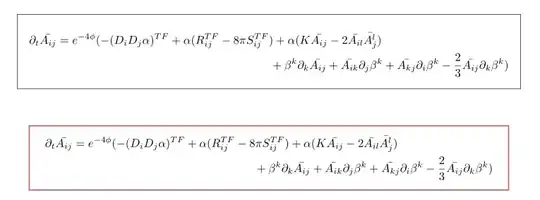
enter image description here

Bernard
  • 271,350
  • +1. Interesting that you interpreted the OP's code as meaning that he/she wants to place a frame around the displayed equation. I had interpreted the \begin{frame} and \end{frame} directives as suggesting that the code was taken from a beamer document... Let's see if the OP weighs in with more information. – Mico Jul 09 '17 at 10:20
  • @Mico: It's the problem with O.P.s posting only code snippets without (at least) explaining the context. I must say I didn't even think of beamer (I rarely use it). Everyone sees it their own way… – Bernard Jul 09 '17 at 11:13
0

enter image description here

If you want a boxed equation with multiple lines then you need to use \boxed command with aligned environment inside an equation environment. Also, the equation above looks crowded, so enhance readability by adding spaces using \thinspace command in certain places (such as between \alpha and (). The source code for the above result:

\documentclass{book}

\usepackage{amsmath}

\begin{document}

\begin{equation}
\boxed{
        \begin{aligned}
            %
            \partial_t \bar{A_{ij}} = & e^{-4\phi} \Big[ -(D_i D_j \alpha)^{TF} + \alpha \thinspace (R_{ij}^{TF} - 8 \pi S_{ij}^{TF}) + \alpha \thinspace (K \bar{A_{ij}} - 2 \bar{A_{il}} \bar{A_j^l})
            \\
            + & \beta^k \partial_k \bar{A_{ij}} + \bar{A_{ik}} \partial_j \beta^k + \bar{A_{kj}} \partial_i \beta^k - {2 \over 3} \bar{A_{ij}} \partial_k  \beta^k) \Big]
            %
        \end{aligned}
    }
\end{equation}

\end{document}
  • 1
    Please change = & to &=. (The asymmetrical whitespace spacing around the first = symbol should be a give-away that something isn't quite right.) – Mico Jul 09 '17 at 07:16
  • Why did you change & + to + &, while leaving = & unchanged? Before, you had one instance of bad spacing; now, you have two such instances. (At least, I suppose, the spacing is consistently bad now...) – Mico Jul 09 '17 at 08:01
  • In my field, the second line is aligned either with = or with the symbol letter after it – Al-Motasem Aldaoudeyeh Jul 09 '17 at 08:37
  • The point I was trying to make is that that there are 2 problems with your current solution: (i) The whitespace around the = symbol in the first row is rather asymmetric; (ii) there's no whitespace at all between + symbol and \beta^k at the start of the second row. This makes that + symbol look like a unary operator instead of as a binary operator. Change = & and + & to &= and &+, respectively, and the spacing will be much improved -- without affecting the alignment across rows. If you don't believe me, please consult section 3 of the user guide of the amsmath package. – Mico Jul 09 '17 at 10:14
