2

Consider the following LaTeX manuscript featuring a TikZ picture of an empty node with an attached pinned label.

\documentclass[tikz]{standalone}
\begin{document}
\begin{tikzpicture}
  \node [draw,pin=x] {};
\end{tikzpicture}
\end{document}

The resulting image is

                                                                A node with a pinned label

(This is not quite the image you'd get from the above code: I enhanced the pin's visibility a little, for the reader's convenience.)

I know how to adjust the angle and length of the pin (this is described in section 17.10.3 'The Pin Option' of the TikZ & PGF manual for version 3.0.1a on p. 241), but how can I adjust the position of the lable (angle, distance, and label anchor) with respect to the head of the pin?

Evan Aad
  • 11,066

2 Answers2

5

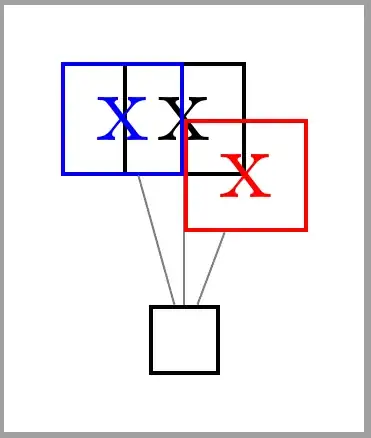
As can be seen in following code, the desired anchor (south in this default case) is placed on label's position and, after that, the pin line is drawn from node's center to label's center:
enter image description here

\documentclass[tikz,border=2mm]{standalone} 
\usetikzlibrary{positioning}

\begin{document}
\begin{tikzpicture}
\node [draw, pin={[draw]x}, pin={[draw, anchor=west, red]x}, pin={[draw, anchor=south east, blue]x}] {};
\end{tikzpicture}
\end{document}

Update:

Let's try again.

pin={[pin distance=1.2cm, draw, red]0:x},

will draw a label node at distance 1.2 cm from main node.0 anchor. The anchor for label's node will be west. This default anchor is decided according the labels position respect the main node.

pin={[pin distance=1.2cm, draw, blue]74:x}

this one will place default label's anchor (south west) at distance 1.2 cm following a 74 degrees line starting at main node .74 anchor. Once node is placed, pin line is drawn between nodes centers. This line won't follow the 74 degrees nor have 1.2 cm length.

pin={[name=pin, pin distance=1.2cm, draw, red, anchor=-37]74:\phantom{x}},

same than last one, but .-37 label node anchor is placed at 1.2 cm from main nodes .74 anchor.

enter image description here

\documentclass[tikz,border=2mm]{standalone} 
\usetikzlibrary{positioning}

\begin{document}
\begin{tikzpicture}

\draw[help lines] (-1,-1) grid (4,2);
\node [draw, 
    pin={[pin distance=1.2cm, draw, red]0:x},
    pin={[pin distance=1.2cm, draw, blue]74:x}] (a) {};

\draw[<->] (a.0)-- node[above]{1.2 cm} ++(0:1.2);
\draw[<->] (a.74)-- node[above]{1.2 cm} ++(74:1.2);

\begin{scope}[xshift = 3cm]
\node [draw, 
    pin={[name=pin, pin distance=1.2cm, draw, red, anchor=-37]74:\phantom{x}},
    pin={[pin distance=1.2cm, draw, blue]74:x}] (a) {};

    \draw[red] (pin.center)--(pin.-37);
\end{scope}
\end{tikzpicture}
\end{document}
Ignasi
  • 136,588
  • You wrote: "the desired anchor [...] is placed on label's position". How can the label's position be specified? – Evan Aad Jul 12 '17 at 08:54
  • @EvanAad with pin position (or angle), pin distance, ... Where do you want it? – Ignasi Jul 12 '17 at 08:56
  • For instance, suppose I wish the label's anchor to be at angle -37 on the label's border, and I'd like this coordinate to be a distance of 1.2cm from the coordinate that is at angle 74 on the node's border. – Evan Aad Jul 12 '17 at 09:00
  • So, if I understand you correctly, the way it works is this. You specify the label's anchor (from the fixed list: above, above left, etc.) as well as an angle, say alpha, and a pin distance. Then the specified label anchor is positioned a distance of pin distance from the center of the node at an angle of alpha with respect to the node. Then the pin is drawn between the node's center and the label's center, which implies that the pin's length might end up being different to pin distance. Am I correct so far? – Evan Aad Jul 12 '17 at 09:16
  • Furthermore, if I understand your correctly, it is impossible to change the fact that the pin is drawn between the center of the node and the center of the label. Correct? – Evan Aad Jul 12 '17 at 09:27
  • 1
    @EvanAad I've drawn some more examples, I hope they are more clear than the previous one. About pin line, if you want to draw a line not between center anchors, I think, it's better to use a label option and later on drawn the line as you want. – Ignasi Jul 12 '17 at 09:37
  • Could you please add your last comment to the answer? Also, I'd like to request that you add to your answer that in order to change the distance from the label's text to the pin's head along the pin's line, the label option inner sep can be used. – Evan Aad Jul 12 '17 at 10:04
1

Your question is duplicate, however, i can't find now it (yet), so please, don't vote my answer. But I store in my LaTeX examples collection the answer on it:

%%%% aligned-pin
\documentclass[tikz, border=5mm]{standalone}

\tikzset{aligned pin/.style args={[#1]#2:#3}% new sort of pin
    {pin={[%
           inner sep=0pt,%
           label={[%
                append after command={%
                node[%
                     inner sep=0pt,%
                     at=(\tikzlastnode.#2),% 
                     anchor=#1,%
                    ]{#3}%
                }%
            ]center:{}}%
         ]#2:{}}%
    }
        }

    \begin{document}
\begin{tikzpicture}
\draw[thick] (0,0) -- node[pos=0.8,% position of node
                           coordinate,                 % node is behavior as coordinate
                           aligned pin={[east]         % anchor of pin label
                                        120:           % direction of pin
                                        g factor=1.96} % text in pin label
                                  ] {} (3,2);
\end{tikzpicture}
    \end{document}

enter image description here

Edit: I found original Qrrbrbirlbel's answer

Zarko
  • 296,517
  • Thanks. However without explanatory text your code is difficult for me to comprehend. – Evan Aad Jul 12 '17 at 09:51
  • 1
    this is not my code :), but it is relatively simple to use. I will add some comments into code. – Zarko Jul 12 '17 at 09:54
  • Thanks for adding the explanatory text. However, it looks like it's simply a shortcut for specifying the most rudimentary positioning information for a pinned label. It neither explains how pin positioning works, nor provides a way of adjusting the label's positioning the way I described in my question. – Evan Aad Jul 12 '17 at 10:22
  • all missing information you can find in original answer, see link in my answer and at your question – Zarko Jul 12 '17 at 10:35