Here is one approach to a compound numbering scheme (taken from a duplicate post on LaTeX User's Group):

\documentclass{article}
\usepackage{booktabs}% http://ctan.org/pkg/booktabs
\usepackage{xparse}% http://ctan.org/pkg/xparse
\newcounter{compoundcntr} \newcounter{subcompoundcntr}[compoundcntr]
\renewcommand{\thesubcompoundcntr}{\thecompoundcntr\alph{subcompoundcntr}}
\NewDocumentCommand{\compound}{s o m}{%
  \IfBooleanTF{#1}
    {% \compound*[<label>]{<name>}
      \IfNoValueTF{#2}
        {#3}% \compound{<name>}
        {\stepcounter{compoundcntr}\refstepcounter{subcompoundcntr}#3, \thesubcompoundcntr\label{#2}}% \compound[<label>]{<name>}
    }
    {% \compound[<label>]{<name>}
      \ifnum\value{compoundcntr}=0\stepcounter{compoundcntr}\fi% Can use \compound[<label>]{<name>} to start first compound
      \IfNoValueTF{#2}
        {#3}% \compound*{<name>}
        {\refstepcounter{subcompoundcntr}#3, \thesubcompoundcntr\label{#2}}% \compound*[<label>]{<name>}
    }
}
\begin{document}
\begin{table}[t]
  \centering
    \begin{tabular}{lll}
      \toprule
      Compound & R$^1$ & R$^2$ \\
      \midrule
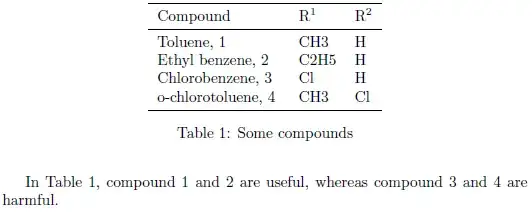
      \compound*[toluene]{Toluene} & CH3 & H \\
      \compound[ethylbenzene]{Ethyl benzene} & C2H5 & H \\
      \compound[chlorobenzene]{Chlorobenzene} & Cl & H \\
      \compound*[o-chlorotoluene]{o-chlorotoluene} & CH3 & Cl \\
      \bottomrule
    \end{tabular}
    \caption{Some compounds} \label{tbl:compounds}
\end{table}

In Table~\ref{tbl:compounds}, compound~\ref{toluene} and~\ref{ethylbenzene} are useful, whereas compound~\ref{chlorobenzene} and~\ref{o-chlorotoluene} are harmful.
\end{document}
The main command is \compound*[<label>]{<name>}. If you specify the starred version (\compound*[<label>]{<name>}), a new "main compound" is created (incrementing the first number). The unstarred version (\compound[<label>]{<name>}) does not increment the "main compound" counter, but increments the "sub compound" counter. If you specify a <label> (yes, this is optional), it prints the compound number. Otherwise, it doesn't. Whatever you specify in <name> (a mandatory argument) is printed as the name.
In summary, the available commands are
\compound*[<label>]{<name>} = new "main compound" with compound number\compound*{<name>} = new "main compound" without compound number\compound[<label>]{<name>} = new "sub compound" with compound number\compound{<name>} = new "sub compound" without compound number
Effectively \compound*{<name>} and \compound{<name>} are the same. You reference the compounds by using \ref{<label>}, as usual, as seen in the example. Modifications to label representation and command usage is also possible. Care has been taken to allow starting the first compound with \compound instead of \compound*.
If your interested in a single compound numbering scheme, the construction of \compound is much simpler. Here's a view on one such construction:
\documentclass{article}
\usepackage{booktabs}% http://ctan.org/pkg/booktabs
\usepackage{xparse}% http://ctan.org/pkg/xparse
\newcounter{compoundcntr}
\renewcommand{\thecompoundcntr}{\arabic{compoundcntr}}
\NewDocumentCommand{\compound}{s o m}{%
  \IfBooleanTF{#1}
    {% \compound*[<label>]{<name>}
      #3%
    }
    {% \compound[<label>]{<name>}
      \refstepcounter{compoundcntr}% Increment compound counter for correct referencing
      #3, \thecompoundcntr
      \IfNoValueTF{#2}
        {}% \compound{<name>}
        {\label{#2}}% \compound[<label>]{<name>}
    }
}
\begin{document}
\begin{table}[t]
  \centering
    \begin{tabular}{lll}
      \toprule
      Compound & R$^1$ & R$^2$ \\
      \midrule
      \compound[toluene]{Toluene} & CH3 & H \\
      \compound[ethylbenzene]{Ethyl benzene} & C2H5 & H \\
      \compound[chlorobenzene]{Chlorobenzene} & Cl & H \\
      \compound[o-chlorotoluene]{o-chlorotoluene} & CH3 & Cl \\
      \bottomrule
    \end{tabular}
    \caption{Some compounds} \label{tbl:compounds}
\end{table}

In Table~\ref{tbl:compounds}, compound~\ref{toluene} and~\ref{ethylbenzene} are useful, whereas compound~\ref{chlorobenzene} and~\ref{o-chlorotoluene} are harmful.
\end{document}
Using \compound*[<label>]{<name>} doesn't make much sense, since <label> is disregarded.


\labeland\refsystem that will work for anything, and there are various methods for including figures as subfigures, including thesubfigandsubcaptionpackages. For example: How to put two images next to each other with a) and b) labels? and How can I put three pictures with sub-captions in two rows using subfig package? – Alan Munn Dec 16 '11 at 02:58