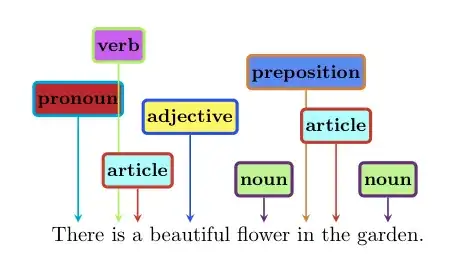
Here is another way. Please, be aware of the fact that there are a few subtle bugs that prevents the use of a few options in the shapes.callouts library and consider this as an esoteric option for now.
Update: The bug has been tracked down and patched by Daniel
in his answer. Probably it will be included in the successor of version 2.10 of TikZ/PGF. Now one can directly put the pointers without using the inconvenient
relative pointer key. One can even link this with our now-famous
\tikzmark solutions (See Peter's answer and others for its wonders).
I have defined 4 alternatives which are far from optimal and in fact, pretty limited. But, again, this is just for demonstration (as usual underlining causes trouble).
\documentclass{beamer}
\usepackage{tikz}
\usetikzlibrary{calc,shapes.callouts,shapes.arrows}

\newcommand{\arrowthis}[2]{
        \tikz[remember picture,baseline]{\node[anchor=base,inner sep=0,outer sep=0]%
        (#1) {\underline{#1}};
        \node[overlay,single arrow,draw=none,fill=red!50,anchor=tip,rotate=60]
        at (#1.south) {#2};}%
    }%

\newcommand{\speechthis}[2]{
        \tikz[remember picture,baseline]{\node[anchor=base,inner sep=0,outer sep=0]%
        (#1) {\underline{#1}};\node[overlay,ellipse callout,fill=blue!50]
        at ($(#1.north)+(-.5cm,0.8cm)$) {#2};}%
    }%

\newcommand{\bubblethis}[2]{
        \tikz[remember picture,baseline]{\node[anchor=base,inner sep=0,outer sep=0]%
        (#1) {\underline{#1}};\node[overlay,cloud callout,callout relative pointer={(0.2cm,-0.7cm)},%
        aspect=2.5,fill=yellow!90] at ($(#1.north)+(-0.5cm,1.6cm)$) {#2};}%
    }%

\newcommand{\pointthis}[2]{
        \tikz[remember picture,baseline]{\node[anchor=base,inner sep=0,outer sep=0]%
        (#1) {\underline{#1}};\node[overlay,rectangle callout,%
        callout relative pointer={(0.2cm,0.7cm)},fill=green!50] at ($(#1.north)+(-.5cm,-1.4cm)$) {#2};}%
        }%
\begin{document}
\begin{frame}
\arrowthis{There is}{Corot} a\speechthis{beautiful flower}%
{Van Gogh}\bubblethis{in}{Matisse}\pointthis{the garden}{Monet}.
\end{frame}
\end{document}

EDIT After the edit to the question, here is a simple pointthis with left and right definitions. I would strongly recommend you to play around with the positioning, the font and the colors to get your own version. These examples are only for the demonstration of the idea.
Replace the original \pointthis function with
\newcommand{\leftpointthis}[2]{
        \tikz[remember picture,baseline]{\node[anchor=base,inner sep=0,outer sep=0]%
        (#1) {\underline{#1}};\node[overlay,rectangle callout,%
        callout relative pointer={(0.2cm,0.7cm)},fill=green!50] at ($(#1.north)+(-.5cm,-1.4cm)$) {#2};}%
        }%

\newcommand{\rightpointthis}[2]{
        \tikz[remember picture,baseline]{\node[anchor=base,inner sep=0,outer sep=0]%
        (#1) {\underline{#1}};\node[overlay,rectangle callout,%
        callout relative pointer={(-0.3cm,0.7cm)},fill=green] at ($(#1.north)+(.5cm,-1.4cm)$) {#2};}%
        }%
Now you can try \rightpointthis{{There, is}}.