Possible Duplicate:
How to superimpose LaTeX on a picture?
Take this image for example:

How can I add labels to an image as done above without manually drawing a line and adding text at the end of the line?
Possible Duplicate:
How to superimpose LaTeX on a picture?
Take this image for example:
How can I add labels to an image as done above without manually drawing a line and adding text at the end of the line?
Because your image already has annotations, I use the following image as an example.
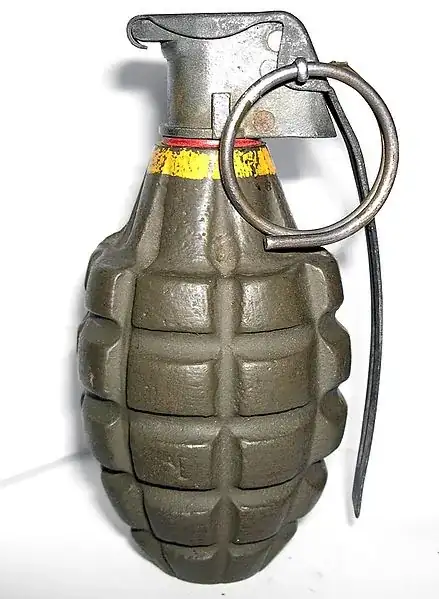
Then I converted it to EPS (named as grenade.eps) using ImageMagick.
\documentclass[pstricks,border=12pt]{standalone}
\usepackage{pstricks-add}


\usepackage{graphicx}
\newsavebox\ImageBox
\savebox\ImageBox{\includegraphics[width=0.9\linewidth]{grenade}}

\def\Rows{5}
\def\Columns{5}

\addtopsstyle{gridstyle}
{
    subgriddiv=5,
    subgridcolor=lightgray,
    gridcolor=blue,
    subgriddots=10,
    griddots=100,
}

\psset
{
    xunit=\dimexpr\wd\ImageBox/\Rows,
    yunit=\dimexpr\ht\ImageBox/\Columns,
    nodesepA=3pt,
    linecolor=red,
}

\begin{document}

\begin{pspicture}[showgrid=top](-\Columns,0)(\Columns,\Rows)% turn off the grid by setting showgrid=false
\rput[b](0,0){\usebox\ImageBox}
% Pull Ring
\psComment[ref=l,angleA=180](4,3)(1.9,3.5){\large Pull Ring}[\ncdiagg]
% Safety Pin
\psComment[ref=l,angleA=180](4,4.8)(0.95,4.4){\large Safety Pin}[\ncdiagg]
% Body
\psComment[ref=r](-4,4)(0,2){\large Body}[\ncdiagg]
\end{pspicture}
\end{document}
Don't forget to compile the source code either with xelatex or latex-dvips-ps2pdf sequence.
Output without grid is as follows.

And if you need the grid to find the node coordinates during the development.


xelatex you can also use png, pdf, and jpg. In short: every possible image for latex or pdflatex
–
Jan 08 '12 at 18:08
You may try the following. In the code, the file can is your image.
\documentclass{article}

\usepackage{tikz}

\begin{document}

\begin{tikzpicture}

\node at (5,5) {\includegraphics[scale=0.5]{can}};

%to help place things, draw a grid
%remove grid when done
\draw (0,0) grid (10,10);

\draw (5,5) -- ++(4,0) node[above=5pt,anchor=south east,inner sep=0] {this is a label};

\end{tikzpicture}

\end{document}
The result is


In this answer I tried to mimic the labels given by the questioner.
\documentclass{article}
\usepackage{pstricks-add}
\usepackage[tightpage,active]{preview}
\setlength{\PreviewBorder}{12pt}
\PreviewEnvironment{pspicture}

\usepackage{graphicx}
\newsavebox\ImageBox
\savebox\ImageBox{\includegraphics[width=0.9\linewidth]{grenade.eps}}

\newcommand\Rows{5}
\newcommand\Columns{5}

\newpsstyle{gridstyle}
{
    subgridcolor=green!20,
    subgridwidth=0.05pt,
    gridcolor=cyan!30,
    gridwidth=0.1pt,
    subgriddiv=2,
}

\psset
{
    xunit=\dimexpr\wd\ImageBox/\Rows\relax,
    yunit=\dimexpr\ht\ImageBox/\Columns\relax,
    style=gridstyle,
    linecolor=red,
}

\def\mylabel(#1,#2,#3)[#4][#5][#6]{
    \dotnode(#1,#3){#4start}
    \pnode(#2,#3){#4stop}
    \ncline{#4start}{#4stop}
    \rput[#6](#4stop){\large #5}
}
\begin{document}

\begin{pspicture}(-\wd\ImageBox,0)(\wd\ImageBox,\ht\ImageBox)
\rput[b](0,0){\usebox\ImageBox}
%\psgrid
% Pull Ring
\mylabel(1.9,4,3.5)[pr][Pull Ring][br]
% Safety Pin
\mylabel(0.95,4,4.4)[sp][Safety Pin][br]
% Body
\mylabel(0,-4,2)[b][Body][bl]
\end{pspicture}
\end{document}


overpic. – Marco Daniel Jan 08 '12 at 14:44have to manually draw the lines? – Marco Daniel Jan 08 '12 at 16:12