To answer your question, you have to look at how the thebibliography environment is defined. Here's the definition from article.cls (it's similar to what you'll find in book.cls and report.cls):
 1: \newenvironment{thebibliography}[1]
 2:      {\section*{\refname}%
 3:       \@mkboth{\MakeUppercase\refname}{\MakeUppercase\refname}%
 4:       \list{\@biblabel{\@arabic\c@enumiv}}%
 5:            {\settowidth\labelwidth{\@biblabel{#1}}%
 6:             \leftmargin\labelwidth
 7:             \advance\leftmargin\labelsep
 8:             \@openbib@code
 9:             \usecounter{enumiv}%
10:             \let\p@enumiv\@empty
11:             \renewcommand\theenumiv{\@arabic\c@enumiv}}%
12:       \sloppy
13:       \clubpenalty4000
14:       \@clubpenalty \clubpenalty
15:       \widowpenalty4000%
16:       \sfcode`\.\@m}
17:      {\def\@noitemerr
18:        {\@latex@warning{Empty `thebibliography' environment}}%
19:       \endlist}
For reference, I've numbered the lines. Here's some explanatory details:
Line 1 starts by defining the thebibliography environment to take a single, mandatory argument. So, you'll have to call it with \begin{thebibliography}{<something>} rather than just \begin{thebibliography}.
Line 2 sets the bibliography as a \section* using the title \refname. If you want to change this, you can add \renewcommand{\refname}{My BiBLioGRaPHy} somewhere before \begin{thebibliography}{.}. book and report uses \bibname. See How to change the name of document elements like "Figure", "Contents", "Bibliography", "Appendix", etc.?
Line 3 updates the running headers, both left and right headers are set to the uppercase version of whatever is in \refname.
Lines 4-11 starts a \list. Yes, the bibliography is set as a list, so all list-related changes can be applied to the bibliography if you wish to change the formatting.
\list takes 2 mandatory arguments. The first is set in line 4: \@biblabel{\@arabic\c@enumiv}. This defines how the "label" for each \bibitem will be set. Specifically, every \bibitem sets an item label, and this label will be \@biblabel{\@arabic\c@enumiv}, which translates to an arabic representation of the enumiv counter (the fourth level of an enumerate environment), boxed using \@biblabel (the default definition for this is to set its argument inside [..]).
So, \@biblabel{\@arabic\c@enumiv} is similar to an output of [<num>], where <num> increases with every \bibitem.
Line 5 sets the \labelwidth to the width of \@biblabel{#1} where #1 is the argument you supplied to the thebibliography environment. This answers your question about the argument for thebibliography - it defines the width of the labels within the environment. So, if you plan on having less than 10 bibliography elements, then you can use \begin{thebibliography}{0} (or x, some single-letter element). If you have more items but fewer than 100, you can use \begin{thebibliography}{00}, or \begin{thebibliography}{000} for more items but fewer than 1000, etc.
Lines 6-8 sets up horizontal margins for the list environment, with \@openbib@code usually being empty.
Line 9 identifies the counter to be used with each enumerated \bibitem. In this case, it'll be enumiv (the fourth level of an enumerate environment). It's assumed that this counter is rarely used at that level, especially when setting a bibliography. It's unlikely that you'll set a bibliography when nested three levels into other lists.
Line 10 removes any prefix for the enumiv counter (since nested enumerates typically add their hierarchy to the enumeration).
Line 11 updates the representation of the counter - \theenumiv - to be arabic.
Lines 12-16 updates penalties and paragraph formatting parameters, since bibliographies do not contain your average textual content. It usually contains names (with unknown hyphenation patterns), URLs, cities, and many more oddities. These penalty updates allows for some flexibility to set things that might be a bit \sloppy otherwise.
Lines 17-19 ends off the thebibliography environment (the definition of \end{thebibliography}) and does two things. The first is to update the way an error is reported if you do not have any \bibitems in your thebibliography (lines 17-18) and the last is to close the list environment that was opened during \begin{thebibliography} in line 4.
Knowing that thebibliography is just a \list, adjustment of the vertical spacing between items is achieved by changing the value of \itemsep (see section 55.2 Vertical Spacing (skips) (p 285) of source2e; something like \setlength{\itemsep}{0pt} would remove all the vertical space between items.
A slightly cleaner approach would be to update this within the preamble, as in this example:
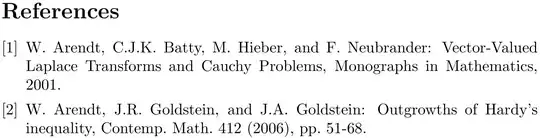
\documentclass{article}

\makeatletter
\g@addto@macro\@openbib@code{\setlength{\itemsep}{0pt}}
\makeatother

\begin{document}

\begin{thebibliography}{0}

  \bibitem{abhn2001}
  W. Arendt, C.J.K. Batty, M. Hieber, and F. Neubrander:
  Vector-Valued Laplace Transforms and Cauchy Problems, Monographs in
  Mathematics, 2001.

  \bibitem{agg2006}
  W. Arendt, J.R. Goldstein, and J.A. Goldstein:
  Outgrowths of Hardy's inequality, Contemp. Math. 412 (2006), pp.\
  51-68.

\end{thebibliography}

\end{document}
Here is the same bibliography with an \itemsep of 1cm using \begin{thebibliography}{000}:

Bigger spacing between elements, and a wider label.
Changing the size of the bibliography title can be achieved by setting it to something other than a \section*. Perhaps, say, a \subsection*. The following example highlights that:
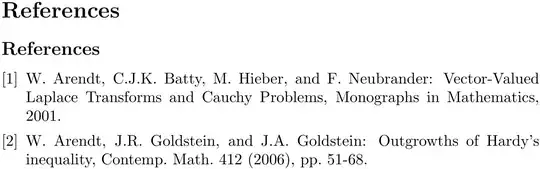
\documentclass{article}

\usepackage{etoolbox}
\patchcmd{\thebibliography}{\section}{\subsection}{}{}

\makeatletter
\g@addto@macro\@openbib@code{\setlength{\itemsep}{0pt}}
\makeatother

\begin{document}

\section*{\refname}
\begin{thebibliography}{0}

  \bibitem{abhn2001}
  W.\ Arendt, C.J.K.\ Batty, M.\ Hieber, and F.\ Neubrander:
  Vector-Valued Laplace Transforms and Cauchy Problems, Monographs in
  Mathematics, 2001.

  \bibitem{agg2006}
  W.\ Arendt, J.R.\ Goldstein, and J.A.\ Goldstein:
  Outgrowths of Hardy's inequality, Contemp.\ Math.\ 412 (2006), pp.\
  51-68.

\end{thebibliography}

\end{document}


