I am not sure this is a sensible way to do this: is it one tree or two? If you are replacing one tree with another, I'd use two trees; if not, I'd try to keep common parts of the one tree common.
Be that as it may, it is quite straightforward to implement a style with the syntax you want. So, as a hypothetical exercise whose application in the real world I do not recommend, here's one way to do it.
\documentclass{beamer}
\usepackage{forest}
\forestset{%
only/.code args={<#1>}{%
\alt<#1>{}{\pgfkeysalso{before typesetting nodes={remove}}}
},
}
\begin{document}
\begin{frame}{Another test}
\Forest{
  [,phantom
    [S,only=<1> [NP [N [I]]]]
    [S,only=<1> [V [wrote]]]
    [S,only=<2>
      [NP [N [I]]]
      [V [wrote]]]]
}
\end{frame}
\end{document}
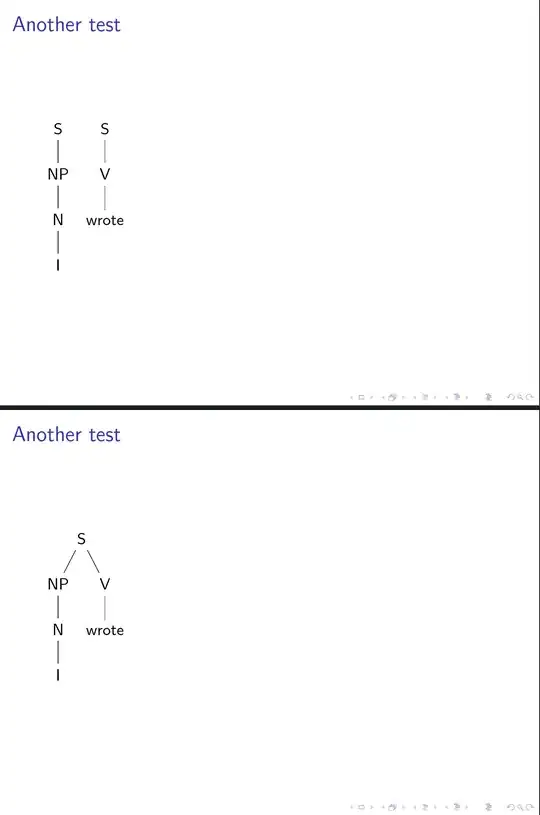
EDIT
Here's an alternative which I think allows you to specify the tree in a more perspicuous way.
\begin{frame}<1-2>{Yet Another test}
  \Forest{
    [S, adopt grandchildren=<2>
      [S [NP [N [I]]]]
      [S [V [wrote]]]
      ]
  }
\end{frame}
adopt grandchildren, as specified here, adopts all grandchildren, does away with all children (at dead of night) and switches to phantom prior to adoption.

Whether this is exactly what you want is dubious, but an approach which allows the code to reflect the tree's structure is, I think, preferable, even if it takes a bit more thought to design precisely the right tool(s) for your work-flow.
\documentclass{beamer}
\usepackage{forest}
\forestset{%
  alt/.code args={<#1>#2#3}{%
    \alt<#1>{\pgfkeysalso{#2}}{\pgfkeysalso{#3}} % \pgfkeysalso doesn't change the path
  },
  define long step={grandchildren}{style}{branch={children,children}},
  adopt grandchildren/.style args={<#1>}{
    alt=<#1>{
      before typesetting nodes={
        tempkeylista=,
        for grandchildren={tempkeylista+/.option=name},
        split register={tempkeylista}{,}{append},
        for children=remove,
      },
    }{phantom}
  },
}
\begin{document}
\begin{frame}<1-2>{Yet Another test}
  \Forest{
    [S, adopt grandchildren=<2>
      [S [NP [N [I]]]]
      [S [V [wrote]]]
      ]
  }
\end{frame}
\end{document}


phantomnode, but I find this very practical, because they'll end up inside onetikzpicture. So I can easily draw derivations (i.e. shift subtrees and add edges between them). – Timm Feb 25 '18 at 10:23