I want to typeset a table where certain numbers are going to appear red. In order to achieve the correct alignment I am using the dcolumn package. The problem is that the parsing that dcolumn does, prevents the correct appliance of color.
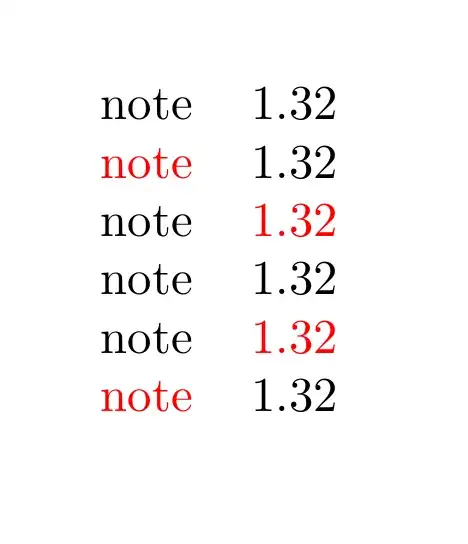
In the following example, in the third row, only the "1" appears red. The dot and the "32" appears black. Using \textcolor results in a syntactical mistake.
I tried using siunitx, but unfortunately, since I am producing programmatically hundreds of tables, the compilation time increased too much (more than a minute)
So the question is, how can you color a number belonging in a dcolumn?
\documentclass[]{article}

\usepackage{xcolor}
\usepackage{tabu}
\usepackage{dcolumn}

\newcolumntype{d}[1]{D{.}{.}{#1}}

\begin{document}

\begin{tabu}{cd{2}}
note & 1.32\\
\color{red}note & 1.32 \\
\color{red}note & \color{red}1.32 \\
% note & 1.32\\
% \textcolor{red}{note} & 1.32 \\
% \textcolor{red}{note} & \textcolor{red}{1.32} \\  % results in a compilation error.
\end{tabu}

\end{document}




\newcommand? Probably such a feature couldn't be done in a compatible way, but I add this comment should anyone be making an improved xxxdcolumn package and is looking for ideas... It would be nice (and probably possible) to make\mathsf{\color{red} 123.456}change the font and colour without messing up the alignment. – David Carlisle Jan 30 '12 at 11:58siunitxcan handle such a feature much easier by using the LaTeX3-Syntax. Maybe Joseph will provide this. – Marco Daniel Jan 30 '12 at 12:02