1
\begin{tikzpicture}


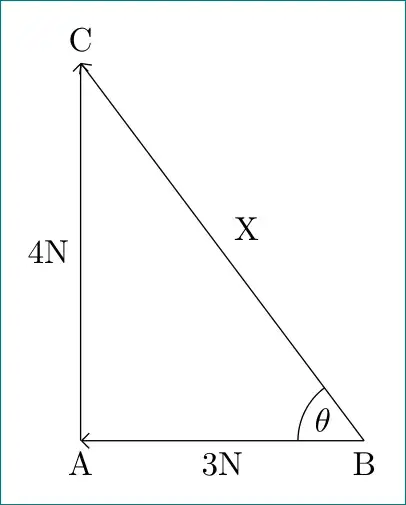
\draw[<-] (0,0) -- (1.5,0) node[anchor=south] {3N} -- (3,0) node [anchor=330, node distance=10cm] {$\theta$};

\draw[->] (0,0) -- (0,2) node[anchor=west] {4N} -- (0,4);

\draw[->] (3,0) -- (1.5,2) node[anchor=south west] {X} -- (0,4);


\end{tikzpicture}

I'm trying to increase the distance to the node label, as it is too close to the corner of the triangle, however I don't want to move the other labels, how do I do this?

3 Answers3

3

like this?

enter image description here

for edge labels is used tikz library quotes, for angle "theta" angle. corners of triangle is defined by \coordinate. they are needed to positioned \theta.

\documentclass[tikz, margin=3mm]{standalone}
\usetikzlibrary{angles, arrows.meta, positioning, quotes}

\begin{document}
    \begin{tikzpicture}[auto]
\coordinate (a);
\coordinate[right=3cm of a] (b);
\coordinate[above=4cm of a] (c);
\draw[-Straight Barb] (b) edge ["3N"]   (a)
                      (b) edge ["X" ']    (c)
                      (a)  to  ["4N"]   (c);
\pic[angle eccentricity=1, "$\theta$"] {angle = c--b--a};
    \end{tikzpicture}
\end{document}

if you for example like to add names of corners and draw locus at ``theta`, than you can obtain this by:

\documentclass[tikz, margin=3mm]{standalone}
\usetikzlibrary{angles, arrows.meta, positioning, quotes}

\begin{document}
    \begin{tikzpicture}[auto]
\coordinate[label=below:A] (a);
\coordinate[label=below:B, right=3cm of a] (b);
\coordinate[label=above:C, above=4cm of a] (c);
\draw[-Straight Barb] (3,0) edge ["3N"]   (0,0)
                      (3,0) edge ["X" ']  (0,4)
                      (0,0)  to  ["4N"]   (0,4);
\pic[draw, angle radius=7mm, angle eccentricity=0.7, "$\theta$"] {angle = c--b--a};
    \end{tikzpicture}
\end{document}
enter image description here

Zarko
  • 296,517
2

Not sure if it's the best solution, but labels and label distance can help:

\documentclass[tikz,border=7pt]{standalone}
\begin{document}
\begin{tikzpicture}
  \draw[latex-,label distance=4mm] (0,0) -- node[midway,above=1mm] {3N} (3,0) node [label={[anchor=mid]160:$\theta$}] {};
  \draw[-latex] (0,0) -- (0,2) node[right=1mm] {4N} -- (0,4);
  \draw[-latex] (3,0) -- node[midway,above right] {X} (0,4);
\end{tikzpicture}
\end{document}

enter image description here

Note also that if you need to draw lot's of angles, the angle library may be useful.

tobiasBora
  • 8,684
2

A short solution with coordinate. Define a coordinate at corner point, then use left, right, above or below and adjust it's parameters of node at this coordinate.

\documentclass[margin=1cm]{standalone}
\usepackage{tikz}
\begin{document}

\begin{tikzpicture}
\draw [latex-] (0,0) -- (3,0) coordinate (A) node[midway, above] {3N} ;
\node at (A) [left=5mm, above=0.1mm ] {$\theta$}; 
\draw[-latex] (0,0) -- (0,2) node[anchor=west] {4N} -- (0,4);
\draw[-latex] (3,0) -- (1.5,2) node[anchor=south west] {X} -- (0,4);
\end{tikzpicture}

\end{document}