What you need is
colortbl (it provides \cellcolor and \rowcolor).- an extra instruction such that
pgfplotstable knows that you want to modify the content of the current cell (as opposed to loading some option). This is done by modifying @cell content inside of every row 2 column 1/.style .
- A fix to the expansion: the instruction
every row \themyCounter column 1 expands to something like every row 3column 1, i.e. you need add \space (according to a general rule of how TeX gobbles spaces after macro names).
- A fix to the expansion inside of the loop: writing
\x inside of a style fails because TeX inserts the name \x instead of its value -- and the name becomes meaningless once the loop iteration is done. To solve this, we need control over expansion (compare Where do I start LaTeX programming?)
Here is a potential solution:
\documentclass{standalone}
\usepackage{pgfplotstable,filecontents}
\usepackage{colortbl}

\begin{filecontents*}{test.csv}
    ColA, ColB, ColC
    0.17, 0.91, 0.67
    0.15, 0.17, 0.92
    0.48, 0.1, 0.28
\end{filecontents*}


\begin{document}
    \newcounter{myCounter}
    \setcounter{myCounter}{-1}

    % extracted this as separate macro such that I can get rid of the
    % '\x' macro below
    \def\kevinassigncolor#1{%
        \pgfplotstableset{
            every row \themyCounter\space column 1/.style={
                postproc cell content/.style={
                    @cell content/.add={\cellcolor{#1}}{}%
                },%
            },
        }%
    }%


    \pgfplotsforeachungrouped\x in{green,blue,orange}{%
        \stepcounter{myCounter}%
        % the \expandafter is a trick to ensure that \kevinassigncolor
        % does not see the '\x':
        % we must not write \cellcolor{\x} into a style because the
        % meaning of \x will be lost as soon as we left this loop
        % iteration!
        % \expandafter inserts the _value_ of \x rather than '\x':
        \expandafter\kevinassigncolor\expandafter{\x}%
    }
    \pgfplotstabletypeset[col sep=comma,
    ]{test.csv}
\end{document}
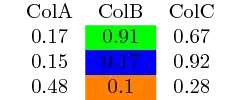
Note that I substituted \foreachitem by \pgfplotsforeachungrouped, but only because I do not have package listofitems at hand.
See also the related application Drawing heatmaps using TikZ


