1

The following code describes my questions about the use of pgfkeys's value which puzzles me long. Anybody can give me a hand?

\documentclass{article}
\usepackage{pgfkeys,xcolor}
\begin{document}
\pgfkeys{%
  /path/.cd,
  color/.code=#1,
}

\pgfkeys{/path/.cd,color=yellow} %typeset "yellow" as desired

\pgfkeysvalueof{/path/color} %get nothing, typeset "yellow" is wanted

\color{\pgfkeys{/path/.cd,color=yellow}} %\color{yellow} is desired,but fail to compile

\end{document}
lyl
  • 2,727

2 Answers2

3

It's a bit more complicated:

A code key (/path/some key/.code=) executes the code between = and , with the given value as parameter (#1). Normally it has no value, so \pgfkeysvalueof{/path/some key} will give out nothing (see 7 and 8). A value key can be set with another key/.initial=initial value. It will be given out with \pgfkeysvalueof{/path/another key} (see 9) or with \pgfkeys{/path/another key} (see 3). But \pgfkeys{/path/another key=another value} will just set the value, overwriting the old one, and give out nothing (see 6).

A code key can have a default value (path/some key/.default=), which will be used, if no value is given (see 2). This default will not be changed, if the key is called with a value given.

With \pgfkeyssetvalue{/path/some key}{value} a value can be assigned to the code key (see 10). After that, \pgfkeysvalueof{/path/some key} will deliver this value (see 11). But \pgfkeys{/path/some key=something} will still execute the code with the given value as parameter. Nevertheless, this will not change the value set with \pgfkeyssetvalue (see 13).

A more common example for a code key is color d (see 14) in the code below.

Here some example code:

\documentclass[a4paper]{article}
\usepackage{pgfkeys}
\usepackage{xcolor}

\pgfkeys{%
  /path/.cd,
  color a/.code=#1,
  color b/.code=#1,
  color b/.default=red,
  color c/.initial=blue,
  color d/.code={\color{#1}},
}

\parindent0pt\parskip1ex
\begin{document}
\begin{enumerate}
\item \verb|\pgfkeys{/path/color a}|: \pgfkeys{/path/color a}\\
      (executes given code with empty parameter)
\item \verb|\pgfkeys{/path/color b}|: \pgfkeys{/path/color b}\\
      (executes given code with default value as parameter)
\item \verb|\pgfkeys{/path/color c}|: \pgfkeys{/path/color c}\\
      (gives out initial value)
\item \verb|\pgfkeys{/path/color a=yellow}|: \pgfkeys{/path/color a=yellow}\\
      (executes given code with ``yellow'' as parameter)
\item \verb|\pgfkeys{/path/color b=green}|: \pgfkeys{/path/color b=green}\\
      (executes given code with ``green'' as parameter)
\item \verb|\pgfkeys{/path/color c=cyan}|: \pgfkeys{/path/color c=cyan}\\
      (just sets a new value)
\item \verb|\pgfkeysvalueof{/path/color a}|: \pgfkeysvalueof{/path/color a}\\
      (key has no value)
\item \verb|\pgfkeysvalueof{/path/color b}|: \pgfkeysvalueof{/path/color b}\\
      (key has no value)
\item \verb|\pgfkeysvalueof{/path/color c}|: \pgfkeysvalueof{/path/color c}\\
      (gives out the last value stored)
\item \verb|\pgfkeyssetvalue{/path/color a}{blue}|: \pgfkeyssetvalue{/path/color a}{blue}\\
      (sets a value)
\item \verb|\pgfkeysvalueof{/path/color a}|: \pgfkeysvalueof{/path/color a}\\
      (now key has a value)
\item \verb|\pgfkeys{/path/color a=yellow}|: \pgfkeys{/path/color a=yellow}\\
      (still executes given code with ``yellow'' as parameter)
\item \verb|\pgfkeysvalueof{/path/color a}|: \pgfkeysvalueof{/path/color a}\\
      (but the value has not changed)
\item \verb|\pgfkeys{/path/color d=magenta}|: \pgfkeys{/path/color d=magenta}\\
      (executes given code, which switches to the given color)
\end{enumerate}
\end{document}

And its result:
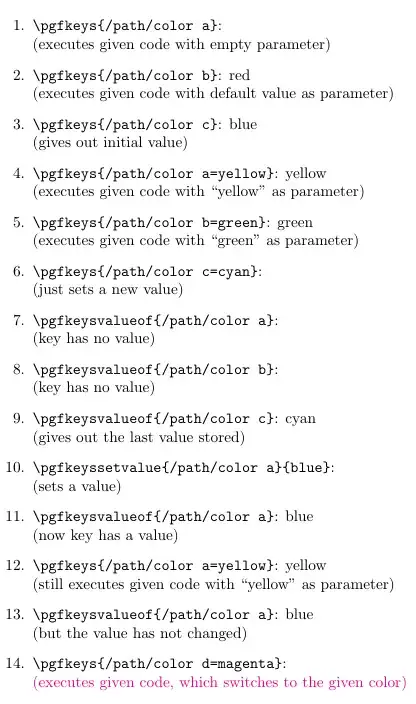
enter image description here

Mike
  • 8,664
  • @ Mike thank you so much for your detail explanation. I'd like review the item 8 and 9. In item 9, color c get its value for the reason of item 6. Then why does in item 8, color b not get its value by item 5? – lyl May 21 '18 at 06:51
  • @lyl Since color b is a code key, it gets executeted in item 5. But as a normal code key it has no value. The value green is used as parameter for the execution (see result of 5), but not stored anywhere. – Mike May 21 '18 at 20:20
  • Then what about /.initial? It's code or set value of a key? Why is this wrong--\pgfkeys{color/.initial=red} \color{\pgfkeysvalueof{color}} – lyl May 23 '18 at 00:38
  • @lyl \pgfkeysvalueof needs a full path for the key, starting with /. So \color{\pgfkeysvalueof{/color}} works. – Mike May 23 '18 at 19:54
1

You can set the key with \pgfkeyssetvalue.

\documentclass{article}
\usepackage{pgfkeys,xcolor}
\begin{document}
\pgfkeys{%
  /path/.cd,
  color/.code=#1,
}

\pgfkeyssetvalue{/path/color}{yellow}

\pgfkeysvalueof{/path/color} 

\color{\pgfkeysvalueof{/path/color}}{x} %
\end{document}

ADDENDUM: I am not sure I understand your question in the comments. \color does not use pgfkeys. What you can do, however, is to use .store in.

\documentclass{article}
\usepackage{pgfkeys,xcolor}
\begin{document}
\pgfkeys{%
  /path/.cd,
  color/.code=#1,
  mycolor/.store in=\mycolor
}

\pgfkeyssetvalue{/path/color}{yellow}

\pgfkeysvalueof{/path/color} 

\color{\pgfkeysvalueof{/path/color}}{x}

\pgfkeys{path/mycolor=red}
\color{\mycolor}{hello}

\end{document}

Of course, in the example at hand there is not much benefit, however in other situations in which you work with, say, TikZ commands which use pgfkeys like here there is.

  • Thank you marmot, I just corrected my code to get a complete Latex code block(that is, \begin{document}, and xcolor package). Yet \color{\pgfkeyssetvalue{/path/color}{yellow}} still does not work. – lyl May 21 '18 at 03:21
  • @lyl With \pgfkeyssetvalue and \pgfkeysgetvalue it works as expected. –  May 21 '18 at 03:27
  • if a calling of macro like this: \mycolor{color=yellow}, how to use \pgfkeyssetvalue and \pgfkeysgetvalue except for "color/.code=\color{#1}, but \color{pgfkeys' macro}? – lyl May 21 '18 at 07:21
  • @lyl I made an update. Are you by chance looking for .store in such that you can access the value without pgfkeys? –  May 21 '18 at 12:57
  • Thank you marmot! This make me learn a new way to store value in a key. – lyl May 21 '18 at 13:14
  • then \pgfkeys{color/.code=\pgfkeyssetvalue{color}{#1}}. Is the "color" of "color/.code" the same as "color" of "\pgfkeyssetvalue{color}"? – lyl May 23 '18 at 00:53
  • @lyl No. Code can contain all sorts of real codes, not just a "fake code" which consists just of a string. –  May 23 '18 at 00:55
  • After that, \pgfkeys{color=blue}, which "color" is funtional, the former or the latter? – lyl May 23 '18 at 01:02
  • @lyl Sorry, was offline. After what? And what do you dislike about store in? –  May 23 '18 at 02:21
  • After that means after \pgfkeys{color/.code=\pgfkeyssetvalue{color}{#1}}, then \pgfkeys{color=blue}. Which "color" is funtional, the color/.code or the \pgfkeyssetvalue{color}? And for "store in", anoter macro has to be defined which I don't like that. – lyl May 23 '18 at 06:23
  • @lyl The syntax \pgfkeys{color/.code=\pgfkeyssetvalue{color}{#1}} doesn't seem right to me (but I haven't tried it). So I probably misinterpret your question, I thought the aim is to make the key available to commands that are not using pgf keys. –  May 23 '18 at 15:39