As others have commented it is difficult to know exactly what you want. Perhaps a simpler method will suffice, but for fine alignment control I often use \phantom along with \makebox.
Here is a short example to illustrate. Note that to better illustrate the alignment the following was done within a single align, but the MWE below show how the same techniques can be used across other elements. Note that:
- In the first three equations, each term is aligned with the corresponding one above.
- In the fourth equation,
\arcsin(x) is centered exactly between \sin(x) + h(x).
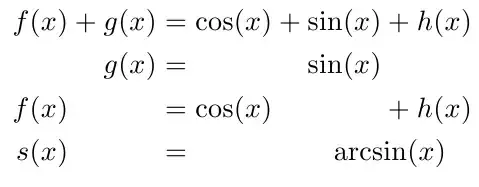
Explanation:
The \phantom{} will take up as much space (both horizontal and vertical) as the parameter given to it. There is also a \vphantom{} which will take up only vertical space (zero horizontal width), and \hphantom{} which take up only horizontal space (and zero height).
So, for the second equation we have:
\phantom{f(x) +{}} g(x) &= \phantom{\cos(x) +{}} {\sin(x)} \phantom{{}+ h(x)}
The first \phantom{f(x) +{}} takes up as much space as would be taken up by f(x) +{}. The trailing {} are necessary so that the + is treated as a binary operator. This also applies to the other two \phantoms on this line. Also note that the {\sin(x)} was necessary to eliminate the additional space that would have been inserted to the left of \sin(x). The necessary space was already inserted with the \phantom via the {}, so we don't want this inserted twice.
The case of the third equation is very similar to the second.
In the fourth equation I illustrate how to place text relative to some other text. Here I use a \makebox[<width>][c]{<text>} which will place the given <text> in the space taken up by the specified <width>. The second parameter is used to control the alignment of the placed <text>. In this case I used [c] to center, but this could also be [r] for right aligned, or [l] for left aligned.
\newcommand*{\PhantomText}[1]{\makebox[\widthof{$\sin(x) + h(x)$}][c]{$#1$}}%
To compute the precise width I use \widthof{} from the calc package. So, with the above definition of \PhantomText{\arcsin(x)}
Code:
\documentclass{article}
\usepackage{amsmath}
\usepackage{calc}
\newcommand*{\LongText}{Lorem ipsum dolor sit amet. Lorem ipsum dolor sit amet. Lorem ipsum dolor sit amet. Lorem ipsum dolor sit amet. Lorem ipsum dolor sit amet. Lorem ipsum dolor sit amet}% For dummy text
\newcommand*{\PhantomText}[1]{\makebox[\widthof{$\sin(x) + h(x)$}][c]{$#1$}}%
\begin{document}
\begin{align}
             f(x) +    g(x)  &=          \cos(x) +              \sin(x)             + h(x) \
    \phantom{f(x) +{}} g(x)  &= \phantom{\cos(x) +{}}          {\sin(x)} \phantom{{}+ h(x)}\
    f(x)  \phantom{{}+ g(x)} &=          \cos(x) \phantom{{} +  \sin(x)}            + h(x) \
    s(x)  \phantom{{}+ g(x)} &= \phantom{\cos(x) +{}} \PhantomText{\arcsin(x)}
\end{align}
%
The following is just to illustrate how to use this with separate align envionments.
\begin{align}
    f(x) + g(x) &= \cos(x) + \sin(x) + h(x)
\end{align}
\LongText
\begin{align}
    \phantom{f(x) +{}} g(x)  &= \phantom{\cos(x) +{}}          {\sin(x)} \phantom{{}+ h(x)}
\end{align}
\LongText
\begin{align}
    f(x) \phantom{{}+g(x)}  &= \cos(x) \phantom{{} + \sin(x)} + h(x)
\end{align}
%
\begin{align}
    s(x) \phantom{{}+ g(x)} &= \phantom{\cos(x) +{}} \PhantomText{\arcsin(x)}
\end{align}
\end{document}


fleqndocumentclass option? It will have all displayed math items be flush-left aligned. – Mico Feb 05 '12 at 17:22