First of all: Do not use DIV=last after your geometry settings. This KOMA-Script option recalculates the typearea! Load package showframe or use the geometry option showframe to see the difference. Eg. left and right margin will have the same width again.
Load package setspace with option onehalfspacing before the geometry settings. Then you can use geometry options heightrounded and footskip=<length>.
Since KOMA-Script version 3.24 (current is 3.25) there is an option singlespacing for scrlayer-scrpage.
\documentclass[
               usegeometry = on,
               DIV=calc
              ]{scrartcl}

\usepackage[onehalfspacing]{setspace}% before the geometry settings

\usepackage[
            left = 25mm,
            bottom = 20mm,
            right = 45mm,
            top = 20mm,
            includehead,% remove if the header should be inside the 20mm top margin
            heightrounded,
            footskip=30pt% <- adjust to your needs
           ]{geometry}

\usepackage[singlespacing]{scrlayer-scrpage}
\AfterTOCHead{\singlespacing}

% the following packages are only for this example:
\usepackage{showframe}% to show the page layout
\usepackage{layout}% to show the page layout

\begin{document}
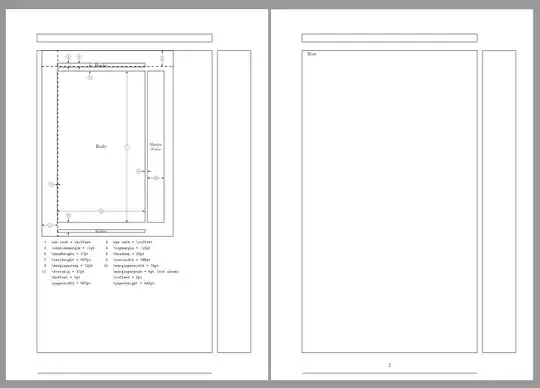
\layout%  to show the page layout

Test.
\end{document}

Note that KOMA-Script option pagesize is default. If you remove both options usegeometry=on and DIV=calc in the example above only \marginparwidth changes.
It is also possible to shift all layers in the footer of scrheadings and plain.scrheadings. If the bottom of these layers should be 2\baselineskips above of lower page border, you can use
\documentclass[
               usegeometry = on,
               DIV=calc
              ]{scrartcl}

\usepackage[onehalfspacing]{setspace}% before the geometry settings

\usepackage[
            left = 25mm,
            bottom = 20mm,
            right = 45mm,
            top = 20mm,
            includehead,% remove if the header should be inside the 20mm top margin
            heightrounded,
           ]{geometry}

\usepackage[singlespacing]{scrlayer-scrpage}
\ForEachLayerOfPageStyle*{scrheadings}{%
    \ifstrstart{#1}{scrheadings.foot}
      {\ModifyLayer[voffset=\paperheight-2\baselineskip,align=b]{#1}}
      {}%
}
\ForEachLayerOfPageStyle*{plain.scrheadings}{%
    \ifstrstart{#1}{plain.scrheadings.foot}
      {\ModifyLayer[voffset=\paperheight-3\baselineskip,align=b]{#1}}
      {}%
}
\AfterTOCHead{\singlespacing}

% the following packages are only for this example:
\usepackage{showframe}% to show the page layout
\usepackage{layout}% to show the page layout

\begin{document}
\layout%  to show the page layout

Test.
\end{document}
Result:
 Can I have more control of the position of the page numbers? At least one line height of space should be below of the page numbers!


geometryalso has an optionfootskip. – Schweinebacke Jul 20 '18 at 06:12