2

I want a multiline equation that labeled once and support page break. If I choose

\begin{align}\begin{split}
balabala\\
balabala
\end{split}\end{align}

then the split makes it unable to support page break. I understand that I can use align together with nonumber but I want a smarter way that I don't have to worry. It doesn't matter where the label appears.

A simplified question would be: is there any way that automatically set label on the first line and at the same time the whole equation allows page break?

  • 2
    Welcome to TeX.SX! If the multi-line equation is labeled only once, wouldn’t a page break cause confusion? I mean, if the whole thing is split across two pages, then which part of the equation the label is to represent? – Ruixi Zhang Jul 20 '18 at 01:15
  • This is called visual formatting and should be deferred to the so-called “final revision” of your document/article/book/… It’s usually a mistake to worry prematurely about such issues, because they are likely to disappear when the document is modified and the page breaks change consequently. If you actually are in the final revision phase, the solution could be an align environment with equation numbers manually suppressed on all lines but one by means of \notag. – GuM Jul 20 '18 at 01:16
  • @RuixiZhang I see your point but I said it doesn't matter where the label appears, which means it's perfectly fine to me that the label always shows up in the first line (which would have no confusion at all). – RoderickLee Jul 20 '18 at 01:30
  • @GuM as I said I want a smarter, automatic way rather than put it manually. Probably you are right that this `visual formatting' thing should be deferred but I personally just enjoy this way. – RoderickLee Jul 20 '18 at 01:33
  • Then @GuM’s solution of align with \notag is the way to go. Or if you want only one number, then use align* with \tag. See the comments of @DavidCarlisle in this post. All of these require \allowdisplaybreaks from amsmath, of course. – Ruixi Zhang Jul 20 '18 at 01:38
  • @RuixiZhang it's not the same question at all and it seems like to some extent you didn't understand my question completely. I want a automatic way rather than put commands manually at the end of basically every line. The reason that I ask this question is all of my equations are more than 100 lines and I don't want to label them by my hand, i.e., I still want to use the counter "equation" to label them. – RoderickLee Jul 20 '18 at 01:53
  • I think you misunderstand my comment. I suggested align* with \tag, so you no longer need to put commands manually at the end of every line. Since align* automatically suppress numbering and then \tag gives you exactly what you want: Placing label wherever you want to. – Ruixi Zhang Jul 20 '18 at 02:05
  • @RuixiZhang then I have to manually put \tag, still not an automatic way. – RoderickLee Jul 20 '18 at 02:08
  • 1
    The post I linked in my comment explicitly answered that “[t]he environment split can't handle page breaks”, so you are to replace your split anyway. It also comes with the suggestion from @DavidCarlisle to minimize your commands change. IMHO, there is no simple code that will allow split to page break. And I find the align*+\tag solution is at least better than the align+\notag one. – Ruixi Zhang Jul 20 '18 at 02:14
  • @RuixiZhang so I clearly didn't refer to environment split. Please read my question. I believe there exists an automatic way which might involve using some macro editing. I'm working on it and will post my solution here if I get one. – RoderickLee Jul 20 '18 at 02:17
  • (a) You have split in your question. (b) You cannot use \nonumber in aligned. (c) Both split and aligned are inner math environments, and they don’t support page break. (d) With your outer math environment align, changing it to align*, eliminating the inner math environment and finally placing \allowdisplaybreaks in your preamble and a \tag to your first line of equation will produce the result you desired. – Ruixi Zhang Jul 20 '18 at 02:20
  • @RuixiZhang (a) if you read my question, the split will disable page break is something I already knew. (b) it's a typo and I corrected in the new description. (c) I know this so I want someway to bypass using inner math environments. – RoderickLee Jul 20 '18 at 02:27
  • 1
    @PhelypeOleinik not duplicate. And this question is already well answered below by nox – RoderickLee Jul 20 '18 at 12:54
  • To @StefanPinnow and to the others who voted to close as duplicate: I agree with the OP’s opinion that this question is not an exact duplicate, because it explicitly asks for an automatic solution. – GuM Jul 22 '18 at 11:13

3 Answers3

2

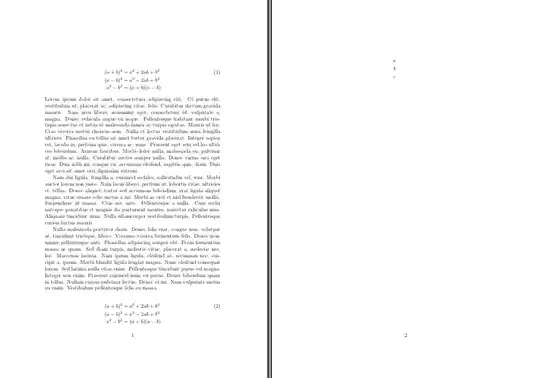
If I understand you correctly, this is what you are looking for: Some aligned equations that are numbered once in the very beginning (first line) and allow page-breaks? The following code does that.

It uses the align* environment to suppress automatic equation numbering. I wrote the short macro \numberthis which does number the current line of an align* environment and updates the equation counter. Then I patched the align* environment to use it and number the first line. As others mentioned, you also need \allowdisplaybreaks.

\documentclass[12pt,a4paper]{article}
\usepackage{amsmath}
\usepackage{etoolbox}

\usepackage{lipsum}

\newcommand{\numberthis}{\refstepcounter{equation}\tag{\arabic{equation}}}
\expandafter\appto\csname align*\endcsname{\numberthis}
\allowdisplaybreaks

\begin{document}
\begin{align*}
    (a+b)^2&=a^2+2ab+b^2\\
    (a-b)^2&=a^2-2ab+b^2\\
    a^2-b^2&=(a+b)(a-b)
\end{align*}
\lipsum[1-3]
\begin{align*}
(a+b)^2&=a^2+2ab+b^2\\
(a-b)^2&=a^2-2ab+b^2\\
a^2-b^2&=(a+b)(a-b)\\
a&\\
b&\\
c&
\end{align*}

\end{document}

result

nox
  • 4,160
  • 12
  • 26
  • I’d prefer \newcommand\numberthis{\addtocounter{equation}{1}\tag{\theequation}} by @IanThompson in this answer since it accommodates a numbering style which is not necessarily arabic. However, this post pointed out the potential problem with the cleveref package. – Ruixi Zhang Jul 20 '18 at 04:54
  • 2
    @RuixiZhang You can change this to your liking, of course. It's worth mentioning that \refstepcounter is usually the preferred way over \addtocounter. While both increase the counter by one, the former enables you to reference to it later by \labeling . The latter doesn't. \chapter, \section, but also floats, use this in order to label them. This is not needed here (correct), as I used \tag already. You still could use \stepcounter{equation} as equivalent of \addtocounter{equation}{1}. – nox Jul 20 '18 at 11:10
  • 1
    1) @RuixiZhang’s suggestion of using \theequation is good, but of course \refstepcounter is *much* better than \addtocounter. 2) It would be preferable to define a new environment with a different name than to redefine align*. – GuM Jul 20 '18 at 11:12
  • 1
    In this context \refstepcounter does no different from \stepcounter, because a \label in align* refers to \tag. – egreg Jul 22 '18 at 14:50
2

Please note: This answer serves more as a LaTeX code-improving suggestion than as an attempt to change amsmath’s subordinated math environments. The latter should be discouraged.

You shouldn’t use subordinated math environments to write multiple equations

Here are two quotes from amsldoc.pdf, the User’s Guide for the amsmath Package:

Section 3.4, p. 6: … [T]he split environment is for single equations that are too long to fit on one line and hence must be split into multiple lines.

and

Section 3.7, p. 9: … [V]ariants gathered, aligned, and alignedat … can be used as a component in a containing expression.

In summary, you shouldn’t use subordinated math environments to write multiple equations, as the subordinates are merely building blocks within other top-level math environments, and the top-levels — such as align, align*, gather, gather*, etc. — are the intended structures for multiple equations.

You should put your attention on breaking multiple equations

Again, I present two other quotes from the User’s Guide for the amsmath Package:

Section 3.9, p. 10: … When the amsmath package is in use page breaks between equation lines are normally disallowed; the philosophy is that page breaks in such material should receive individual attention from the author. … If you prefer a strategy of letting page breaks fall where they may, even in the middle of a multiline equation, then you might put \allowdisplaybreaks[1] in the preamble of your document.

and in the same section

… Certain equation environments wrap their contents in an unbreakable box[.] … These include split, aligned, gathered, and alignedat.

So I strongly recommend to

  1. avoid large chunks of multiple equations;
  2. add customized tag manually.

Are you putting multiple equations inside subordinated environments which are already inside some multiline top-level environments?

Well, don’t do this. Just use one layer of the top-level environment, whatever that is.

If you write your equations this way, a simple combination of the align* environment and \tag suffices. See, for instance, this answer.

Please note that the answer by @nox is almost identical to that of @IanThompson in the linked post, but the one by @nox will cause all align* to be altered. Are you sure you want to do this?

Added: By combining the comments under @nox’s answer, you may want to use \theequation instead of \arabic{equation}, and to define your own environment for this particular use as suggested by @GuM.

Ruixi Zhang
  • 9,553
  • 1
    +1. You may want to think, though, about not using the keyword inner to describe subordinated math environments such as split and aligned. As you probably know (but other readers may be unaware of), inner has a very special meaning in TeX's math-mode world. Maybe use subordinated instead of inner (and top-level instead of outer)? – Mico Jul 20 '18 at 06:16
  • 1
    @Mico You’re right! I wasn’t thinking about \mathinner when I wrote my answer. Thank you for the suggestions. – Ruixi Zhang Jul 20 '18 at 15:11
1

I think that @nox’s good answer could be further improved if one defined a new environment, rather than redefining (and hence abusing) align*; I expressed this opinion in a comment, but more than two days have elapsed without the suggestion being accepted, so I dare to submit this additional answer that shows how this can be done. Allow me to stress that this is just an improvement over the solution devised by @nox, whose main credit I’m glad to acknowledge.

Actually, implementing @nox’s solution by means of a new environment may not be entirely straightforward, since deriving new environments from those of amsmath is notoriously tricky. But the trick boils down to a simple hack: just avoid to change the value of \@currenvir inside the code you write. This can be achieved by replacing \begin{FOOENV} and \end{FOOENV} with \FOOENV and \endFOOENV, respectively. In our case, however, the environment we want to use contains a non-letter (an asterisk) in its name, so we must resort to \csanme align*\endcsname, or, which is the same, to \@nameuse{align*}.

Here’s a complete compilable example; further comments can be found in the code itself. I must also withdraw my previous, erroneous remark about the use of \refstepconter: indeed \stepcounter is enough (I had already realized this before @egreg posted his comment!).

% My standard header for TeX.SX answers:
\documentclass[a4paper]{article} % To avoid confusion, let us explicitly 
                                 % declare the paper format.

\usepackage[T1]{fontenc}         % Not always necessary, but recommended.
% End of standard header.  What follows pertains to the problem at hand.

\usepackage{amsmath}
\usepackage{lipsum} % only for this example (of course!)

\makeatletter

\newenvironment{oddalign}{%
    \@nameuse{align*}% or directly "\csname align*\endcsname"
    \stepcounter{equation}\tag{\theequation}%
}{\@nameuse{endalign*}} % as above

\makeatother

\allowdisplaybreaks[1] % see amsmath manual, section 3.9


\begin{document}

A normal \texttt{align*} environment (which you might \emph{still} want to use, 
of course!):
\begin{align*}
    (a+b)^2 &= a^2+2ab+b^2\\
    (a-b)^2 &= a^2-2ab+b^2\\
    a^2-b^2 &= (a+b)(a-b)
\end{align*}
An example of our new \texttt{oddalign} environment where a page break isn't
needed:
\begin{oddalign}
    \label{eq:example1}
    (a+b)^0 &= 1 \\
    (a+b)^1 &= a+b \\
    \begin{split}
        (a+b)^2 &= (a+b)(a+b) = a^2+ab+ab+b^2 \\
            &= a^2+2ab+b^2
    \end{split} \\
    \begin{split}
        (a+b)^3 &= (a+b)(a+b)^2 = (a+b)(a^2+2ab+b^2) \\
            &= a^3+2a^2b+2ab^2+a^2b+2ab^2+b^3 \\
            &= a^3+3a^2b+3ab^2+b^3
    \end{split} \\
    \intertext{and in general}
    (a+b)^{n} &= \sum_{k=0}^{n}\binom{n}{k} a^{n-k}b^{k}
\end{oddalign}
Note that our new environment behaves correctly with nested environments (and
with \verb|\intertext|, too).

% Try different alternatives:
% no "\lipsum" at all
% \lipsum[1]
\lipsum[2-3]
% \lipsum[1-3]

We'll now repeat the same code as above in a place where, on the contrary, a
page break \emph{is} needed:
\begin{oddalign}
    \label{eq:example2}
    (a+b)^0 &= 1 \\
    (a+b)^1 &= a+b \\
    \begin{split}
        (a+b)^2 &= (a+b)(a+b) = a^2+ab+ab+b^2 \\
            &= a^2+2ab+b^2
    \end{split} \\
    \begin{split}
        (a+b)^3 &= (a+b)(a+b)^2 = (a+b)(a^2+2ab+b^2) \\
            &= a^3+2a^2b+2ab^2+a^2b+2ab^2+b^3 \\
            &= a^3+3a^2b+3ab^2+b^3
    \end{split} \\
    \intertext{and in general}
    (a+b)^{n} &= \sum_{k=0}^{n}\binom{n}{k} a^{n-k}b^{k}
\end{oddalign}
Will the next equation be numbered correctly?
\begin{equation}
    x=y
    \label{eq:xy}
\end{equation}
Yes.

The references are to equations \eqref{eq:example1} and~\eqref{eq:example2},
(and to equation~\eqref{eq:xy}): this is OK\@.  Note, however, that in order for
the references to work correctly, the \verb|\label| commands must be placed at
the very beginning of the \texttt{oddalign} environment.

On second thought, why the name \texttt{oddalign}?  It isn't that odd, after
all!

\end{document}
GuM
  • 21,558