2

I would like to draw several arrows (as in the diagram) in 2 colours (as the blue/cyan arrow). I use the following code.

How to set a global tikzset command to draw these arrows with different 2-colours in different locations?

enter image description here

\documentclass{beamer}
\beamertemplatenavigationsymbolsempty
\usepackage{tikz}
\usepackage{pgfplots}
\usetikzlibrary{arrows, arrows.meta}
\begin{document}
\begin{frame}[fragile,t]
\frametitle{}
\begin{tikzpicture}[scale=.9, transform shape]
\draw [thick,-latex](0,0) -- (4,0);
\draw [thick,-latex](0,0) -- (0,2.);
\draw [ultra thick, green, -latex'] (.2,.8) -- +(0:.76);
\draw [ultra thick, red, -latex'] (.4,.5) -- +(0:.76);
\draw [ultra thick, violet, -latex'] (.6,.2) -- +(0:.76);
\filldraw[left color=blue, right color=cyan] (2,1)-- ++(90:0.1)--++(0:1.)--++(90:0.1)--++(-45:.212)--++(-135:.212)--++(90:0.1)--cycle;
\end{tikzpicture}
\end{frame}
\end{document}
Hany
  • 4,709

2 Answers2

3

Tikz has a predefined shape single arrow in the shapes.arrows library. The my arrow style takes two arguments, first is the left color and second is the right color. An intermediate color can be chosen by adding the middle color=<color> key to the node options.

Resizing the node can be done as usual, taking into account that the minimum width key sets the length of the arrow, and the minimum height keys sets the width of the tip. Additionally the single arrow head extend key can be used to indirectly set the width of the 'tail'. tail width = minimum height - 2 * head extend.

enter image description here

Edit
I noticed that when rotating the arrow, the shading does not rotate with it. To this end I slightly adjusted the my arrow style to pass on the argument of rotate to the shading angle key, with a 90° offset.

\documentclass{beamer}
\beamertemplatenavigationsymbolsempty
\usepackage{tikz}
\usetikzlibrary{shapes.arrows}

\tikzset{
    my arrow/.style 2 args={
        single arrow,
        draw,
        inner sep = 0pt,
        minimum height = 1cm, % Arrow length
        minimum width = 2.5mm, % Arrow width
        single arrow head extend = 0.1mm,
        left color = #1,
        right color = #2,
        rotate/.append style={shading angle=##1+90},
    },
    my arrow/.default={blue}{cyan},
}

\begin{document}
    \begin{frame}[t]
        \frametitle{}
        \begin{tikzpicture}[scale=.9, transform shape]
            \draw [thick,-latex](0,0) -- (4,0);
            \draw [thick,-latex](0,0) -- (0,2.);

            \node at (0.6,0.8) [my arrow={green}{blue}]{};
            \node at (0.8,0.5) [my arrow={yellow}{red}]{};
            \node at (1,0.2) [my arrow={purple}{violet},middle color=yellow]{};
            \node at (2.5,1.1) [my arrow]{}; % The default is {blue}{cyan}
            \node at (1.1,2) [my arrow={white}{red},minimum height=2cm,minimum width=4mm]{};
            \node at (1,1.5) [my arrow={white}{red},minimum height=0.5cm,minimum width=1mm,single arrow head extend=0.5pt]{};
            \node at (3.5,1) [my arrow={green}{red},minimum height=2cm,minimum width=4mm,rotate=45,middle color=white]{};
        \end{tikzpicture}
    \end{frame}
\end{document}

PS. It is not necessary to use this frame as fragile. This increases the compilation time significantly, so I removed it from the MWE (if you need it for other things on the same frame, please ignore this).

Max
  • 9,733
  • 3
  • 28
  • 35
  • Thank you very much. One more request please, can an argument be added to control the height and width of the arrow s, so that it can be used with different lengths too in different locations. – Hany Aug 17 '18 at 09:07
  • Thank you very much. I appreciate your answer and comment. – Hany Aug 17 '18 at 09:29
  • 1
    @Hany also see my edit about rotating the arrow, hope it can be of use. – Max Aug 17 '18 at 09:49
  • Thank you very much for your addition to your answer and your comments. I appreciate them very much. – Hany Aug 17 '18 at 13:04
3

One quite flexible option, which works for any custom "shape", is to define "pic" for your arrow. You can read all about these in section 18.2 of the tikz manual (version 3.0.1a).

enter image description here

This is done with essentially your code thrown inside a pic called myarrow that takes two arguments: the left and right colour. Here is the code:

\documentclass{beamer}
\beamertemplatenavigationsymbolsempty
\usepackage{tikz}
\usepackage{pgfplots}
\usetikzlibrary{arrows, arrows.meta}
\begin{document}

\tikzset{
  pics/myarrow/.style args = {#1,#2}{% left colour, right colour
    code={
      \filldraw[left color=#1, right color=#2]
         (0,0)--++(90:0.1)--++(0:1.)--++(90:0.1)--++(-45:.212)
              --++(-135:.212)--++(90:0.1)--cycle;
    }
  }
}

\begin{frame}[fragile,t]
  \frametitle{}
  \begin{tikzpicture}[scale=.9, transform shape]
    \draw [thick,-latex](0,0) -- (4,0);
    \draw [thick,-latex](0,0) -- (0,2.);
    \draw [ultra thick, green, -latex'] (.2,.8) -- +(0:.76);
    \draw [ultra thick, red, -latex'] (.4,.5) -- +(0:.76);
    \draw [ultra thick, violet, -latex'] (.6,.2) -- +(0:.76);
    \pic at (2,1) {myarrow={blue,cyan}};
    \draw (1,2) pic{myarrow={green,yellow}};
  \end{tikzpicture}
\end{frame}
\end{document}

The coordinates inside myarrow are relative to where you place the arrow. As shown above, you can place the pic using either a \draw command or a \pic command.

Edit

You can add extra augments to the definition of the pic to change the length etc. Of course, if you want to be able to change the length, the angle, the ... then you will end up adding many additional arguments and this soon becomes a little cumbersome. Another approach is to define some pgfkeys to control the additional specifications using a more manageable key-value syntax; this is done, for example, in this post How can I create a parent node in tikz with parts of the node designated for pointers?.

In this case, I think that the best approach is to add a third argument and have the pic use a scope environment that is controlled by #3. This allows you to produce:

enter image description here

using the code:

\documentclass{beamer}
\beamertemplatenavigationsymbolsempty
\usepackage{tikz}
\usepackage{pgfplots}
\usetikzlibrary{arrows, arrows.meta}
\begin{document}

\tikzset{
  pics/myarrow/.style args = {#1,#2,#3}{% left colour, right colour
    code={
      \begin{scope}[#3]
        \filldraw[left color=#1, right color=#2]
           (0,0)--++(90:0.1)--++(0:1.)--++(90:0.1)--++(-45:.212)
                --++(-135:.212)--++(90:0.1)--cycle;
      \end{scope}
    }
  }
}

\begin{frame}[fragile,t]
  \frametitle{}
  \begin{tikzpicture}[scale=.9, transform shape]
    \draw [thick,-latex](0,0) -- (4,0);
    \draw [thick,-latex](0,0) -- (0,2.);
    \draw (1,1.5) pic{myarrow={green,yellow,}};
    \pic at (2,1) {myarrow={blue,cyan,}};
    \pic at (.2,.8) {myarrow={green,blue,xscale=2}};
    \pic at (.4,.5) {myarrow={red,yellow,scale=-1}};
    \pic at (.6,.2) {myarrow={violet,blue!10!white,rotate=60}};
    \pic at (4,-.2){myarrow={violet,red!10!white,{rotate=90,yscale=2}}};
  \end{tikzpicture}
\end{frame}
\end{document}

One thing to be careful of here is that pics are very unforgiving if you don't use their syntax exactly as specified: above, you always need to give myarrrow three comma separated arguments. Hence, the trailing comma in myarrow={blue,cyan,}, which sets #3 to be nothing in the second example above, and the braces around the third augment rotate=90,yscale=2 in the last example myarrow={violet,red!10!white,{rotate=90,yscale=2}}}. In fact, you can abuse this and, for example, use

\pic at (.4,.5) {myarrow={{red,draw=white},yellow,scale=-1}};

to add optional augments to the \filldraw command in myarrow, which in this case changes the boarder of the arrow from black to white. This changes the last image above to:
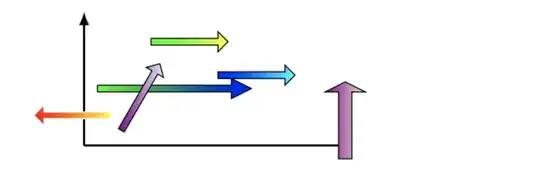
enter image description here

Note that the arrow pointing from right to left has a white boarder.

  • Thank you very much. One more request please, can an argument be added to control the length of the arrow --++(90:0.1), so that it can be used with different lengths too in different locations. – Hany Aug 17 '18 at 09:05
  • 1
    @Hany Yes, just add #3 to the argument specs and then replace 90 etc with the #3. Will add more details if needed tomorrow (it’s late for me) –  Aug 17 '18 at 14:05