Depending on what you want, you could do
\documentclass[tikz,border=5pt]{standalone}
\usepackage{tikz}
\usetikzlibrary{shapes.misc}
\begin{document}
\begin{tikzpicture}
\node[draw, align = center,
    minimum height = 1.5cm,
    text width = 1.5cm]
  (a) at (0, 0)[rounded rectangle]{a};
\node[draw](b) at (a.east |- a.north)[anchor=north west]{b};
\end{tikzpicture}
\end{document}
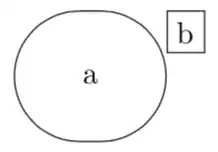
The main question is what you want to achieve. It is obvious that the anchor north east is not at a corner, simply because a rounded rectangle has no corners. So I "invented" a corner. (a.east |- a.north) is precisely an imaginary corner of a rectangle around the a node,
It is of course also possible to let the b node touch the boundary of a.
\documentclass[tikz,border=5pt]{standalone}
\usepackage{tikz}
\usetikzlibrary{shapes.misc,intersections}
\begin{document}
\begin{tikzpicture}
  \node[draw, align = center,name path=rr,
    minimum height = 1.5cm,
    text width = 1.5cm]
  (a) at (0, 0)[rounded rectangle]{a};
  \node[opacity=0,overlay](phantomb) at (a.east |- a.north)[anchor=north west]{b};
  \path[name path=aux] (phantomb.south west) -- ++(-1,0);
  \draw[name intersections={of=rr and aux}] node[draw](b) at (intersection-1)
  [anchor=south west]{b};
\end{tikzpicture}
\end{document}

There are other possibilities, really depends on what you precisely want to achieve.
Addendum: relative positioning of two such shapes. I do not know what precisely you are after, but here is a possibility.
\documentclass[tikz,border=5pt]{standalone}
\usepackage{tikz}
\usetikzlibrary{shapes.misc,intersections,calc}
\begin{document}
\begin{tikzpicture}
  \node[draw, align = center,name path=rr,
    minimum height = 1.5cm,
    text width = 1.5cm]
  (a) at (0, 0)[rounded rectangle]{a};
  \node[opacity=0,rounded rectangle,overlay](phantomb) at (a.east |- a.north)[anchor=north west]{b};
  \path[name path=aux] (phantomb.south west) -- ++(-1,0);
  \draw[name intersections={of=rr and aux}]
  let \p1=($(phantomb.south west)-(phantomb.south -| phantomb.west)$) in
  node[draw,rounded rectangle](b) at ([xshift=\x1]intersection-1)
  [anchor=south west]{b};
\end{tikzpicture}
\end{document}

EDIT: Added overlay to prevent the phantom nodes from enlarging the bounding box.


bshould remain in the same location as in the first figure, imagining a rectangular border drawn enclosing the rounded rectangle. – Viesturs Oct 04 '18 at 18:54(a.east |- a.north)is precisely an imaginary corner of a rectangle arounda. – Oct 04 '18 at 18:54|-signifies an intersection point? – Viesturs Oct 04 '18 at 19:10xcoordinate ofa.eastand theycoordinate ofa.north. This is explained in detail in this nice answer. – Oct 04 '18 at 19:12bitself is drawn with arounded rectangle? How to set the anchor? – Viesturs Oct 04 '18 at 19:29(phantomb.south west)and(phantomb.south -| phantomb.west)and use the distance to shift the node. Of course, here are tons of possibilities, touch vs. not touch etc., but all of them can be addressed this way, I think – Oct 04 '18 at 19:47visible onfrom aobs (texdoc aobs) works. – Oct 04 '18 at 20:17aobs. Looks very interesting. Thank you for sharing that. – A.Ellett Oct 04 '18 at 20:22