1

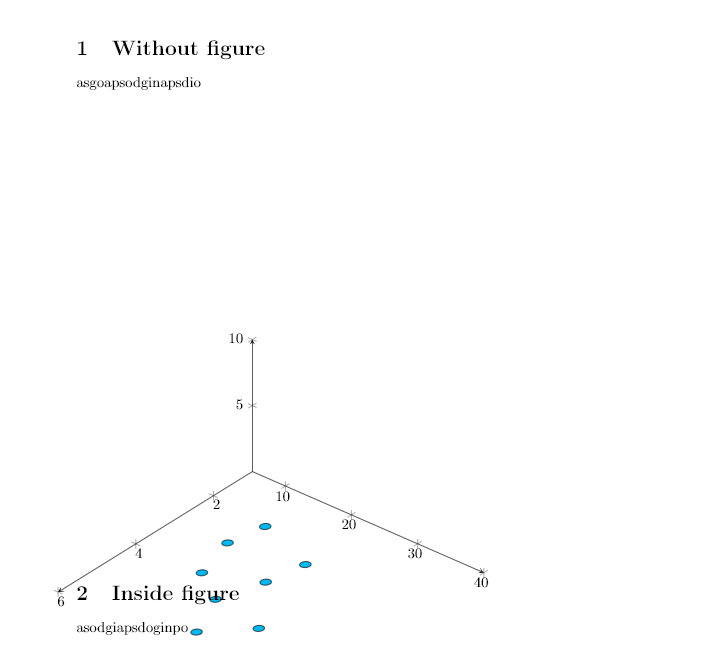
I am trying to include a tikzpicture inside a figure. It had worked for other tikzpicture, but now I have a complicated 3D one here, that I have trouble integrating.

Here is the overleaf MWE where you can run and see the error (sorry, thats only way I could find to show error)

Error is pretty generic and cryptic as usual like "undefined control sequence". I dont understand, why tikzpicture as outside works fine, but when put inside figure suddenly not. As you could also see, I need to be inside figure float else you can see its improperly placed.

Front code:

\documentclass[10pt,a4paper]{article}
\usepackage[latin1]{inputenc}
\usepackage{amsmath}
\usepackage{amsfonts}
\usepackage{amssymb}
\usepackage{graphicx}


\usepackage{mytikz_custom}
\pgfplotsset{compat=1.15}
\author{Parthiban Rajendran}
\begin{document}


    % example 3D sample set
\pgfplotstableread{
    X Y Z m
    2.2 14 0 0
    2.7 23 0 0
    3 13 0 0
    3.55 22 0 0
    4 15 0 0
    4.5 20 0 0
    4.75 28 0 0
    5.5 23 0 0
}\datatablet


\section{Runs fine if not inside figure}    
        \begin{tikzpicture}[scale=1.5]
\begin{axis}
[ set layers,   
view={130}{50},
samples=200,
samples y=0, 
xmin=1,xmax=6, ymin=5,ymax=40, zmin=0, zmax=10,
% ytick=\empty,xtick=\empty,ztick=\empty,
clip=false, axis lines = middle,
area plot/.style=   % for this: https://tex.stackexchange.com/questions/53794/plotting-several-2d-functions-in-a-3d-graph
{
    fill opacity=0.5,
    draw=none,
    fill=orange,
    mark=none,
    smooth
}
]               
\GetLocalFrame              
\begin{scope}[transform shape]
\addplot3[only marks, fill=cyan,mark=fcirc] table {\datatablet};
\end{scope}         
\end{axis}
\end{tikzpicture}   


\section{Silly blocking error if put inside figure} 

The error says undefined control sequence. Commented to go through. Same tikz content as above, only now inside figure. 

\begin{figure}
        \begin{tikzpicture}[scale=1.5]
\begin{axis}
[ set layers,   
view={130}{50},
samples=200,
samples y=0, 
xmin=1,xmax=6, ymin=5,ymax=40, zmin=0, zmax=10,
% ytick=\empty,xtick=\empty,ztick=\empty,
clip=false, axis lines = middle,
area plot/.style=   % for this: https://tex.stackexchange.com/questions/53794/plotting-several-2d-functions-in-a-3d-graph
{
    fill opacity=0.5,
    draw=none,
    fill=orange,
    mark=none,
    smooth
}
]               
\GetLocalFrame              
\begin{scope}[transform shape]
\addplot3[only marks, fill=cyan,mark=fcirc] table {\datatablet};
\end{scope}         
\end{axis}
\end{tikzpicture}   
\end{figure}

\end{document}

And here is the style package mytikz_custom

  • 1
    In the definition of \GetLocalFrame add \globaldefs=0\relax after \tikzset. (I guess I need to rewrite this bit, didn't expect you'd use it like that.) –  Oct 22 '18 at 17:36
  • wow, this did the trick, but its like magic :( really wish there were some clue in the error to lead to such things. what was your hint, and how you resolved. tikz errors are so misleading and upright unhelpful without any hint on anything near the cause. I almost all the time have to use tikz inside figure for proper placementi n the document, are there any other better ways of inclusion? I hate figure because of unpredictable placement of floats. – Parthiban Rajendran Oct 22 '18 at 17:48
  • I was aware that this is a hack (and I said so in my previous) answer. pgfplots is quite tricky, and it has a "survey phase", which I was exploiting to make this happen. Unfortunately, in the way you used it now, this also lead to the fact that some things were made global that should not. Even though I do not precisely understand why that happens, my guess was that I need to switch the globalization of, and that did it. I'm still thinking about a cleaner way, but couldn't find one so far. –  Oct 22 '18 at 18:11

1 Answers1

3

Since I messed that up, here is a cleaner solution. Just use this for the style file:

% This style package was created using hint from here: https://tex.stackexchange.com/questions/77/how-to-make-a-standard-preamble-into-a-package?rq=1

% Declare that this style file requires at least LaTeX version 2e.
\NeedsTeXFormat{LaTeX2e}

% Provide the name of your page, the date it was last updated, and a comment about what it's used for
\ProvidesPackage{mytikz_custom}[2018/09/06 Hardcoded preamble to be used in main tex to support subfiles (sub-files should include and refer here the preamble they need)]

\usepackage{tikz}
\usepackage{pgfplots, pgfplotstable}
\usetikzlibrary{3d,calc,math, decorations.pathreplacing,angles,quotes,bending, arrows.meta}


% small fix for canvas is xy plane at z % https://tex.stackexchange.com/a/48776/121799
\makeatletter
\tikzoption{canvas is xy plane at z}[]{%
    \def\tikz@plane@origin{\pgfpointxyz{0}{0}{#1}}%
    \def\tikz@plane@x{\pgfpointxyz{1}{0}{#1}}%
    \def\tikz@plane@y{\pgfpointxyz{0}{1}{#1}}%
    \tikz@canvas@is@plane}
\makeatother

%\pgfplotsset{compat=1.15}


% ref: https://tex.stackexchange.com/questions/456138/marks-do-not-appear-in-3d-for-3d-scatter-plot/456142
\pgfdeclareplotmark{fcirc}
{%          
    \begin{scope}[expand style={local frame}{\MyLocalFrame},local frame]
        \begin{scope}[canvas is xy plane at z=0,transform shape]
            \fill circle(0.1);
        \end{scope}   
    \end{scope}
}% based on https://tex.stackexchange.com/a/64237/121799
\tikzset{expand style/.code n args={2}{\tikzset{#1/.style/.expanded={#2}}}}
\newcommand{\GetLocalFrame}
{
    \path let \p1=(     $(1,0,0)-(0,0,0)$   ), \p2=(    $(0,1,0)-(0,0,0)$   ), \p3=(   $(0,0,1)-(0,0,0)$   )  % these look like axes line paths
    in \pgfextra  %pgfextra is to execute below code before constructing the above path 
    {
        \pgfmathsetmacro{\ratio}
        {   
            veclen(\x1,\y1)/veclen(\x2,\y2)  
        }
        \xdef\MyLocalFrame{   
                x   =  {   (\x1,\y1)    },
                y   =  {    (\ratio*\x2,\ratio*\y2)     },
                z   =   {     (\x3,\y3)     }
            }
    }; 
}

\tikzset
{
    declare function={
        % normal(\m,\s)=1/(2*\s*sqrt(pi))*exp(-(x-\m)^2/(2*\s^2));
        normal(\x,\m,\s) = 1/(2*\s*sqrt(pi))*exp(-(\x-\m)^2/(2*\s^2));
    }
}

% Finally, we'll use \endinput to indicate that LaTeX can stop reading this file. LaTeX will ignore anything after this line.
\endinput

then it works. I will also clean up my previous answer.

  • thank you very much for the extra work marmot. however, a slight problem exists. now if i embed inside figure or not, the tikzpictures position is messed up, going way too down, and behind the upcoming texts as shown here. why would that happen? – Parthiban Rajendran Oct 23 '18 at 07:14
  • @PaariVendhan This does not happen on my updated TeXLive2018 distribution. Actually, I do not see any way how that would happen. Do you really compile your above file, or something else? –  Oct 23 '18 at 08:50
  • I just compiled in overleaf here where you could just run and see the same outcome – Parthiban Rajendran Oct 23 '18 at 09:03
  • @PaariVendhan Well, I copied your overleaf file, compiled it, and got a very different output, meaning an output without any overlaps. Overleaf seems also to complain about overfull boxes, but I do not get these warnings when compiling your file(s) on my TeXLive 2018 distribution. Honestly, to me this sounds a bit like a bug in overleaf. What happens if you forget about all these flat 3d dots and compile the thing without the corresponding \addplot3s and without the \GetLocalFrame and fcirc parts? –  Oct 23 '18 at 09:12
  • The set layers is causing this issue. With it, and if I remove frame stuff and instead of fcirc, simply use mark=*, still the same issue. But I also remove set layers this issue is gone. But with frame stuff, I cannot remove set layers as that is giving error. – Parthiban Rajendran Oct 23 '18 at 09:28
  • @PaariVendhan This might be very weird overleaf bug. As I said, on my machine this does not happen when compiled with pdflatex. (I noticed, though, that your document cannot be compiled with xelatex nor lualatex.) I have zero knowledge on overleaf, and do not know which compiler it employs. –  Oct 23 '18 at 09:32
  • oh ok marmot, then we will leave this issue at this level, and lets see if any one else could help. it is ok for now when i use texstudio and pdflatex i guess, will revert on this if any issue in there as well. – Parthiban Rajendran Oct 23 '18 at 09:43
  • @PaariVendhan Yes. I am really sorry that I cannot provide more info here. But I do not see how set layers can have such an effect, and, more importantly, I cannot reproduce the issue.I compiled both with pdflatex and latex -> dvi -> pdf, there are no issues. With lualatex and xelatex there is an error message ! Package inputenc Error: inputenc is not designed for xetex or luatex. which is unrelated to the issue, and if I ignore it then the issue does not arise either. –  Oct 23 '18 at 14:39
  • just added another question here on same graph. Kindly check out if possible. – Parthiban Rajendran Oct 24 '18 at 15:01
  • 1
    For the record: Jake's patch is now incorporated in v3.1 of TikZ. – Stefan Pinnow Jan 15 '19 at 19:27