There are many advanced packages, such as forest, which make tree drawing very convenient. In this answer, however, I will follow the path you've taken and make some minor suggestions. You can use node styles, implemented via nodes={...}, to make your life easier. And you can add the bullets via positioning.
\documentclass{article}
\usepackage{tikz}
\usetikzlibrary{matrix,positioning}
\tikzset{bullet/.style={circle,fill,inner sep=2pt}}
\begin{document}
  \begin{tikzpicture}[>=stealth,sloped]
    \matrix (tree) [%
      matrix of nodes,
      minimum size=1cm,
      column sep=3.5cm,
      row sep=1cm,nodes={text width=8em}
          ]
    {
          &   &  \\
          & {Stock price =\$B\\ Option price =\$c} &   \\
     Stock price = \$A &   &  \\
          &  {Stock price =\$B\\ Option price =\$c} &   \\
          &   &  \\
    };
    \node[bullet,right=0mm of tree-3-1.east](b-3-1){};
    \node[bullet,left=0mm of tree-2-2.west](b-2-2){};
    \node[bullet,left=0mm of tree-4-2.west](b-4-2){};
    \draw[->] (b-3-1) -- (b-2-2) node [midway,above] {$p$};
    \draw[->] (b-3-1) -- (b-4-2) node [midway,below] {$(1-p)$};
  \end{tikzpicture}


  \begin{tikzpicture}[>=stealth,sloped]
    \matrix (tree) [%
      matrix of nodes,
      minimum size=1cm,
      column sep=2.5cm,
      row sep=1cm,nodes={text width=8em}
          ]
    {
          &   &  D\\
          & B &   \\
     A &   &  E\\
          &  C &   \\
          &   &  F\\
    };
    \node[bullet,left=3.14mm of tree-3-1.west](b-3-1){};
    \node[bullet,left=3.14mm of tree-2-2.west,label=above:22,label=below:2.057](b-2-2){};
    \node[bullet,left=3.14mm of tree-4-2.west](b-4-2){};
    \node[bullet,left=3.14mm of tree-1-3.west](b-1-3){};
    \node[bullet,left=3.14mm of tree-3-3.west](b-3-3){};
    \node[bullet,left=3.14mm of tree-5-3.west](b-5-3){};
    \draw[->] (b-3-1) -- (b-2-2);
    \draw[->] (b-2-2) -- (b-1-3);
    \draw[->] (b-2-2) -- (b-3-3);
    \draw[->] (b-3-1) -- (b-4-2);
    \draw[->] (b-4-2) -- (b-3-3);
    \draw[->] (b-4-2) -- (b-5-3);
  \end{tikzpicture}

\end{document}
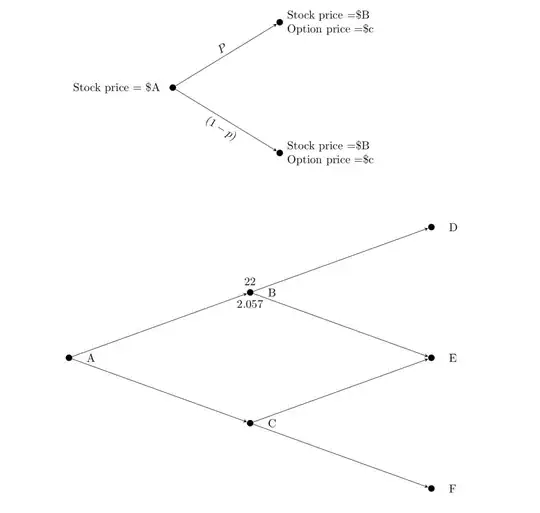
In the second example, I also show how to add labels to the bullets, but of course I do it just for one (rather than punching all numbers from your screenshot in).
As mentioned above, there are certainly more elegant ways, but this way has of course the advantage that you can place additional things at will.


\draw[->] (tree-3-1) -- (tree-2-2.west) node [midway,above] {$P$}; \draw[->] (tree-3-1) -- (tree-4-2.west) node [midway,below] {$(1-p)$};. You can also addnodes={text width=8em}to the options of the matrix to have the text in two lines. – Oct 30 '18 at 19:46