A one liner:
\documentclass{article}
\usepackage{expl3}

\ExplSyntaxOn
\cs_set:cpn {@arabic} #1 { \int_to_base:nn { #1 } { 6 } }
\ExplSyntaxOff

\setlength{\textheight}{2.5cm} % to keep the image small

\begin{document}

\newcounter{test}

\loop\ifnum\value{test}<100
  \arabic{test}%
  \stepcounter{test}%
  \space
\repeat

\end{document}
Every counter that's defined to use \arabic will print in base six, including page.
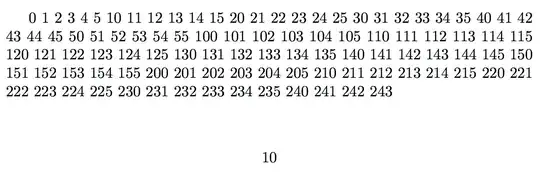
Beware: this will break all macros that abuse \the<counter> for obtaining the decimal representation of the counter instead of relying on its abstract value.
Better defining a suitable representation and choosing it for representing the counters you need.
\documentclass{article}
\usepackage{expl3}

\ExplSyntaxOn
\cs_new:Npn \basesix_print:N #1 { \int_to_base:nn { #1 } { 6 } }
\cs_generate_variant:Nn \basesix_print:N {c}
\cs_new:Npn \basesix_start:n #1 { \basesix_print:c {c@#1} }
% user interface
\cs_new_eq:NN \basesix \basesix_start:n
% to keep \pagenumbering{basesix} happpy
\cs_new_eq:cN {@basesix} \basesix_print:N
\ExplSyntaxOff

\setlength{\textheight}{2.5cm} % to keep the image small
\pagenumbering{basesix}

\begin{document}

\setcounter{page}{6}

\newcounter{test}
\renewcommand{\thetest}{\basesix{test}}

\loop\ifnum\value{test}<100
  \thetest
  \stepcounter{test}%
  \space
\repeat

\end{document}


