You could make the following redefinitions:
\documentclass{beamer}


\mode<presentation>

\useinnertheme[shadow=true]{rounded}
%\useoutertheme{shadow}
\usecolortheme{orchid}
\usecolortheme{whale}

\setbeamerfont{block title}{size={}}

\mode
<all>


\author{diabonas}
\title{Frame border}
\setbeamertemplate{background canvas}{%
{\color{black}\rule{3pt}{\paperheight}\hspace*{\dimexpr\paperwidth-6pt\relax}\rule{10pt}{\paperheight}}%
}

\makeatletter
\mode<presentation>

\useoutertheme{split}


\setbeamercolor{frametitle}{parent=subsection in head/foot}
\setbeamercolor{frametitle right}{parent=section in head/foot}


\pgfdeclarehorizontalshading[frametitle.bg,frametitle right.bg]{beamer@frametitleshade}{\paperheight}{%
  color(0pt)=(frametitle.bg);
  color(\paperwidth)=(frametitle right.bg)}

\AtBeginDocument{
  \pgfdeclareverticalshading{beamer@topshade}{.982\paperwidth}{%
    color(0pt)=(bg);
    color(4pt)=(black!50!bg)}
}

\addtobeamertemplate{headline}
{}
{%
  \vskip-0.2pt
  \hskip0.11cm\pgfuseshading{beamer@topshade}
  \vskip-2pt
}


\defbeamertemplate*{frametitle}{shadow theme}
{%
  \nointerlineskip%
  \vskip-2pt%
  \hbox{\leavevmode
    \advance\beamer@leftmargin by -12bp%
    \advance\beamer@rightmargin by -12bp%
    \beamer@tempdim=\textwidth%
    \advance\beamer@tempdim by \beamer@leftmargin%
    \advance\beamer@tempdim by \beamer@rightmargin%
    \hskip-\Gm@lmargin\hbox{%
      \setbox\beamer@tempbox=\hbox{\begin{minipage}[b]{\paperwidth}%
          \vbox{}\vskip-.75ex%
          \leftskip0.3cm%
          \rightskip0.3cm plus1fil\leavevmode
          \usebeamercolor[fg]{frametitle}\usebeamerfont{frametitle}\strut\insertframetitle\par%
          \ifx\insertframesubtitle\@empty\else%
            {\usebeamerfont*{framesubtitle}{\usebeamercolor[fg]{framesubtitle}\insertframesubtitle}\strut\par}%
          \fi%
          \nointerlineskip
          \vbox{}%
          \end{minipage}}%
      \beamer@tempdim=\ht\beamer@tempbox%
      \advance\beamer@tempdim by 2pt%
      \begin{pgfpicture}{0pt}{0pt}{\paperwidth}{\beamer@tempdim}
        \usebeamercolor{frametitle right}
        \pgfpathrectangle{\pgfpointorigin}{\pgfpoint{\paperwidth}{\beamer@tempdim}}
        \pgfusepath{clip}
        \pgftext[left,base]{\pgfuseshading{beamer@frametitleshade}}
      \end{pgfpicture}
      \hskip-\paperwidth%
      \box\beamer@tempbox%
    }%
    \hskip-\Gm@rmargin%
  }%
  \nointerlineskip
    \vskip-0.2pt
    \hbox to\textwidth{\hskip-0.885cm\pgfuseshading{beamer@topshade}\hskip-\Gm@rmargin}
    \vskip-2pt
}


\mode
<all>

\makeatother

\begin{document}
\begin{frame}{content}
content
\end{frame}
\frame{Content}
\begin{frame}
content
\end{frame}
\section{test}
\begin{frame}{Content}
content
\end{frame}
\section{test2}
\end{document}
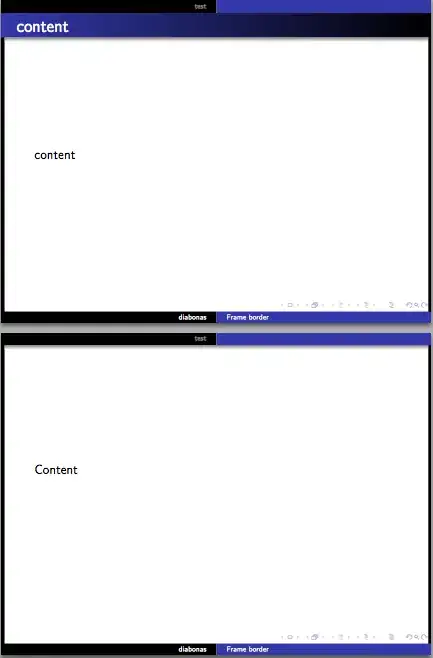
Alternatively one can use version 3.51 of beamer, which is the one and only version which supports transparent shadows, so the example you showed will work out of the box without any further modifications.


