4

I am processing a text, which is the specification for my mathematical package. The typical style for the specification looks as follows:
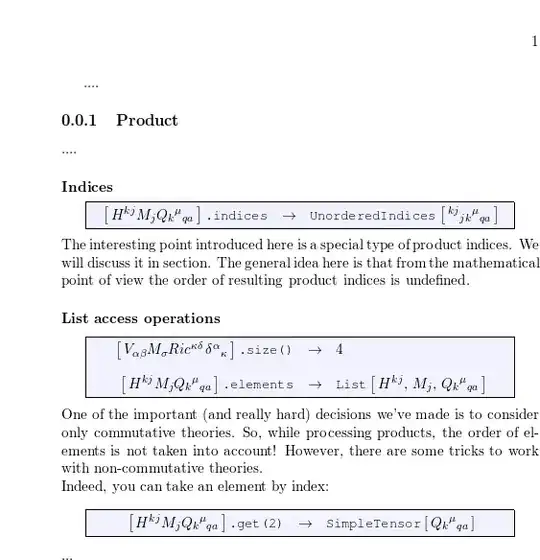
I can align expressions only in a single environment, using align or array and so. But I want, that all examples from presented image, will be aligned with respect to \to symbol through all document. Is there any way to do so?

The code of the presented image (sorry that it rather complicated):

\documentclass[a4paper,titlepage,11pt,oneside]{book}

\usepackage{amsmath}
\usepackage{amssymb}
\usepackage{amsthm}
\usepackage{latexsym}
\usepackage{array}
\usepackage{xargs}
\usepackage{xparse}
\usepackage{xcolor}
\usepackage{empheq}
\usepackage{courier}

\newcommand{\mkey}[1]{{\mbox{\small\ttfamily #1}}}
\newcommand{\mobj}[2]{\mbox{\ttfamily\small #1}\left [\,#2\,\right]}


\definecolor{boxcolor}{rgb}{.95, .95, 1}

\newsavebox{\mysaveboxM} % M for math
\newcommand*\MetaBox[2][Example]{%
 \sbox{\mysaveboxM}{#2}%
 \sbox{\mysaveboxM}{%
  \parbox[b][\ht\mysaveboxM][b]{%
  \wd\mysaveboxM}{#2}%
 }%
 \sbox{\mysaveboxM}{%
 \fcolorbox{black}{boxcolor}{%
  \makebox[\linewidth-4em]{\usebox{\mysaveboxM}}%
  }%
 }%
 \usebox{\mysaveboxM}%
}

\NewDocumentEnvironment{meta}{O{equation*}O{}}{%
 \setkeys{EmphEqEnv}{#1}%
 \setkeys{EmphEqOpt}{box=\MetaBox,#2}%
 \EmphEqMainEnv}%
 {\endEmphEqMainEnv}


\begin{document}
\subsection{Product}
....
\subsubsection{Indices}
\begin{meta}
\begin{array}{rcl}
\mobj{}{H^{kj}M_jQ_k{}^{\mu}{}_{qa}}\mkey{.indices}&\to&
\mobj{UnorderedIndices}{{}^{kj}{}_{jk}{}^{\mu}{}_{qa}}
\end{array}
\end{meta}
The interesting point introduced here is a special type of product
indices. We will discuss it in section. The general idea here is that  
 from the mathematical point of view the order of resulting product indices          
is undefined.
\subsubsection{List access operations}
\begin{meta}
\begin{array}{rcl}
\mobj{}{V_{\alpha\beta}M_\sigma
Ric^{\kappa\delta}\,\delta^\alpha{}_{\kappa}}\mkey{.size()}&\to&4\\[12pt]
\mobj{}{H^{kj}M_jQ_k{}^{\mu}{}_{qa}}\mkey{.elements}&\to&
\mobj{List}{H^{kj},\,M_j,\,Q_k{}^{\mu}{}_{qa}}
\end{array}
\end{meta}
One of the important (and really hard) decisions we've made is to
consider only commutative theories. So, while processing products, the order   
of elements is not taken into account! However, there are some tricks to       
work with non-commutative theories.\newline Indeed, you can take an element 
by index:
\begin{meta}
\begin{array}{rcl}
\mobj{}{H^{kj}M_jQ_k{}^{\mu}{}_{qa}}\mkey{.get(2)}&\to&
\mobj{SimpleTensor}{Q_k{}^\mu{}_{qa}}
\end{array}
\end{meta}

\end{document} 
diabonas
  • 25,784
  • 2
    Welcome to TeX.SX. We usually want some minimum working example, and in your case this is also needed. For example, it isn't clear why you're using the array environment. Wouldn't a tabular be better? –  Feb 29 '12 at 09:08
  • Thank you, for your answer! I have refactored my question and pasted the example. – Stanislav Poslavsky Feb 29 '12 at 10:09

2 Answers2

3

This solution uses TikZ to find where the symbol is and then cuts away the part left of it from the bounding box. Then, the \symbolOffset specifies how far to move the symbol from the left margin. The offset will be the across the entire document (provided \symbolOffset isn't set to a new value somewhere). Since the environment meta automatically centers its content, the array is wrapped by a minipage to get left alignment again (otherwise the offset doesn't work). The document must be compiled twice for this to work.

The downside of this solution is that you have to adapt the offset manually such that no part overflows.

I've incorporated my solution into your example:

\documentclass[a4paper,titlepage,11pt,oneside]{book}

\usepackage{amsmath}
\usepackage{amssymb}
\usepackage{amsthm}
\usepackage{latexsym}
\usepackage{array}
\usepackage{xargs}
\usepackage{xparse}
\usepackage{xcolor}
\usepackage{empheq}
\usepackage{courier}

\newcommand{\mkey}[1]{{\mbox{\small\ttfamily #1}}}
\newcommand{\mobj}[2]{\mbox{\ttfamily\small #1}\left [\,#2\,\right]}

\definecolor{boxcolor}{rgb}{.95, .95, 1}

\newsavebox{\mysaveboxM} % M for math
\newcommand*\MetaBox[2][Example]{%
 \sbox{\mysaveboxM}{#2}%
 \sbox{\mysaveboxM}{%
  \parbox[b][\ht\mysaveboxM][b]{%
  \wd\mysaveboxM}{#2}%
 }%
 \sbox{\mysaveboxM}{%
 \fcolorbox{black}{boxcolor}{%
  \makebox[\linewidth-4em]{\usebox{\mysaveboxM}}%
  }%
 }%
 \usebox{\mysaveboxM}%
}

\NewDocumentEnvironment{meta}{O{equation*}O{}}{%
 \setkeys{EmphEqEnv}{#1}%
 \setkeys{EmphEqOpt}{box=\MetaBox,#2}%
 \EmphEqMainEnv}%
 {\endEmphEqMainEnv}


% --- NEW STUFF --------------------
\usepackage{tikz}
\usetikzlibrary{calc}

\newlength{\symbolOffset}
\setlength{\symbolOffset}{6.2cm} % Distance between the left margin and the
                                 % symbol
\newcommand{\thesymbol}{$\to$} % Symbol
\newcommand{\alignSymbol}{%
  \begin{tikzpicture}%
    \node [inner sep=0pt] (symbol) {\thesymbol};
  \end{tikzpicture}%
}

\newcommand{\alignArray}[1]{%
  \begin{minipage}{\textwidth}%
    \hspace*{\symbolOffset}%
    \begin{tikzpicture}[remember picture]%
      \node (array) [inner sep=0pt] {${#1}$};
      \pgfresetboundingbox
      \path [use as bounding box]
        (symbol |- array.north) rectangle (array.south east);
    \end{tikzpicture}%
  \end{minipage}%
}
% --- END NEW STUFF ----------------


\begin{document}
\subsection{Product}
....
\subsubsection{Indices}
\begin{meta}
  \alignArray{
    \begin{array}{rcl}
      \mobj{}{H^{kj}M_jQ_k{}^{\mu}{}_{qa}}\mkey{.indices}&\alignSymbol&
      \mobj{UnorderedIndices}{{}^{kj}{}_{jk}{}^{\mu}{}_{qa}}
    \end{array}
  }
\end{meta}
The interesting point introduced here is a special type of product indices. We
will discuss it in section. The general idea here is that from the mathematical
point of view the order of resulting product indices is undefined.
\subsubsection{List access operations}
\begin{meta}
  \alignArray{
    \begin{array}{rcl}
      \mobj{}{V_{\alpha\beta}M_\sigma
        Ric^{\kappa\delta}\,\delta^\alpha{}_{\kappa}}\mkey{.size()}&\alignSymbol&4\\[12pt]
      \mobj{}{H^{kj}M_jQ_k{}^{\mu}{}_{qa}}\mkey{.elements}&\alignSymbol&
      \mobj{List}{H^{kj},\,M_j,\,Q_k{}^{\mu}{}_{qa}}
    \end{array}
  }
\end{meta}
One of the important (and really hard) decisions we've made is to consider only
commutative theories. So, while processing products, the order of elements is
not taken into account! However, there are some tricks to work with
non-commutative theories.\newline Indeed, you can take an element by index:
\begin{meta}
  \alignArray{
    \begin{array}{rcl}
      \mobj{}{H^{kj}M_jQ_k{}^{\mu}{}_{qa}}\mkey{.get(2)}&\alignSymbol&
      \mobj{SimpleTensor}{Q_k{}^\mu{}_{qa}}
    \end{array}
  }
\end{meta}

\end{document} 

enter image description here

gablin
  • 17,006
  • It looks like I want, thank you! I never used tikz pictures yet, but I shall try it. – Stanislav Poslavsky Feb 29 '12 at 10:17
  • Thank you very much for your work! I tried such an approach and found two details.
    1. Compiling code within the latex && dvipdf, I need to delete file .aux at each time, otherwise the output (in case of some changes in code) will be inconsistent. But this is not a main problem.
    2. I have a problem with alignment through several pages. If two expressions are on different pages, they are not aligned by \alignSymbol. What is the problem?
    – Stanislav Poslavsky Feb 29 '12 at 12:27
  • I forgot to mention that you must compile the document twice for this to work. The first time it will probably look very bizarre, but that will correct itself on the second compilation. This has to do with the position of the symbol is not known at the first compilation. Try that first and see if some of the problems disappear. – gablin Feb 29 '12 at 13:15
  • In between the compilations, the .AUX file must remain intact as that's where the information about the symbol location is stored. I also can't see the problem of the alignment being wrong across pages. Could you add a minimal example to your question? – gablin Feb 29 '12 at 13:22
  • Thank you very much for your answer! I am very sorry for delay. I have located the problem. When I use pdflatex (twice), all goes fine, and all expressions aligned through all the document in the resulting pdf. If I compile code with latex command (twice), I get nice dvi file. But when I then build pdf (using dvipdf or dvipdfmx) the resulting pdf looks horrible (alignments are incorrect). Actually I always preferred latex && dvipdf, and may be you know, what is difference between latex and pdflatex at this point? – Stanislav Poslavsky Feb 29 '12 at 20:25
  • One of the major differences that I'm aware of between using latex && dvips and pdflatex has to do with when you include figures. In the former, the figures have to be of EPS format, while in the latter the figures have to be either JPEG or PDF. If you're final output is a PDF, then I've found that using pdflatex produces better results than latex && dvips, but you should probably turn to someone who is more knowledgeable about this. – gablin Mar 01 '12 at 09:07
  • It appears you can also use PNG images in pdflatex. You can find more information here: http://tex.stackexchange.com/questions/349/what-is-the-practical-difference-between-latex-and-pdflatex – gablin Mar 01 '12 at 09:16
2

Another approach is to use a \makebox[<size>][l|r|c]{<text>} to set both the left hand and right hand side into a box of the exact size and place the \to arrow in between. Here I have assumed that you want the left hand side right aligned and the right hand side left aligned:

enter image description here

Notes:

  • As requested in the comments, you can adjust \MetaHShift which controls how much the lines are shifted to the right. So, a negative value here will shift to the left. A zero value here will result in the \to arrow being in the center.

  • The array should not be required. But empheq was now allowing me to put a new line in as in your second example, so used the array structure only for that. There probably is a way to do a new line without resorting to using array. Also note that the array options use @{} to eliminate the column spacing on the left and right.

  • In my opinion usage of ensuremath within the \makebox improves readability, but a $...$ could have been used as well.

Code:

\documentclass[a4paper,titlepage,11pt,oneside]{book}

\usepackage{amsmath} \usepackage{amssymb} \usepackage{amsthm} \usepackage{latexsym} \usepackage{array} \usepackage{xargs} \usepackage{xparse} \usepackage{xcolor} \usepackage{empheq} \usepackage{courier}

\newcommand{\mkey}[1]{{\mbox{\small\ttfamily #1}}} \newcommand{\mobj}[2]{\mbox{\ttfamily\small #1}\left [,#2,\right]}

\definecolor{boxcolor}{rgb}{.95, .95, 1}

\newsavebox{\mysaveboxM} % M for math \newcommand*\MetaBox[2][Example]{% \sbox{\mysaveboxM}{#2}% \sbox{\mysaveboxM}{% \parbox[b][\ht\mysaveboxM][b]{% \wd\mysaveboxM}{#2}% }% \sbox{\mysaveboxM}{% \fcolorbox{black}{boxcolor}{% \makebox[\linewidth-4em]{\usebox{\mysaveboxM}}% }% }% \usebox{\mysaveboxM}% }

\NewDocumentEnvironment{meta}{O{equation*}O{}}{% \setkeys{EmphEqEnv}{#1}% \setkeys{EmphEqOpt}{box=\MetaBox,#2}% \EmphEqMainEnv% }{% \endEmphEqMainEnv% }

%% \newcommand{\MetaHShift}{-0.5em} \newlength{\widthOfArrow}% \newlength{\widthOfLeftText}% \newlength{\widthOfRightText}% \settowidth{\widthOfArrow}{${}\to{}$}% \newcommand{\CentredArrow}[2]{% \setlength{\widthOfLeftText}{\dimexpr0.5\linewidth-0.5\widthOfArrow+\MetaHShift\relax}% \setlength{\widthOfRightText}{\dimexpr0.5\linewidth-0.5\widthOfArrow-\MetaHShift\relax}% \makebox[\widthOfLeftText][r]{\ensuremath{#1}}% \ensuremath{{}\to{}}% \makebox[\widthOfRightText][l]{\ensuremath{#1}}% }%

\begin{document} \subsection{Product} .... \subsubsection{Indices} \begin{meta} \begin{array}{@{}l@{}} \CentredArrow{\mobj{}{H^{kj}M_jQ_k{}^{\mu}{}{qa}}\mkey{.indices}} {\mobj{UnorderedIndices}{{}^{kj}{}{jk}{}^{\mu}{}{qa}}} \end{array} \end{meta} The interesting point introduced here is a special type of product indices. We will discuss it in section. The general idea here is that
from the mathematical point of view the order of resulting product indices
is undefined. \subsubsection{List access operations} \begin{meta} \begin{array}{@{}l@{}} \CentredArrow{\mobj{}{V
{\alpha\beta}M_\sigma Ric^{\kappa\delta},\delta^\alpha{}{\kappa}}\mkey{.size()}}{4} \[12pt] \CentredArrow{\mobj{}{H^{kj}M_jQ_k{}^{\mu}{}{qa}}\mkey{.elements}}{ \mobj{List}{H^{kj},,M_j,,Q_k{}^{\mu}{}{qa}}} \end{array} \end{meta} One of the important (and really hard) decisions we've made is to consider only commutative theories. So, while processing products, the order
of elements is not taken into account! However, there are some tricks to
work with non-commutative theories.\newline Indeed, you can take an element by index: \begin{meta} \begin{array}{@{}l@{}} \CentredArrow{\mobj{}{H^{kj}M_jQ_k{}^{\mu}{}
{qa}}\mkey{.get(2)}}{ \mobj{SimpleTensor}{Q_k{}^\mu{}_{qa}}} \end{array} \end{meta} \end{document}

Peter Grill
  • 223,288