According to page 190 of the manual, stealth arrows are built according to a quadrilateral.
The < color > will apply both to any drawing and filling operations
used to construct the path. For instance, even though the Stealth
arrow tips looks like a filled quadrilateral, it is actually
constructed by drawing a quadrilateral and then filling it in the same
color as the drawing (see the fill option below to see the
difference).
But if you specify a color for the arrow with the draw option, it is only its border that takes on this color. For it to fill green, it must also be filled with green.
garr/.style = {arr, dashed,draw=green,fill=green},
Here, it is enough to indicate the color without specifying draw for it to also fill the arrow.
garr/.style = {arr, dashed,green},
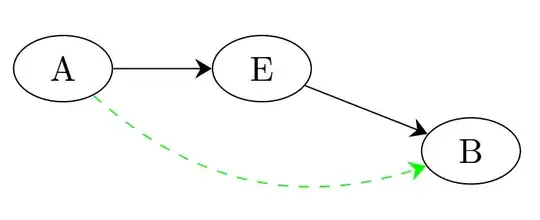
here a solution with PDFLatex (I don't use Context, but it's the same).
\documentclass{article}
\usepackage{tikz}
\usetikzlibrary{positioning,fit,shapes,calc,arrows.meta,decorations.markings}

\tikzset{
  arr/.style = { -{Stealth[width=2mm]} },
  garr/.style = {arr, dashed,green},
  cflow/.style={draw=black,ellipse,text centered,minimum width=1cm}
}
\begin{document}
%\starttext
\begin{tikzpicture}
    \node[cflow] (A) {A};
    \node[cflow,right=of A] (E) {E};
    \node[cflow,below right=.35cm and 1.4cm of E] (B) {B};

    \path[arr]
      (A) edge (E)
      (E) edge (B);
    \path[garr]
      (A) edge[bend right] (B);
\end{tikzpicture}
%\stoptext

\end{document}
Translated with www.DeepL.com/Translator


draw=greenwhen justgreensuffices. – flyx Nov 30 '18 at 12:42TikZ, so the extraordinary thing would be to not forget anything:-) – AndréC Nov 30 '18 at 12:50