2

An example in 3d-plot.pdf

\documentclass[12pt,pstricks,border=5pt]{standalone}

\usepackage{pst-3dplot}
\begin{document}

\begin{pspicture}(-5,-3)(4,6)
\psset{Beta=60}
\pstThreeDCoor[zMax=9]
\psCylinder[RotX=10,increment=5]{3}{5}
\pstThreeDLine[linecolor=red](0,0,0)(0,0,8.5)
\end{pspicture}
\end{document} 

It produces:

enter image description here

An example of Asymptote:

enter image description here

Question:

Can PStricks do it? ... !

  • 2
    These interactive 3D objects are Adobe PRC files that only Asymptote (as an open-source software) is able to write. They are embedded into PDF using the media9 LaTeX package under the hood. Only Acrobat (Reader) is currently able to render them as embedded objects in a PDF file. – AlexG Dec 17 '18 at 16:10
  • @AlexG I like more PStricks than and hope in the future, these interactive 3D will be embedded into PStricks..... Because Asymptote is too difficult that I can not understand it. Sob. –  Dec 17 '18 at 16:19
  • This is unlikely to happen, I am afraid. PRC is a binary format, which is difficult to write from within Postscript. – AlexG Dec 17 '18 at 16:24
  • what exactly do you mean with "Can PStricks do it"? . 3D objects in central projection or the style of such figures? –  Dec 17 '18 at 16:29
  • @AlexG The news came as a complete shock........ –  Dec 17 '18 at 16:31
  • 1
    @herbert : I guess OP means interactivity. – AlexG Dec 17 '18 at 16:32
  • @AlexG yes, interactivity is the biggest thing compare to rotate in three-dimension... –  Dec 17 '18 at 16:39
  • 1
    Rotating as a 3d Object (as Aleander already mentioned) is not possible, but as a simple animation rotation it s no problem. –  Dec 17 '18 at 16:40
  • @herbert I am going to prepare one. – AlexG Dec 17 '18 at 16:41
  • @Herbert " but as a simple animation rotation it s no problem ". Can you show it for me, please! –  Dec 17 '18 at 16:42
  • Gradient shading with Asymptote is really awesome. Unfortunately, it cannot be reproduced with PSTricks. – Display Name Dec 17 '18 at 17:00
  • 1
    @chishimotoji: run texdoc animate (the package from Alexander) or see http://tug.org/PSTricks/main.cgi?file=Animation/gif/gif –  Dec 17 '18 at 17:20

1 Answers1

3

These interactive 3D objects are Adobe PRC files that only Asymptote (as an open-source software) is able to write. They are embedded into PDF using the media9 LaTeX package under the hood. Only Acrobat (Reader) is currently able to render them as embedded objects in a PDF file.

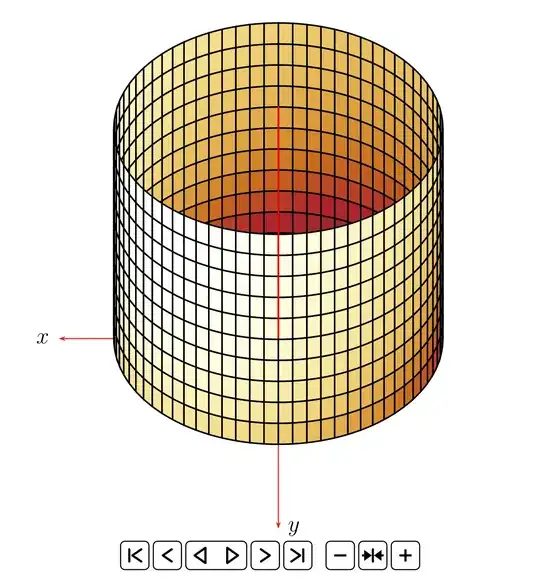
As PRC is a binary format, it is difficult to write it from within a PostScript program. With PSTricks, it is possible to prepare frame-based animations as standalone (GIF, SVG) files or embedded into PDF.

Click on the image to load the animated SVG. Chrome, Chromium or other Blink-based browser required, as Firefox is too slow:
%\documentclass[12pt,border=5pt]{standalone}   % PDF animation in A-Reader
%\documentclass[12pt,pstricks,border=5pt,export]{standalone}  % for export to animated GIF
\documentclass[dvisvgm]{article} %animated SVG
\usepackage{animate}
\pagestyle{empty}

\usepackage{pst-3dplot}

\begin{document}
\frame{\begin{animateinline}[controls]{24}
  \multiframe{72}{iAng=0+5}{
    \begin{pspicture}(-4.9,-3.6)(4.6,6)
    \psset{Alpha=\iAng,Beta=60}
    \pstThreeDCoor[zMax=9]
    \psCylinder[RotX=10,increment=5]{3}{5}
    \pstThreeDLine[linecolor=red](0,0,0)(0,0,8.5)
    \end{pspicture}
  }
\end{animateinline}}

\end{document}
AlexG
  • 54,894
  • What do you mean with consecutive? – AlexG Dec 17 '18 at 17:33
  • use the correct button! –  Dec 17 '18 at 17:38
  • Sorry, I misunderstood of gif. I want it seems gif INTO PDF. How to do that? –  Dec 17 '18 at 17:41
  • 1
    Uncomment 1st line, comment out the 3rd. But is not GIF, it is better ;-). But you need A-Reader to view the PDF. – AlexG Dec 17 '18 at 17:43
  • Hi, can your answer be used \multido to replace \multiframe ? If it works , please give me its code! –  Dec 20 '18 at 04:15
  • What do you want to achieve by replacing multiframe? – AlexG Dec 20 '18 at 08:24
  • I saw many simple examples without animateinline environment and animate package. They only use \multido or \foreach and the code works fine. So, I want to know in your answer, can we? –  Dec 20 '18 at 08:33
  • You wil not get an animation then. Only a PDF with many pages. – AlexG Dec 20 '18 at 09:09
  • Wow, I see ah. I understood. –  Dec 20 '18 at 09:19
  • The same result (multipage PDF) you will get if you comment out the third code line and enable the second one with the export option. If you want an animated GIF, you have to convert the multipage PDF, e. g. with ImageMagick convert. See here. – AlexG Dec 20 '18 at 09:54