6

I am new in LaTeX. In tabular, we generally use & for partition. I want to create a .sty for tabular environment. Replace & with comma delimiter, in this case comma should be work as & like in tabular command.

In .tex file, input is a,b,c and output should look like |a|b|c|

limlian
  • 151
  • 5
    I strongly recommend not to do that, because it is extremely complicated. Firstly you have to understand the definition of tabular in latex.ltx. That is a real problem. –  Mar 04 '19 at 14:53
  • 4
    I do not which use you would do of this convention, but how would you fiddle with cells that should contain commas? If it is for special types of tabulars, you might want to take a look at the csvsimple package, or the more powerful datatool. – Bernard Mar 04 '19 at 15:00
  • 1
    @Bernard Can't you say the same about the default syntax: how would you fiddle with cells that should contain &s? Ultimately it depends on the nature of the data whether commas or ampersands are more common in the cells. (I'm not recommending trying to achieve the OP's goal in LaTeX -- my preference would be to run a preprocessor on the comma-separated data to produce valid LaTeX syntax -- just pointing out that the LaTeX syntax just happens to be what Knuth/Lamport decided to adopt for their use-cases, and isn't objectively better for all applications.) – ShreevatsaR Mar 04 '19 at 18:16
  • You have to escape the ampersand to print it (\&)whereas for the comma you can't . Also, using a comma is certainly mor commen (for instance if a cell contains a list, or the decimal comma for numeric values – not all countries use a dot for that. – Bernard Mar 04 '19 at 18:47
  • 1
    @Bernard There is no intrinsic difference between \& and ,except that the former happens to have an appropriate definition in LaTeX by default, and the latter doesn't (and would have to be redefined after finding a new name for what is currently,). And yes, commas may indeed be more common in many/most "typical" applications, but we don't know what's more common in the OP's application. Question is whether to bend the tool for the sake of our task or vice-versa… IMO the only reason for preferring&` here is because LaTeX is more suited for it, not anything intrinsic to the syntax. – ShreevatsaR Mar 04 '19 at 22:07
  • This is a beginners question. Better ask for the code of a tabular and describe, what you have to use, which data and where you don't know how to move on. Here, in your question, you as a beginner a kind of »solved« that first question, at the cost of needing commas, which leads to sophisticated code that might break later in your work at an unexpected point. Keep it simple, LaTeX usually can offer a solution, that already exists! – Keks Dose Mar 05 '19 at 13:57
  • 1
    Hey, I also thought about that when I wanted to include my results.csv into the LaTeX report. However, I realised it was easier to export to CSV using & as a delimiter. For example, if using pandas, you can do dataframe.to_csv('results.csv', sep='&', line_terminator='\\\\\n') – Ciprian Tomoiagă Mar 05 '19 at 14:02

3 Answers3

12

Proof of concept. Use at your own risk!

The basic approach is to change \catcode of the character you want to use as “alignment tab”. Here's a mytabular environment which does that:

\documentclass{article}

\usepackage{xparse}

\ExplSyntaxOn
\NewDocumentEnvironment {mytabular} { O{\,} }
  {
    \char_set_catcode_other:N \&
    \char_set_catcode_alignment:n {`#1}
    \begin{tabular}
  }
  {
    \end{tabular}
  }
\ExplSyntaxOff

\begin{document}
\pagestyle{empty}

\begin{mytabular}{l|r}
  a , b & c \\
  c , d \\
\end{mytabular}

\begin{mytabular}[@]{l|r}
  a @ b \\
  c @ d, & e \\
\end{mytabular}

\end{document}

enter image description here

The optional argument lets you choose which character is used as alignment tab. No verification whatsoever is done to see if the character you passed is valid. If you don't pass a character, a comma is used. The & behaves as a normal character.

However, as other already warned you, this is not the best idea. Packages that rely on & being an alignment tab will break.

  • @limlian TeX doesn't allow you more than 9 parameters. You'd have to find another way around to use 12. But in your example you used only 6 parameter (non consecutive). But I think that 12 is far from user friendly and I would suggest another approach, if you specified your use case. However, try the code I proposed with \begin{mytabular}{|c|c|c|} a, b, c \\ x, y, z \\ \end{mytabular}. It seem to do as you want. – Phelype Oleinik Mar 05 '19 at 12:09
  • @limlian Please, add to your question, not to comments to an answer. But I believe that a new question, with better specification of your problem is what you should do. – egreg Mar 05 '19 at 12:17
11

As Bernard suggested, why don't use csvsimple?

If you have commas in your cells, just put the contents within curly brackets.

If you have & in your cells, just write \&.

\documentclass{article}
\usepackage{filecontents}
\usepackage{csvsimple}

\begin{document}

\begin{filecontents*}{mydata.csv}
a,b,c
\end{filecontents*}
\csvreader[
  tabular=|c|c|c|,
  nohead
 ]{mydata.csv}% filename
{}{\csvcoli & \csvcolii & \csvcoliii}

\vspace{3ex}
and if you have commas or \& in your cells:
\vspace{3ex}

\begin{filecontents*}{mydata.csv}
a,b,c
{c, d},{e, f, g},{h, i, j, k}
l \& m,{n \& o, p},q \& r \& s \& t
\end{filecontents*}
\csvreader[
  tabular=|c|c|c|,
  nohead
 ]{mydata.csv}% filename
{}{\csvcoli & \csvcolii & \csvcoliii}

\end{document}
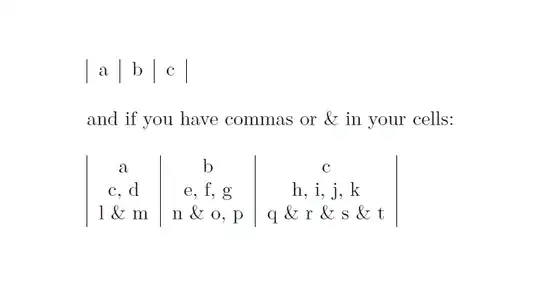
enter image description here

CarLaTeX
  • 62,716
7

You can use the spalign package (documentation here), which includes \spaligntabular that acts exactly like tabular, except it uses both space and comma as the align character & and semicolon as the the end-of-row control sequence \\:

\documentclass[12pt]{report}
\usepackage{spalign}

\begin{document}

\spaligntabular{lcr}{a b c; aa bb cc}

\spaligntabular{|c|c|c}{a,b,c}

\end{document}

It produces this:

spaligntabular example

and

spaligntabular example 2

The spalign package also includes similar commands, such as \spalignmat for a matrix and \spalignarray for a generic array.

There are options to use different characters instead of or in addition to space, comma, and semicolon (see the documentation).

By the way, if you need to include a comma, space, or semicolon in your table, just enclose it in braces {}.

JasonV
  • 143