I've caught wind of a trick for trimming/cropping images in LaTeX. I know I can use the trim or viewport option of includegraphics to crop an image as described here and here. Determining what coordinates to use with trim is very time consuming though. This answer mentions the overpic package and suggests its grid can help with determining coordinates. I've gotten this to work wonderfully with Tikz by setting the overpic units to 1mm (Tikz defaults to 1cm I think), but I can't get it to work with a resized image:
\documentclass{beamer}
    \usepackage[abs]{overpic}
    \usepackage{graphicx}
    \title{Zoomed Image}
\begin{document}

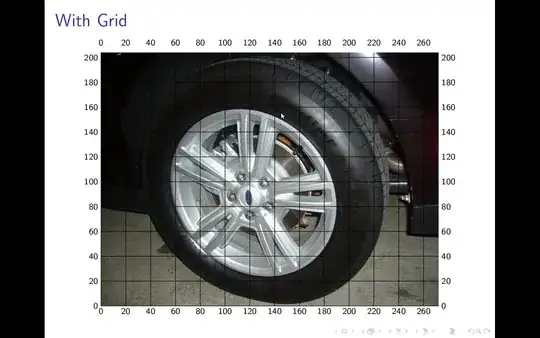
\begin{frame}{With Grid}
    \begin{center}
        \begin{overpic}[height=0.75\paperheight,grid,unit=1bp,tics=20]{standardWheel}
        \end{overpic}
    \end{center}
\end{frame}

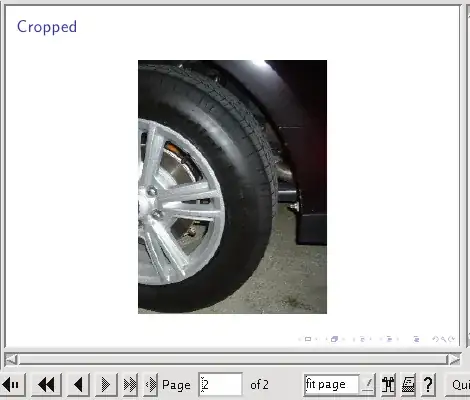
\begin{frame}{Cropped}
    \begin{center}
        \includegraphics[trim=120 0 0 0,clip,height=0.75\paperheight]{standardWheel}
    \end{center}
\end{frame}

\end{document}
I set the units of overpic to be one big point (the default units for includegraphics according to this) but it's clear that the grid numbers don't match the crop numbers - according to the grid, trimming 120 off the left side should remove half the wheel. It barely removes anything from the left side. I read online somewhere that this probably doesn't work because I resized the image with height=0.75\paperheight, but it's hard to figure out without resizing because this image is huge. Does anyone know how to get the grid numbers to match the trim numbers for a resized image (I've resized both images the same way).

EDIT:
This post on LaTeX community shows that it works well if no resizing is done, but warns that resizing renders it useless.
As a side note, I'm compiling with pdflatex, which reports that it is
pdfTeX using libpoppler 3.141592-1.40.3-2.2 (Web2C 7.5.6)
and I unfortunately am not able to perform installations/updates on this machine.



\makeatletterand\makeatother. – aeroNotAuto Mar 20 '12 at 04:08