1

When I compile the following code in XeLaTeX (also works with pdflatex) under windows, [containsverbatim] shows up in the ouput:

Ouput

Here is the code:

\documentclass{book} 
\usepackage{showexpl} 
\usepackage[frenchb]{babel}
\usepackage[T1]{fontenc}
\usepackage[top=5cm, bottom=5cm, left=6cm, right=3cm]{geometry}

\lstloadlanguages{[LaTeX]Tex} 
\lstset{% 
     basicstyle=\ttfamily\small, 
     commentstyle=\itshape\ttfamily\small, 
     showspaces=false, 
     showstringspaces=false, 
     breaklines=true, 
     breakautoindent=true, 
     captionpos=t 
} 

\begin{document}

\begin{frame}[containsverbatim] %Problem here

\begin{LTXexample} 

\chapter{Good buy}
\section{haha}
lorem ipsum dolor si amet...lorem ipsum dolor si amet...lorem ipsum dolor si amet...lorem ipsum dolor si amet...lorem ipsum dolor si amet...lorem ipsum dolor si amet...
\end{LTXexample}

\end{frame}

\end{document}

When I don't add [containsverbatim] it still works, but it leaves an annoying dot: Output 2
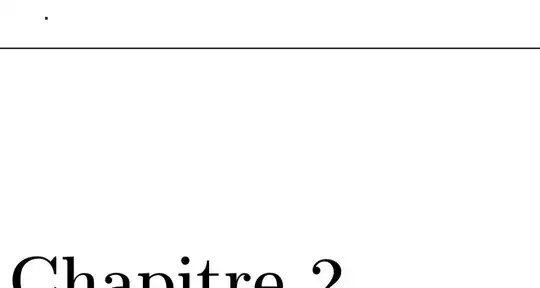
I'm surely doing something wrong here, so I appreciate any help.

Raphael
  • 245
  • 1
    The frame environment is proper of beamer, not of book (where \frame does a very different thing). There's no mention of containsverbatim in the beamer manual, though. – egreg Mar 18 '12 at 14:46
  • Isn't that what \usepackage{showexpl} suppose to do? – yannisl Mar 18 '12 at 14:50
  • @egreg containsverbatim is I think an old option for beamer: it's there in the code, but fragile is the supported option name. – Joseph Wright Mar 18 '12 at 14:55

1 Answers1

4

The containsverbatim "option" to frame is something used in beamer which you are not using. Also, the frame environment is an inherited construct (actually a regular macro) within LaTeX, hence the fact that there is no error when using it.

If you wish to frame the entire LTXexample output, you should use the framed or mdframed packages that respectively provide the framed and mdframed environments.

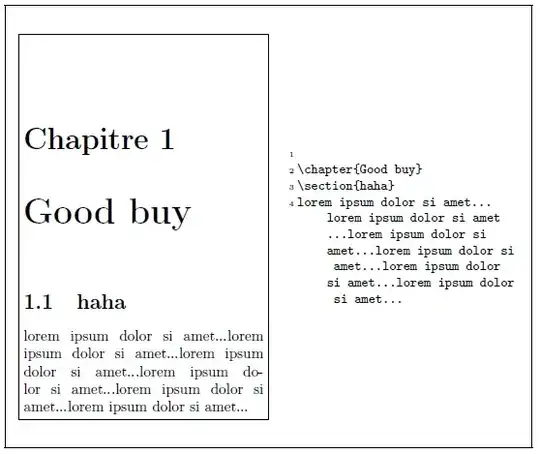
Here's an MWE showcasing the use of the former (framed) package:

enter image description here

\documentclass{book}
\usepackage{showexpl}% http://ctan.org/pkg/showexpl
\usepackage[frenchb]{babel}% http://ctan.org/pkg/babel
\usepackage[T1]{fontenc}% http://ctan.org/pkg/fontenc
\usepackage[top=5cm, bottom=5cm, left=6cm, right=3cm]{geometry}% http://ctan.org/pkg/geometry
\usepackage{framed}% http://ctan.org/pkg/geometry

\lstloadlanguages{[LaTeX]Tex} 
\lstset{% 
     basicstyle=\ttfamily\small, 
     commentstyle=\itshape\ttfamily\small, 
     showspaces=false, 
     showstringspaces=false, 
     breaklines=true, 
     breakautoindent=true, 
     captionpos=t 
} 

\begin{document}

\begin{framed}

\begin{LTXexample} 

\chapter{Good buy}
\section{haha}
lorem ipsum dolor si amet...lorem ipsum dolor si amet...lorem ipsum dolor si amet...lorem ipsum dolor si amet...lorem ipsum dolor si amet...lorem ipsum dolor si amet...
\end{LTXexample}

\end{framed}

\end{document}
Werner
  • 603,163
  • Thanks for very quick response (and for explaining), works perfectly. – Raphael Mar 18 '12 at 15:02
  • I have a little side question... Is it possible with showexpl to only show the output without the code displaying? – Raphael Mar 19 '12 at 02:45
  • @bobicool: You don't need showexpl to only show the output. LaTeX creates the output by default. Otherwise please explain your intent. – Werner Mar 25 '12 at 21:23
  • Well, I posted another question related to what I asked you: http://tex.stackexchange.com/questions/49245/show-output-of-a-full-latex-document maybe you can help me there? Since no has completely answered my question. – Raphael Mar 26 '12 at 00:02