5

Vertical spacing is killing me lately. First I had to learn how to get rid of automatically-generated vertical-spacing after center environment because it was off (\partopsep+\topsep), then I had to learn how to get rid of automatically-generated vertical-spacing after equation or \[\] environments (set belowdisplayskip and belowdisplayshortskip to 0) because it was off. Now I have difficulties with positioning line of text EVENLY between two horizontal lines drawn with tikz. This is crazy! (could it be more simple, like HTML?)

So I am counting on you to help me out with this.

\documentclass[border=5mm,varwidth=150mm]{standalone}

\usepackage{tikz}

\begin{document}

  \begin{tikzpicture}
    \path[draw](0,0)--(\textwidth,0);
  \end{tikzpicture}\\

  hello\\

  \begin{tikzpicture}
    \path[draw=red](0,0)--(\textwidth,0);
  \end{tikzpicture}

\end{document}`
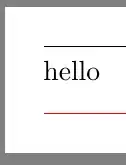
Obviously, the text should be slightly lower.

bp2017
  • 3,756
  • 1
  • 13
  • 33
  • 1
    The baselines are evenly spaced. You need to decide where you want things relative to the baselines. – John Kormylo May 04 '19 at 03:31
  • 1
    Speaking of your vertical spacing questions, it's not clear to me that you need to be going to all of your trouble. What is it that you are trying to do? Your examples haven't been very clear, and seem suggest an XY problem to me. At the least, we should figure out how to appropriately use the existing environments and see what that vertical spacing would be. Then we can figure out why TeX doesn't have the vertical spacing you'd like. – Teepeemm May 04 '19 at 13:19
  • But it's not clear (at least to me) that you need to do the things you say you need to do. Could you show us a simplified example that has the improper spacing? I suppose I could conceive of a situation where I might want to do the things you are trying to do, but I could also see it being possible that you are getting bad spacing because you're misusing some commands. – Teepeemm May 04 '19 at 21:39

5 Answers5

4

You shouldn't use \\ to end a paragraph and the arguably simplest way is to do everything with TikZ.

\documentclass[border=5mm,varwidth=150mm]{standalone}
\usepackage{tikz}
\newcounter{bpnode}
\tikzset{every node/.append style={/utils/exec=\stepcounter{bpnode},
alias=bpnode-\number\value{bpnode}}}
\begin{document}
  \begin{tikzpicture}    
    \node[outer sep=0pt,inner sep=0pt,text width=\textwidth,align=left] (txt) 
    {hello hello hello hello hello hello hello hello hello
    hello hello hello hello hello hello hello hello hello
    hello hello hello hello hello hello hello hello hello};
    \path[draw]([yshift=1em]txt.north west)--++(\textwidth,0);
    \path[draw=red]([yshift=-1em]txt.south west)--++(\textwidth,0);
    %\draw (bpnode-1) -- ++ (2,0);
    \typeout{\the\textwidth}
  \end{tikzpicture}
\end{document}

enter image description here

Here is a "quick and dirty" proposal using the baseline key.

\documentclass[border=5mm,varwidth=150mm]{standalone}

\usepackage{tikz}

\begin{document}

\begin{tikzpicture}[baseline=-0.6ex]
 \path[draw](0,0)--(\textwidth,0);
\end{tikzpicture}\par
\noindent%
hello\par
\noindent%
\begin{tikzpicture}[baseline=-0.6ex]
 \path[draw=red](0,0)--(\textwidth,0);
\end{tikzpicture}

\end{document}

enter image description here

  • 1
    @bp2017 One should use \par to end a paragraph. \ is for tables and the like. If you absolutely do not want to use tikz here, any stable solutions that I can think of will be rather involved. If you want a quick and dirty solution instead, just tune the baseline key of the tikzpictures you use to draw the lines. I'll be happy to spell this out once I am sitting in front of a computer, not just the iPad. –  May 04 '19 at 02:31
  • 1
    @bp2017 I added a quick and dirty proposal. I do not understand the point about naming. You could just add a counter and use it in order to make the node names unique. This can be automatized, of course. –  May 04 '19 at 03:31
  • 1
  • 1
    @bp2017 I don't, that's why it is quick and dirty, and not failsafe. I added a version that automatically numbers the nodes. –  May 04 '19 at 05:53
  • the question is not should you use \\ to end a paragraph, as \\ does not end the paragraph and using it at the end is wrong (and messes up the vertical spacing in the document by adding a spurious white line of text (marked with an underfull hbox warning in the log) – David Carlisle May 04 '19 at 08:03
2

This uses a \parbox and \vfill. The baselines are ignored in this case, since the baseline of the \parbox is more than \baselineskip from either above or below, so instead LaTeX adds a gap of \lineskip (1pt). Inside the \parbox, the \vfills expand to the same size. The same effect is achieved by using [c] instead of [s] and \vfill, but I wanted to show how it was done.

\documentclass[border=5mm,varwidth=150mm]{standalone}
\usepackage{tikz}
\begin{document}

  \noindent\begin{tikzpicture}
    \path[draw](0,0)--(\textwidth,0);
  \end{tikzpicture}\\
  \parbox[c][3\baselineskip][s]{\textwidth}{\vfill
  hello
  \vfill}\\
  \begin{tikzpicture}
    \path[draw=red](0,0)--(\textwidth,0);
  \end{tikzpicture}

\end{document}

This uses \raisebox to move the text relative to the baseline. The \rule shows where the baseline is located.

\documentclass[border=5mm,varwidth=150mm]{standalone}
\usepackage{tikz}
\begin{document}

  \begin{tikzpicture}
    \path[draw](0,0)--(\textwidth,0);
  \end{tikzpicture}\\
  \raisebox{\dimexpr 0.5\depth-0.5\height}{Hellow}
  \rule{1em}{0.5pt}
  \raisebox{\dimexpr 0.5\depth-0.5\height}{pygmy}\\
  \begin{tikzpicture}
    \path[draw=red](0,0)--(\textwidth,0);
  \end{tikzpicture}

\end{document}

demo

John Kormylo
  • 79,712
  • 3
  • 50
  • 120
2

Using TikZ, I would put the text in a node of the desired width, then use the node anchors do draw the lines.

\documentclass[border=5mm,varwidth=150mm]{standalone}
\usepackage{tikz}
\begin{document}
\begin{tikzpicture}
\node(a)[minimum width=\linewidth,text width=\linewidth]{hello};
\draw(a.north west)--(a.north east);
\draw[red](a.south west)--(a.south east);
\end{tikzpicture}
\end{document}

enter image description here

Here's a non-TikZ answer just to show another approach.

\documentclass[border=5mm,varwidth=150mm]{standalone}
\usepackage{booktabs}
\usepackage{colortbl}
\usepackage{tabularx}
\begin{document}
\begin{tabularx}{\linewidth}{@{}l@{}}
\midrule
hello\\
\arrayrulecolor{red}\midrule
\end{tabularx}
\end{document}

enter image description here

erik
  • 12,673
1

Why use TikZ at all?

\documentclass{article}

\usepackage{xcolor}

\begin{document}

\hrule
\vspace{1ex}
\noindent
hello
\vspace{1ex}
{\color{red}\hrule}

\end{document}`

MWE output

As mentioned by others, if you really want to use TikZ you should put the text in a node.


If you want to use this a lot in your document you should of course make it a macro:

\documentclass{article}

\usepackage{xparse}
\usepackage{tikz}

\NewDocumentCommand\mymacro{O{.5\baselineskip} O{.25\baselineskip} +m o O{red}}{%
    \vspace{#2}%
    {\IfValueT{#4}{\color{#4}}\hrule}%
    \vspace{#1}%
    \noindent #3%
    \vspace{#1}%
    {\color{#5}\hrule}%
    \vspace{#2}%
}

\NewDocumentCommand\mytikzmacro{O{.5\baselineskip} O{.25\baselineskip} +m O{} O{}}{%
    \par\noindent
    \begin{tikzpicture} [line cap=butt]
        \node [outer sep=0pt, inner sep=0pt, inner ysep=#1, text width=\textwidth-.4pt] (txt) {#3};
        \draw [#4] (txt.north west) -- (txt.north east);
        \draw [red, #5] (txt.south west) -- (txt.south east);
        \clip ([yshift=-#2] current bounding box.south west) rectangle ([yshift=#2] current bounding box.north east);
    \end{tikzpicture}%
}

\begin{document}

\mymacro{Hello World!}

\mytikzmacro{Adieu World!}

\end{document}

macro MWE output


If what you are trying to do is just putting some frames around text, you might also want to have a look at packages designed for that purpose, like mdframed or tcolorbox.

schtandard
  • 14,892
  • By the way, how do you remove (in your example) vspace between bottom red line of "Hello World!" and top black line of "Adieu World!"? – bp2017 May 04 '19 at 15:43
  • One has to be a bit careful with \hrule, yes. Depending on the contexts in which you want to use this, you may be better off using a macro that's a bit tamer. (Actually, one has to think about these things with other approaches as well (though \hrule is "extra special"). Depending on the environments in which this is to be used, the TikZ solution or one of the packages mentioned may be better. The advantage of \hrule is that it removes interline space, which would have to be taken care of additionally with \rule. – schtandard May 05 '19 at 00:00
  • You can remove the space above the black and below the red line by setting the second argument of the macros to 0pt. If you never want any space there, you can remove it (and the corresponding lines in the macro definition) entirely. – schtandard May 05 '19 at 00:01
0

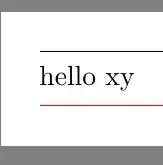
Check this out.

\documentclass[border=5mm,varwidth=150mm]{standalone}

\usepackage{tikz}

\begin{document}

  \begin{tikzpicture}
    \path[draw](0,0)--(\textwidth,0);
  \end{tikzpicture}

  \nointerlineskip\vspace{5pt}
  hello xy % or use \par to replace following blank line

  \nointerlineskip\vspace{5pt}
  \begin{tikzpicture}
    \path[draw=red](0,0)--(\textwidth,0);
  \end{tikzpicture}

\end{document}

bp2017
  • 3,756
  • 1
  • 13
  • 33
  • 1
    in almost all documents you need even line spacing, \nointerlineskip here will break that, meaning that the descender on the y affects the position of following items, is that really what you want? – David Carlisle May 04 '19 at 08:05
  • you didn't answer what you want to happen, or what you mean by evenly spaced. you have a rule above and a rule below hello do you want the same space from the rule to the top of the h and from the bottom of the h to the rule, if so if you add xy do you want the bottom rule to move down so the space from the bottom of the y to the rule matches (that seems to be what you do here, but is unusual requirement) similarly if you change the text to Hello do you want it all to move down so the gap is measured from the rule to the top of the H, again that would be an unusual requirement. – David Carlisle May 04 '19 at 16:35