3

I am using the XCharter OTF font with XeLaTeX and I want a pointy oldstyle numeral 1, whereas what I get with my MWE below is something that looks like I.

\documentclass{minimal}
\usepackage{fontspec}
\setmainfont[Numbers=OldStyle]{XCharter}
\begin{document}
This is the oldstyle numeral 1.

This is the lining numeral $1$.

But how do I get the oldstyle version that looks like a reduced lining numeral in XeLaTeX?
\end{document}

There is a similar question here but I do not use Lua and would like to know how to invoke the equivalent of \useosfin the XCharter package, but for XeLaTeX.

chandra
  • 3,084
  • The font contains a glyph named one.Alt.oldstyle, but it is not available as a stylistic set. – egreg Jul 29 '19 at 10:41

2 Answers2

3

With some help from here, you can access the glyph directly using:

\XeTeXglyph\the\XeTeXglyphindex "one.Alt.oldstyle"\relax

The glyph index was found using:

otfinfo -g XCharter-Roman.otf | grep one

MWE

Edit: Don't make 1 active as it can easily cause problems. See comments from @UlrikeFischer below

Edit 2: Support enumerate environment with the enumitem package.

\documentclass{article}
\usepackage{enumitem}
\usepackage{tikz}
\usepackage{fontspec}
\setmainfont[Numbers=OldStyle, Mapping=onealtoldstyle]{XCharter}
\ExplSyntaxOn
\tl_new:N \l__chandra_counter_tl
\cs_new:Nn \__chandra_one_alt_oldstyle:
  {
    \XeTeXglyph\XeTeXglyphindex "one.Alt.oldstyle"\relax
  }
\cs_new_protected:Nn \__chandra_alt_oldstyle:n
  {
    \tl_set:Nn \l__chandra_counter_tl {#1}
    \tl_replace_all:Nnn \l__chandra_counter_tl { 1 }
      { \__chandra_one_alt_oldstyle: }
    \tl_use:N \l__chandra_counter_tl
  }
\cs_generate_variant:Nn \__chandra_alt_oldstyle:n { x }
\NewDocumentCommand{\OldStyleArabic}{m}
  {
    \__chandra_alt_oldstyle:x {#1}
  }
\NewDocumentCommand{\OneAltOldstyle}{}
  {
    \__chandra_one_alt_oldstyle:
  }
\ExplSyntaxOff
\setlist[enumerate]{label=\OldStyleArabic{\arabic*}}
\begin{document}
This is the oldstyle numeral \OneAltOldstyle.

\begin{enumerate}
  \item Foo
  \item Bar
  \item Baz
\end{enumerate}

This is the lining numeral $1$.

This is \verb|tikz|: \tikz \draw (1, 1) -- (0, 1);
\end{document}
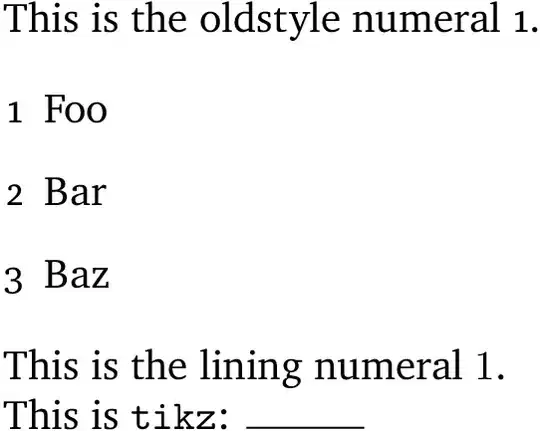
MWE output

David Purton
  • 25,884
  • You don't really suggest to make 1 active don't you? – Ulrike Fischer Jul 29 '19 at 07:19
  • @UlrikeFischer, what should be done instead? – David Purton Jul 29 '19 at 07:20
  • Well not this, try e.g. \tikz\draw(1,1)--(0,1); to get an idea about the problem with your approach. Btw: you don't need the \the, \XeTeXglyph\XeTeXglyphindex "one.Alt.oldstyle"\relax works. – Ulrike Fischer Jul 29 '19 at 07:23
  • @UlrikeFischer, that was just copied from your answer ;). So is the best option for the OP just to use a macro? – David Purton Jul 29 '19 at 07:25
  • Uff the \the not the active 1 is from my answer - you gave quite a shock ;-). Probably only a macro will work, the only other alternative I can think of with xelatex would be to try to create a teckit mapping, but I don't know if it could access the alternative glyph. – Ulrike Fischer Jul 29 '19 at 07:33
  • @UlrikeFischer OK, thanks! A TECkit mapping might be above my pay grade. I'll modify my answer. But maybe I will try and learn. – David Purton Jul 29 '19 at 07:40
  • Could I use this solution in an enumerate list with arabic numerals? If so, how? Alternatively, is there a way to define the alternative one as the glyph to be used in a package like enumitem? – chandra Jul 29 '19 at 09:16
  • @chandra good question! I'll think some more – David Purton Jul 29 '19 at 09:18
  • @chandra, I had a go at supporting the enumitem package using some expl3 code. – David Purton Jul 29 '19 at 14:25
  • 1
    @David Purton: Thank you for that "heroic" code, which works, but is beyond me. I also just realized that I had left out section and page numbers: the tedium multiplies trying to fix these. I have instead written to the package author who has told me that access to the pointy one in XeLaTeX will be available on the next update to xcharter. – chandra Jul 31 '19 at 08:40
  • @chandra, that is a much better solution – David Purton Jul 31 '19 at 13:01
1

Now that the package is updated it is possible to achieve this without heroic code by copying code from the very last page of the XCharter documentation. The MWE then becomes

\documentclass{minimal}
\usepackage{fontspec}
\setmainfont[CharacterVariant={1:0}, Numbers=OldStyle]{XCharter}
\begin{document}
This is the oldstyle numeral 1.

This is the lining numeral $1$.
\end{document}
Fredrik P
  • 1,386