Another option would be the new tabularray package (CTAN). It has the command \SetRow which you can use to modify all properties of the current row, including color. Using that, vertical lines appear correct with Adobe Acrobat Reader.
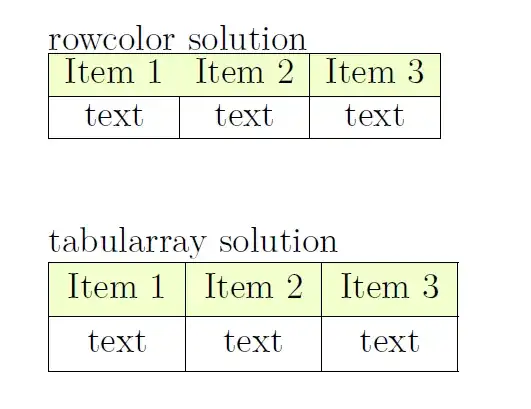
\documentclass[12pt]{amsart}
\usepackage{amsmath,amsthm,amssymb,amsxtra,amsopn}
\usepackage{xcolor}
\usepackage{colortbl}
\usepackage{etoolbox}
\usepackage{tabularray}
\begin{document}
    rowcolor solution
\begin{tabular}{|c|c|c|}
    \hline
    \rowcolor{lime!20}Item 1 & Item 2 & Item 3 \\
    \hline
    text & text & text\\
    \hline
\end{tabular}
\vspace{1cm}

tabularray solution

\begin{tblr}{|c|c|c|}
    \hline
    \SetRow{lime!20} Item 1 & Item 2 & Item 3 \\
    \hline
    text & text & text\\
    \hline
\end{tblr}

\end{document}
Note: The package has different (better) default spacing, which you can modify with the rowsep and colsep keys as you like.
Edit: I don't exactly know what causes it, but the vertical and horizontal lines are the not all the same width for the colored cells with the colortbl solution. It seems as if the tabularray "encoding" is superior, since it does not cause any artifacts no matter the zoom level.
As Zarko pointed out in his comment, the tabularray package also supports a very nice key-value interface for formatting.
\begin{tblr}{
        hlines, vlines, cells = {c},
        row{1} = {bg=lime!20},
    }
    Item 1 & Item 2 & Item 3 \\
    text   & text   & text   \\
\end{tblr}


tikzmatrix or alternatively thecalspackage. – leandriis Aug 11 '19 at 07:58calspackage? – user149418 Aug 11 '19 at 23:15