0

I want to write/draw the attached image in latex:enter image description here

The text length can vary. I need the text "tikz4" in the specified arm of the bent arrow. I tried using math environment and \Ldsh command for the bent arrow but could not succeed. Any help would be appreciated.

  • 1
    This link could be useful for your request: https://tex.stackexchange.com/questions/3892/how-do-you-draw-the-snake-arrow-for-the-connecting-homomorphism-in-the-snake-l – Sebastiano Sep 13 '19 at 07:51
  • 3
    I'm voting to close this question as off-topic because this is a just-do-it-for-me class of question. And -1 for no effort. – Raaja_is_at_topanswers.xyz Sep 13 '19 at 08:12
  • 1
    Your question leaves all the effort to our community, even typing the essentials of a TeX document such as \documentclass{}...\begin{document} etc. As it is, most of our users will be very reluctant to touch your question, and you are left to the mercy of our procrastination team who are very few in number and very picky about selecting questions. You can improve your question by adding a minimal working example (MWE) that more users can copy/paste onto their systems to work on. If no hero takes the challenge we might have to close your question. – Alessandro Cuttin Sep 13 '19 at 09:44
  • 1
    @Raaja and other close-voters: Please don't downvote below a score of -1, even if the question in its current form needs some improvement. A score of -1 is enough to show that the question needs work, anything below that is of no use. Also, if you downvote or vote to close, please leave a comment explaining why you did so, but wait at least 24 hours after asking the OP for improvements to the question before voting to close. – Mensch Sep 13 '19 at 13:09
  • @Mensch I am not sure why you explicitly pointed me in your comment. Nevertheless, the OP is a long-term user here, so the OP should be knowing the way-of-wprking in our site. Moreover, as per our site works, if the OP decides to reply, they can pose an edit in the case that it gets closed. Then we can reopen it. Unless it is a new-user, I really do not see a point in the cool-down time of a day. – Raaja_is_at_topanswers.xyz Sep 13 '19 at 14:05
  • @Mensch Nevertheless, if you wish to keep it open, you can do so by voting for it during the review. – Raaja_is_at_topanswers.xyz Sep 13 '19 at 14:14
  • 2
    @Raaja 10 month and 45 rep is not really a sign for a user very often here. It is possible he forgot or never knows how to ask a good question here. What is the problem to give him a hint and time to correct/improve the question with more informations like an MWE? Close voting after an hour is simply too fast. I thaught we want to be a friendly web site here? Is your closing friendly? – Mensch Sep 13 '19 at 17:57
  • Yes we are friendly site. But that doesn't mean that one can be ignoring to see how the site works. Based on rep we cannot say how well someone is well versed in TeX. The only exception is the new users because they cant be expected to know each and every points of way-of-working of this site. Nevertheless, there is no problem in giving in time to correct it, except the fact that site may have many open-questions which are vague or no info to start with. Moreover, you should not link closing to unfriendliness because it is the form of saying that the question needs improvement. – Raaja_is_at_topanswers.xyz Sep 15 '19 at 06:42

1 Answers1

4

Mine is a humble suggestion: read also the comments of the various users that surely are useful. If you don't want to spend time writing a perfect code I can suggest you to use Matcha. It tool on line give you a possibility to create a fast (but it is not perfect output) to export as TikZ.

\documentclass[a4paper,12pt]{article}
\usepackage{tikz}
\begin{document}
\tikzset{every picture/.style={line width=0.75pt}} %set default line width to 0.75pt        
\begin{tikzpicture}[x=0.75pt,y=0.75pt,yscale=-1,xscale=1]
\draw    (214,92) -- (381.5,91.01) ;
\draw [shift={(383.5,91)}, rotate = 539.66] [color=black][line width=0.75]    (10.93,-3.29) .. controls (6.95,-1.4) and (3.31,-0.3) .. (0,0) .. controls (3.31,0.3) and (6.95,1.4) .. (10.93,3.29)   ;
\draw   (446.5,90) -- (500.5,90) -- (500.5,158.97) ;
\draw    (500.5,158.97) -- (269.5,160.98) ;
\draw [shift={(267.5,161)}, rotate = 359.5] [color=black][line width=0.75]    (10.93,-3.29) .. controls (6.95,-1.4) and (3.31,-0.3) .. (0,0) .. controls (3.31,0.3) and (6.95,1.4) .. (10.93,3.29)   ;
\draw (420,92) node  [align=left] {tikz3};
% Text Node
\draw (295,79) node  [align=left] {tikz2};
% Text Node
\draw (175,92) node  [align=left] {tikz1};
% Text Node
\draw (391,147) node  [align=left] {tikz4};
% Text Node
\draw (230,158) node  [align=left] {tikz5};
\end{tikzpicture}
\end{document}
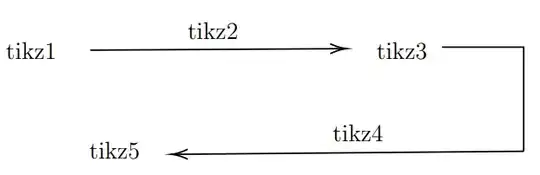
enter image description here

You can draw yourself and modify the coordinates so you can choose to position the text based on your preferences.

Sebastiano
  • 54,118