Well, I would suggest to use \newline after all logical breaks in your long line -- means after all \land and \yLuego.
In this question you can find the definition of a new command \parState like:
% see https://tex.stackexchange.com/questions/384017/how-to-wrap-lines-correctly-inside-algorithmic-more-indentation-for-children-l
\makeatletter % <=======================================================
\newcommand{\algmargin}{\the\ALG@thistlm}
\makeatother
\algnewcommand{\parState}[1]{\State%
    \parbox[t]{\dimexpr\linewidth-\algmargin}{\strut\hangindent=\algorithmicindent \hangafter=1 #1\strut}}
% <=====================================================================
Adding that code to your preamble you can then use the following code
\If{\parState{$c1 \in campos(dameUno(r)) \land %\newline <==========
    c2 \in campos(dameUno(r)) \yLuego %\newline
    dameUno(r)[c1] = dameUno(r)[c2]$}}
to write your longer \If statement. Please see that I commented here the included \newline. Please try first this variant and compile to see the result, then uncomment the \newline commands, compile again and check the changed result. Choose that variant you like more ...
Please see this complete TeX code
\documentclass[11pt, oneside]{article}

\usepackage{showframe} % <==============================================
\usepackage{algorithm,algpseudocode}
\usepackage{ifthen}
\usepackage{caption}
\usepackage{amsmath}
\usepackage{graphicx}
\usepackage{amssymb}

\newcommand{\yLuego}{\land _L}
% see https://tex.stackexchange.com/questions/384017/how-to-wrap-lines-correctly-inside-algorithmic-more-indentation-for-children-l
\makeatletter % <=======================================================
\newcommand{\algmargin}{\the\ALG@thistlm}
\makeatother
\algnewcommand{\parState}[1]{\State%
    \parbox[t]{\dimexpr\linewidth-\algmargin}{\strut\hangindent=\algorithmicindent \hangafter=1 #1\strut}}
% <=====================================================================


\begin{document}
\begin{itemize}
\algrenewtext{EndIf}{\textbf{fi}}

\item $ filtrarPorValor (r, c, v) =$
\begin{algorithmic}
\If{\o?(r)}
    \State \o
\Else
    \If{\parState{$c1 \in campos(dameUno(r)) \land %\newline <==========
        c2 \in campos(dameUno(r)) \yLuego %\newline
        dameUno(r)[c1] = dameUno(r)[c2]$}}
        \State $Ag(dameUno(r), filtrarPorValor(sinUno(r), c, v))$
    \Else
        \State $filtrarPorValor(sinUno(r), c, v)$
    \EndIf
\EndIf
\end{algorithmic}

\end{itemize}
\end{document}
and its result:

After deleting the % in front of the \newlines you get the changed result:
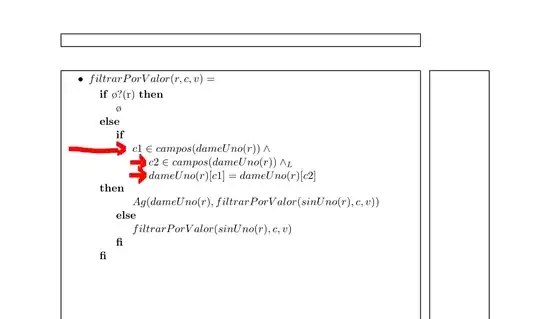
Please see that I used package showframe to visualize the typing area and margin. Delete it for your real work, it is only here for testing purposes ...
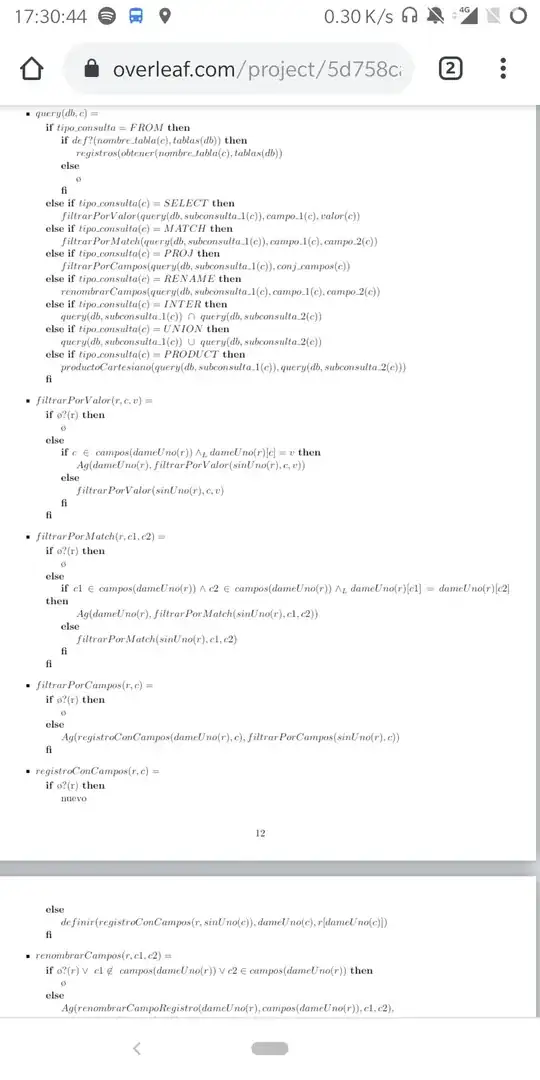


\geometry{a4paper}that, for some reason , just prints the line "a4paper" on the document. That does not happen in the original – Santiago Sep 16 '19 at 14:46\mathit{variable} for typing variable names in math mode, otherwise the innerword spacing is wrong (see e.g the big space indameUno`). – siracusa Sep 16 '19 at 17:29