16

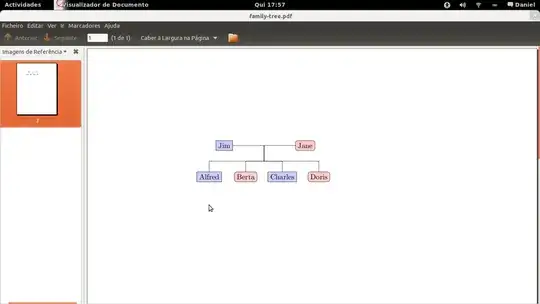
I have this code that outputs a small family tree

    \documentclass{article}
    \usepackage{tikz}
    \usetikzlibrary{trees}
    \begin{document}
    \begin{tikzpicture}[
      man/.style={rectangle,draw,fill=blue!20},
      woman/.style={rectangle,draw,fill=red!20,rounded corners=.8ex},
      grandchild/.style={grow=down,xshift=1em,anchor=west,
        edge from parent path={(\tikzparentnode.south) |- (\tikzchildnode.west)}},
      first/.style={level distance=6ex},
      second/.style={level distance=12ex},
      third/.style={level distance=18ex},
      level 1/.style={sibling distance=5em}]
        % Parents
        \coordinate
          child[grow=left] {node[man,anchor=east]{Jim}}
          child[grow=right] {node[woman,anchor=west]{Jane}}
          child[grow=down,level distance=0ex]
        [edge from parent fork down]
        % Children and grandchildren
        child{node[man] {Alfred}}
        child{node[woman] {Berta}}
        child {node[man] {Charles}}
        child {node[woman]{Doris}};        
    \end{tikzpicture}
    \end{document}

and what I want to do, is to write 2 lines of text in each box (e.g. Jim and underneath his DOB). How do I break a line in order to do that? \\ doesn't work.

Here is a printscreen of the output:
Screenshot

Tobi
  • 56,353
  • Welcome to TeX.sx! Your question was migrated here from [so]. Please register on this site, too, and make sure that both accounts are associated with each other, otherwise you won't be able to comment on or accept answers or edit your question. – Martin Schröder Apr 05 '12 at 19:09

2 Answers2

39

Add align=center to the style if you want to use \\:

enter image description here

Code:

\documentclass{article}
\usepackage{tikz}
\usetikzlibrary{trees}
\begin{document}
\begin{tikzpicture}[
  man/.style={rectangle,draw,fill=blue!20, align=center},
  woman/.style={rectangle,draw,fill=red!20,rounded corners=.8ex, align=center},
  grandchild/.style={grow=down,xshift=1em,anchor=west,
    edge from parent path={(\tikzparentnode.south) |- (\tikzchildnode.west)}},
  first/.style={level distance=6ex},
  second/.style={level distance=12ex},
  third/.style={level distance=18ex},
  level 1/.style={sibling distance=5em}]
    % Parents
    \coordinate
      child[grow=left] {node[man,anchor=east]{Jim}}
      child[grow=right] {node[woman,anchor=west]{Jane}}
      child[grow=down,level distance=0ex]
    [edge from parent fork down]
    % Children and grandchildren
    child{node[man] {Alfred \\ 05-04-83}}
    child{node[woman] {Berta \\ 05-04-99}}
    child {node[man] {Charles \\ 05-04-77}}
    child {node[woman]{Doris \\ 05-04-80}};        
\end{tikzpicture}
\end{document}
Peter Grill
  • 223,288
  • 3
    @DanielNovais: You may apply align=center to all nodes via every node/.style={align=center}. – Tobi Apr 05 '12 at 18:18
3

You could try to use a table (two rows) (tabular env) in the content; though, I have no the required package to check if it would work or that is not allowed. E.g.

  \begin{tabular}{c}
     Jim \\
     DOB \\
  \end{tabular}

If \\ does not work since it was changed someway by the package, then you could try \cr, but I suppose it could not work and if it works, it is bad LaTeX (too much TeXish).

David Carlisle
  • 757,742
  • Thanks, it worked just fine. Yes it is kind of a bummer but it works! –  Apr 05 '12 at 17:27