The very simple answer is that almost all packages you would ever find yourself needing are installed by the full MacTeX, since it installs a full TeX Live distribution. Once you've installed it, there are a couple of ways you can see what has been installed.
Use TeXLive Utility
MacTeX installs the handy TeXLive Utility which is a GUI wrapper for managing your installation. It can be found in the TeX folder installed in Applications. In fact this is probably the first thing you should do after installing a fresh MacTeX anyway, since the installer image is created only once a year. See the following answer for how to use it to update your distribution.
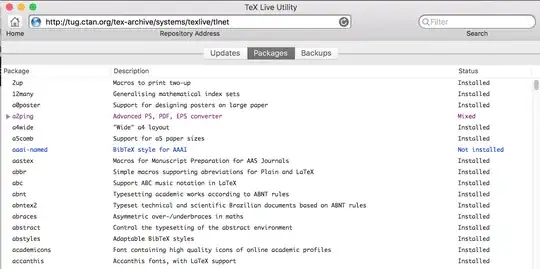
The default panel view when you open the app is the Updates panel, which shows all the packages that have pending updates or have not yet been installed (because they were added to TeX Live after the image was created.) If you choose the Packages panel, you can view a full list of all packages and their current installation status:
Use tlmgr from the Terminal
Alternatively, if you prefer the Terminal, the following command will show you a list of all packages currently installed:
tlmgr info --list --only-installed | less.
The output is long, so I've piped it through the pager less.


tlmgr, you can find the documentation here: https://www.tug.org/texlive/doc/tlmgr.html – DG' Nov 10 '19 at 21:22