In a long equation, I'd like to add a line break such that the equality sign (and only that) on the next line is outdented.
(Quite a typical typesetting I think.) I tried split, but that gives a way too narrow spacing right of the equal sign. align behaves just the same way.
\documentclass{article}

\usepackage{amsmath}

\begin{document}

\begin{equation}
\begin{split}
 &abc\\
=&def\\
 &+ijk
\end{split}
\end{equation}

\end{document}
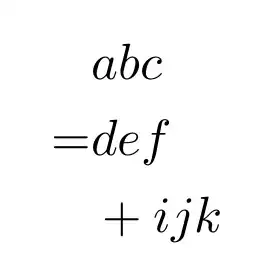 ]1
]1
Perhaps a different alignment/environment should be used here. Any hints?


&=and then&\quad+for the continuation line. – Sigur Jan 28 '20 at 22:23=symbol to the left and have better spacing with={}&rather than just=&. It looks a bit odd to me, though. – Ian Thompson Jan 28 '20 at 22:25&=not=&although as Ian says, you can use={}&if you really want the alignment to the right of the = – David Carlisle Jan 28 '20 at 22:27={}&looks fine indeed, feel free to bump this to an answer. What's a more common way of typesetting those lines though? – Nico Schlömer Jan 28 '20 at 22:29={}&as others suggest. Some alignment options are here: https://tex.stackexchange.com/questions/239252/what-is-the-difference-between-split-multline-align-breqn-for-breakin – rbrignall Jan 28 '20 at 22:37multlined(requiresmathtools) rather thanmultline, as the latter spreads the lines across the full text width. It's possible to "corral" them, but it's a pain. – barbara beeton Jan 28 '20 at 23:20