One part of your requirement straight from the book-- http://mirrors.ibiblio.org/CTAN/graphics/pgf/contrib/tikz-qtree/tikz-qtree-manual.pdf
\documentclass[11pt]{article}
\usepackage{tikz-qtree}

\begin{tikzpicture}
\tikzset{edge from parent/.style=
{draw,
edge from parent path={(\tikzparentnode.south)
-- +(0,-8pt)
-| (\tikzchildnode)}}}
\Tree [.S [.NP [.Det the ] [.N cat ] ]
[.VP [.V sat ]
[.PP [.P on ]
[.NP [.Det the ] [.N mat ] ] ] ] ]
\end{tikzpicture}
\end{document}
EDIT1
Node names can be moved by adding options such as [\edge node[xshift=20pt,yshift=5pt]{$y$};
Here y and pp have been shifted
\begin{tikzpicture}
\tikzset{edge from parent/.style={draw, edge from parent path={(\tikzparentnode.south) -- +(0,-8pt) -| (\tikzchildnode)}}}

\Tree [\edge node[xshift=20pt,yshift=5pt]{$y$}; [.NP [.Det the ] [.N cat ] ]
[.VP [.V sat ]
[\edge node[xshift=30pt,yshift=5pt]{$pp$};  [.P on ]
[.NP [.Det the ] [.N mat ] ] ] ] ]
\end{tikzpicture}

EDIT2
The first part of the requirement has been answered below -- a little adaptation will be required -- this is from the this same site answer on Jan 23, 2019 -- https://tex.stackexchange.com/a/525323/197451

\documentclass[border=5pt]{standalone}
    \usepackage{pgfplots}
    \pgfplotsset{
    % use `compat' level 1.11 or higher so coordinates don't have to be
    % prefixed with `axis cs:' (any more)
    compat=1.11,
    }
    \begin{document}
    \begin{tikzpicture}[
    region/.style={
        draw=black!50,
        dashed,
    },
    Node/.style={
        midway,
        red,
    },
    declare function={
        xmin=0;
        xmax=12;
        ymin=0;
        ymax=300;
    },
    ]
    \begin{axis}[hide axis,
        xlabel={},
        ylabel={},
        xmin=xmin,
        xmax=xmax,
        ymin=ymin,
        ymax=ymax,
        axis background/.style={},
        extra x ticks={},
        extra y ticks={},
        title=title,
        ]
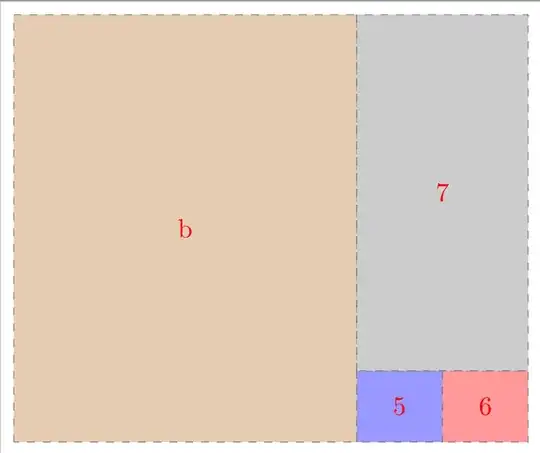
                    \draw [region,fill=brown!40] (xmin,ymin) rectangle (8,ymax)  node [Node, xshift=-55, yshift=-76] {68\%};

        \draw [region,fill=blue!40] (8,ymin)  rectangle (10,50)  node [Node, xshift=-10, yshift=-9] {5\%};
        \draw [region,fill=red!40] (10,ymin)   rectangle (xmax,50)  node [Node, xshift=-10, yshift=-9] {5\%};
        \draw [region,fill=gray!40] (8,50)   rectangle (xmax,ymax) node [Node, xshift=-24, yshift=-64] {22\%};

        \end{axis}
\end{tikzpicture}
\end{document}
After adaptation of the same code the OP can get the following ---