- Use of
\resizebox is very bad idea. With it you lost control on font size (in you case it is not readable. Beter is use smaller font, reduce width of \tabcolsep and write column header in two (or more) lines.
- Unfortunately it is unknown, what is contents of empty cells. I they are numbers you may consider to use
S column type defined in the siunitx package. If not, than can loger text expand table width. in this cas, is beer to use columns with prescribed width, for example p{<width>}.
- More professional look of table you will get if you will remove vertical lines and use rules defined in the
booktabs package (see second example).
- For writing of units is sensible to use units as they are defined in the
siunitx package`.
First example:
\documentclass{elsarticle}
\usepackage{geometry}
\usepackage{makecell}
\renewcommand\theadfont{\bfseries}
\renewcommand\theadgape{}
\usepackage{siunitx}
\usepackage{xparse}
\NewExpandableDocumentCommand\mcc{O{1}m}
    {\multicolumn{#1}{c|}{#2}}

%---------------- show page layout. don't use in a real document!
\usepackage{showframe}
\renewcommand\ShowFrameLinethickness{0.15pt}
\renewcommand*\ShowFrameColor{\color{red}}
%---------------------------------------------------------------%

\begin{document}
    \begin{table}[ht]
     \centering
\caption{Material properties of the PETG and PETG+CF for different designs}
\label{table:3}
    \small
    \setlength\tabcolsep{5pt}
    \setcellgapes{3pt}
    \makegapedcells
    \begin{tabular}{| *{8}{c|} }
    \cline{2-8}
\mcc{}
    & \mcc[5]{\thead{PETG+CF}}
                        &  \mcc[2]{\thead{PETG}}             \\
    \cline{2-8}
\mcc{}
    & \makecell{Un-\\ Notched}
        &   \makecell{Notched\\ (\SI{90}{\degree})}
            &   \makecell{Notched\\ (\SI{0}{\degree})}
                &   \makecell{Notched\\ (Fluid)}
                    &   \makecell{Notched\\ (LSC)}
                        &   \makecell{Un-\\ Notched}
                            &   \makecell{Notched\\ (\SI{0}{\degree})}  \\
    \hline
Modulus (GPa)           &   &   &   &   &  &    &   \\ \hline
Strength (MPa)          &   &   &   &   &  &    &   \\ \hline
Toughness (j.m$^{-3}$)  &   &   &   &   &  &    &   \\ \hline
Failure strain (mm/mm)  &   &   &   &   &  &    &   \\ \hline
\end{tabular}
    \end{table}
\end{document}

Edit 1:
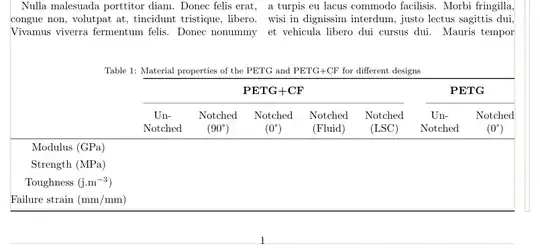
Second example, where is considered, that document has two columns. Since table is about text width wide, it cannot be fir into column wide, so only reasonable solution is to write it over two columns. In this case the package stfloats can be handy, if you like to have table on the same page where is inserted in the text (if there is enough space for it):
\documentclass[twocolumn]{elsarticle}
\usepackage{stfloats}
\usepackage{booktabs, makecell}
\renewcommand\theadfont{\bfseries}
\renewcommand\theadgape{}
\usepackage{siunitx}
\usepackage{xparse}
\NewExpandableDocumentCommand\mcc{O{1}m}
    {\multicolumn{#1}{c}{#2}}

%---------------- show page layout. don't use in a real document!
\usepackage{showframe}
\renewcommand\ShowFrameLinethickness{0.15pt}
\renewcommand*\ShowFrameColor{\color{red}}
%---------------------------------------------------------------%
\usepackage{lipsum}

\begin{document}
    \begin{table}[ht]
     \centering
\caption{Material properties of the PETG and PETG+CF for different designs}
\label{table:3}
    \small
    \setlength\tabcolsep{5pt}
    \setcellgapes{3pt}
    \makegapedcells
    \begin{tabular}{ *{8}{c} }
    \cmidrule[\heavyrulewidth]{2-8}
    & \mcc[5]{\thead{PETG+CF}}
                        &  \mcc[2]{\thead{PETG}}             \\
    \cmidrule{2-6}\cmidrule(l){7-8}
    & \makecell{Un-\\ Notched}
        &   \makecell{Notched\\ (\SI{90}{\degree})}
            &   \makecell{Notched\\ (\SI{0}{\degree})}
                &   \makecell{Notched\\ (Fluid)}
                    &   \makecell{Notched\\ (LSC)}
                        &   \makecell{Un-\\ Notched}
                            &   \makecell{Notched\\ (\SI{0}{\degree})}  \\
    \hline
Modulus (GPa)           &   &   &   &   &  &    &   \\
Strength (MPa)          &   &   &   &   &  &    &   \\
Toughness (j.m$^{-3}$)  &   &   &   &   &  &    &   \\
Failure strain (mm/mm)  &   &   &   &   &  &    &   \\
    \bottomrule
\end{tabular}
    \end{table}
\end{document}
(red lines indicate page layout)


resizeboxto make a table fit into the textwidth. This will lead to illegibly small and inconsistent font sizes. Instead you can have a look at thetabularxpackage. Also, replace\bfwith\textbfsince the former is deprecated. (See also: “Correct” way to bold/italicize text?) – leandriis Feb 22 '20 at 17:58geometrypackage is you use it. – leandriis Feb 22 '20 at 17:59\multicolumnas follows:& \multicolumn{5}{c|}{\textbf{PETG+CF}} & \multicolumn{2}{c|}{\textbf{PETG}}\\ \cline{2-8}. – leandriis Feb 22 '20 at 18:02resizeboxto keep the table inside the margins definitely not the best method. In order to suggest a better approach I asked about the actual contents of the cells. – leandriis Feb 22 '20 at 18:11articlein theelsarticleclass documentation. The available class options ofelsarticleheavily influence the width of the margins and the textblock. – leandriis Feb 22 '20 at 18:13