5

I would like to draw a curve in latex but when I put this code

\psset{algebraic=true}
\pspicture(-2,-0.5)(2,2)

\psline{<->}(-2,0)(2,0)
\psline{->}(0,-0.5)(0,2)
\psplot{-1.5}{1}{x*x+x}

\endpspicture

theses errors appear

! Undefined control sequence.<recently read> \c@lor@to@ps \psline(
! Undefined control sequence.\XC@usec@lor ...string \color@ #1#2\endcsname \@@\fi \space \psline(
! Undefined control sequence.<recently read> \c@lor@to@ps \psline

Please if someone can help me because i didn't understand why this error appears.

\documentclass{article}
\usepackage[french]{babel} 
\usepackage{color} 
\usepackage{xcolor} %les couleurs 
\definecolor{myblue}{rgb}{0.2,0.4,1} 
\usepackage{layout} 
\usepackage[top=2 cm, bottom=2 cm, left=2 cm, right=2 cm]{geometry} 
\usepackage{setspace} 
\usepackage{graphicx} 
\usepackage{array} 
\usepackage{pstricks-add} 
\usepackage{pst-eucl} 

\begin{document} 
\psset{algebraic=true} 
\pspicture(-2,-0.5)(2,2) 
\psline{<->}(-2,0)(2,0) 
\psline{->}(0,-0.5)(0,2) 
\psplot{-1.5}{1}{x*x+x} 
\endpspicture 
\end{document} 
cmhughes
  • 100,947
boutheina
  • 779

4 Answers4

5

The main problem with your MWE was the line

\usepackage[pdftex]{graphicx}

which, when using PSTricks will cause some problems (unless you use How to use PSTricks in pdfLaTeX?)

Note also that there's no need to load the color AND xcolor package- only load the xcolor package in the future.

I've stripped your code down to the following, which works either with xelatex or with the latex->dvips->ps2pdf routine.

enter image description here

\documentclass{article}
\usepackage[french]{babel} 
\usepackage{pstricks-add} 

\begin{document} 
\psset{algebraic=true} 
\pspicture(-2,-0.5)(2,2) 
\psline{<->}(-2,0)(2,0) 
\psline{->}(0,-0.5)(0,2) 
\psplot{-1.5}{1}{x*x+x} 
\endpspicture 
\end{document} 
cmhughes
  • 100,947
3

When using PStricks with PDF output, you need to either

  1. Compile with latex and then run dvi2pdf.
  2. Compile with xelatex.
  3. Compile with pdflatex with \usepackage{auto-pst-pdf}.

In the first two cases, you need to remove the pdftex option from \usepackage{graphicx}, and in the third case, it is still recommended to omit the option.

Alternatively, you could

  1. Use pgfplots, which works natively with pdflatex. For example

\documentclass{article}
\usepackage{pgfplots}

\begin{document}
\begin{tikzpicture}
\begin{axis}[axis lines=middle, enlargelimits=true, xtick=\empty, ytick=\empty]
\addplot [domain=-1.5:1, thick] {x^2+x};
\end{axis}
\end{tikzpicture}
\end{document}

will give you

Jake
  • 232,450
  • thank you for your answers please i have an anathor question i would like to make a curve that i input its data – boutheina Apr 23 '12 at 13:20
  • @boutheina: You should ask a new question for that. – Jake Apr 23 '12 at 13:21
  • @ Jake: i can't publish my question that is:good afternoon, I would like to draw a curve in latex with my own data so how i can make that please? this error appear It does not meet our quality standards. – boutheina Apr 23 '12 at 13:59
  • @boutheina: You'll need to add more information to your question: What compiler do you use (pdflatex, latex, xelatex)? What plotting package do you want to use (PStricks, pgfplots)? In what form do you want to provide the plot data (a text file of comma separated values, coordinates you'll enter into the .tex file)? – Jake Apr 23 '12 at 14:03
  • i change my questio to :good afternoon,

    I would like to draw a curve in latex with my own data so how i can make that please?

    i use the compiler pdflatex and i use plotting package pgfplots and I don't know what is the best form to provide this? but the same error still

    – boutheina Apr 23 '12 at 14:22
  • @boutheina: Hm, don't know why the system doesn't accept your answer. But really, that question kind of is low quality: It is expected that you have done some research of your own before posting a question. In this case, simply looking at page 16 of the pgfplots manual would already answer your question. – Jake Apr 23 '12 at 14:32
  • :thank you but when i publish this question i want that you give me some exemples and some advices concerning houw i can do that. – boutheina Apr 23 '12 at 15:02
  • @boutheina: But there are so many examples in the manual, and on this site. Just search for pgfplots and data on this site and you'll find lots. If you're looking for concrete advice, add that to your question. Also, you should pay attention to correct orthography (capitalising "I", for example), I believe that may trigger the "low quality" error as well. – Jake Apr 23 '12 at 15:05
  • in your previous comment you have said that I can use pgfplots manual but this link doesn't work please do you have an another version please I need that. – boutheina Apr 28 '12 at 22:27
  • @boutheina: That's strange, it works fine for me (it links to a PDF document). Try http://mirror.ctan.org/graphics/pgf/contrib/pgfplots/doc/latex/pgfplots/pgfplots.pdf – Jake Apr 28 '12 at 22:33
  • who can explain to me what these two instructions means because when I put this an error appear: \addplot[color=blue,mark=*] table[x=Cost,y=Error] {pgfplots.testtable}; – boutheina Apr 28 '12 at 22:51
  • @boutheina: Now this is an opportunity to ask a good question: Please include a minimal example document (starting from \documentclass), a sample of your pgfplots.testtable datafile, and the error message you get. – Jake Apr 28 '12 at 22:54
  • ok I will do this tomorrow because it is late now but I also want to understand what mens this because I don't know: \addplot[color=blue,mark=*] table[x=Cost,y=Error] {pgfplots.testtable}; – boutheina Apr 28 '12 at 22:58
  • @boutheina: It's one instruction: \addplot table {<data source>}; with some optional arguments. Please, take a look at p. 22 of the manual (for the \addplot command in general) and p. 26 (for the table input). – Jake Apr 28 '12 at 23:04
2

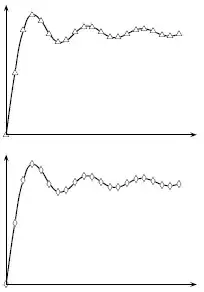
Plotting a curve to which you supply your own data points using pstricks is possible using pst-plot. You can either input the data directly in your .tex file, or read it from an external file. Here's a small example, taken from the pst-plot documentation (see section 2 Plotting data records, p 5-6):

enter image description here

\documentclass{article}
\usepackage{pst-plot}% http://ctan.org/pkg/pst-plot
\usepackage{filecontents}% http://ctan.org/pkg/filecontents
\begin{document}
\begin{pspicture}(4,3)
  \psset{xunit=.2cm,yunit=1.5cm}
  \savedata{\mydata}[
    {{0, 0}, {1., 0.946083}, {2., 1.60541}, {3., 1.84865}, {4., 1.7582},
    {5., 1.54993}, {6., 1.42469}, {7., 1.4546}, {8., 1.57419},
    {9., 1.66504}, {10., 1.65835}, {11., 1.57831}, {12., 1.50497},
    {13., 1.49936}, {14., 1.55621}, {15., 1.61819}, {16., 1.6313},
    {17., 1.59014}, {18., 1.53661}, {19., 1.51863}, {20., 1.54824}}]
  \dataplot[plotstyle=curve,showpoints,dotstyle=triangle]{\mydata}
  \psline{<->}(0,2)(0,0)(22,0)
\end{pspicture}

\bigskip

\begin{filecontents*}{foo.data}
[{0, 0}, {1., 0.946083}, {2., 1.60541}, {3., 1.84865}, {4., 1.7582},
 {5., 1.54993}, {6., 1.42469}, {7., 1.4546}, {8., 1.57419},
 {9., 1.66504}, {10., 1.65835}, {11., 1.57831}, {12., 1.50497},
 {13., 1.49936}, {14., 1.55621}, {15., 1.61819}, {16., 1.6313},
 {17., 1.59014}, {18., 1.53661}, {19., 1.51863}, {20., 1.54824}]
\end{filecontents*}

\begin{pspicture}(4,3)
  \psset{xunit=.2cm,yunit=1.5cm}
  \readdata{\foo}{foo.data}
  \dataplot[plotstyle=curve,showpoints,dotstyle=diamond]{\foo}
  \psline{<->}(0,2)(0,0)(22,0)
\end{pspicture}

\end{document}​
Werner
  • 603,163
1

Compile with pdflatex --shell-escape filename.tex or xelatex --shell-escape filename.tex.

%filename.tex
\documentclass{article}

\usepackage{filecontents}

\begin{filecontents*}{xxx.tex}
\documentclass[pstricks,border=0pt]{standalone}
\usepackage{pstricks-add} 
\begin{document} 
\pspicture*[showgrid](-2,-1)(2,2) 
    \psaxes{->}(0,0)(-1.75,-0.75)(1.5,1.5)[$x$,0][$y$,90]
    \psplot[algebraic,linecolor=red]{-1.5}{1}{x^2+x} 
\endpspicture* 
\end{document} 
\end{filecontents*}


\usepackage{graphicx}

\def\fig#1#2{
    \immediate\write18{xelatex #1}%
    \begin{figure}
        \centering
        \includegraphics[width=0.5\linewidth]{#1}
        \caption{#2}
        \label{fig:#1}
    \end{figure}%
}
\begin{document}
    \fig{xxx}{This is the graph of $y=f(x)=x^2+x$}
\end{document}

enter image description here