TeX recognizes only two grouping characters. These are the characters assigned the catcodes 1 (begin group) and 2 (end group). By default they are { and } respectively. The [ and ] characters are just regular non-alphabetic characters assigned to catcode 12. For more information about TeX catcodes see What are category codes?.
Because of this, only braces (or more properly, the catcode 1 and 2 characters) are matched; everything else, including arguments delimited by [ ] or ( ) or | (to use some real examples) are dealt with completely differently, usually using something like TeX's delimited argument definitions, which cannot deal with nesting directly. For more information about delimited arguments, see How does TeX look for delimited arguments? and Why does TeX remove braces around delimited arguments?.
As egreg notes in the comments, commands defined using the xparse package are able to deal with nested [ ] in optional arguments. Here's a small example showing how they work differently.
Here I've defined two seemingly identical commands, one using \newcommand and one using xparse's \NewDocumentCommand. They each take a single optional argument. I've used colours to show how the commands parse the arguments.
To show how each command works with nested [ ] we can try to make the first optional argument the string [Arg1]. If our command worked correctly, it should make the string [Arg1] red, and the string [Arg2] blue.
\documentclass{article}
\usepackage{xparse}
\usepackage{xcolor}
\newcommand{\regularcmd}[2][]{{\color{red}#1}{\color{blue}#2}}
\NewDocumentCommand{\xparsecmd}{o m}{{\color{red}#1}{\color{blue}#2}}
\begin{document}
\begin{enumerate}
\item\regularcmd[[Arg1]]{[Arg2]}

\item\regularcmd[{[Arg1]}]{[Arg2]}

\item\xparsecmd[[Arg1]]{[Arg2]}

\item\xparsecmd[{[Arg1]}]{[Arg2]}
\end{enumerate}
\end{document}
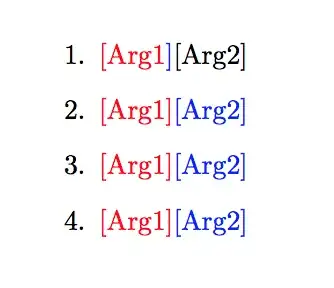
As you can see from the output item 1, the regularly defined command fails to do this. Instead it stops parsing the optional argument at the first ] it encounters, and then takes the next token (in this case the closing ] as the second argument, thus only the ] appears in blue, and none of what we expect to be in blue is coloured at all. If we want this command to work correctly, we then we need to protect the [Arg1] argument with braces so that the first ] encountered parsing the optional argument is the second ]. This is what output item 2 does.
The xparse defined command, however, is able to deal with this nesting without any extra braces, so both output items 3 and 4 show the output we expect even though item 3 uses the same surface syntax as item 1.


{and}are catcode 1 and 2 respectively, but[and]are just regular non-alphabetic characters (catcode 12). So this alone will cause them to be treated differently. So braces are really the only grouping characters built in to TeX. (And of course, since catcodes can be changed, one could in principle make any type of character the grouping characters.) – Alan Munn Mar 10 '20 at 04:39