8

This page has a tutorial for making CV, but it doesn't have the example to make grayed/outdented section as follows:

enter image description here

How can I make this? The copied code from the poster without the outdenting/grayed area is as follows.

\documentclass[a4paper, oneside, final]{scrartcl}

\usepackage{soul}
\usepackage{scrpage2}
\usepackage{titlesec}
\usepackage{marvosym}

\titleformat{\section}{\large\scshape\raggedright}{}{0em}{}[\titlerule]

\pagestyle{scrheadings}

\renewcommand{\headfont}{\normalfont\rmfamily\scshape}

% add the symbols for email and phone contact data
\cofoot{\so{Liefdestraat, 7 - 1234LI, Amsterdam, Nederland}\\
\so{ {\Large\Letter} jeff@gmail.com \ {\Large\Telefon} +31 (0)6 12345678}}

\begin{document}
\begin{center}

\textsc{\Huge{\so{Iulius Caesar}}}

\section{Experiences}
\section{Skills}
\section{Education}
\section{Publications}
\section{Personal Info}
\section{Languages}
\section{Interests}

\end{center}
\end{document}

Update package if necessary

One needs to update enumitem package with tlmgr update --self when the output is as follows:

enter image description here

David Carlisle
  • 757,742
prosseek
  • 6,033

1 Answers1

7

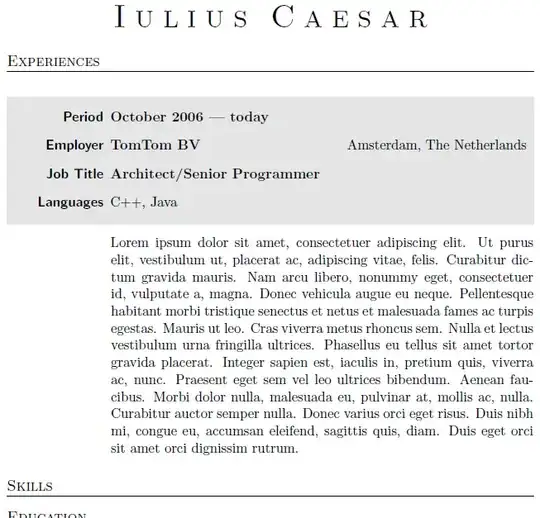
The following could be a start:

enter image description here

\documentclass[a4paper, oneside, final]{scrartcl}
\usepackage{soul}
\usepackage{scrpage2}
\usepackage{titlesec}
\usepackage{marvosym}
\usepackage{xcolor}% http://ctan.org/pkg/xcolor
\usepackage{enumitem}% http://ctan.org/pkg/enumitem
\usepackage{framed}% http://ctan.org/pkg/framed
\usepackage{lipsum}% http://ctan.org/pkg/lipsum

\newlist{experience}{description}{1} \setlist[experience]{labelwidth=7em,align=right} \definecolor{shadecolor}{gray}{.9} \setlength{\FrameSep}{0pt} \titleformat{\section}{\large\scshape\raggedright}{}{0em}{}[\titlerule]

\pagestyle{scrheadings}

\renewcommand{\headfont}{\normalfont\rmfamily\scshape}

% add the symbols for email and phone contact data \cofoot{\so{Liefdestraat, 7 - 1234LI, Amsterdam, Nederland}\ \so{ {\Large\Letter} jeff@gmail.com \ {\Large\Telefon} +31 (0)6 12345678}}

\begin{document} \begin{center} \textsc{\Huge{\so{Iulius Caesar}}} \end{center}

\section{Experiences} \begin{shaded} \begin{experience} \item[Period] \textbf{October 2006 --- today} \item[Employer] \textbf{TomTom BV} \hfill Amsterdam, The Netherlands\mbox{\hspace*{.5em}} \item[Job Title] \textbf{Architect/Senior Programmer} \item[Languages] C++, Java \end{experience} \end{shaded} \begin{experience}[leftmargin=\dimexpr\FrameRule+7em+\labelsep] \item[] \unskip\lipsum[1] \end{experience}

\section{Skills} \section{Education} \section{Publications} \section{Personal Info} \section{Languages} \section{Interests}

\end{document}

Items are organised within an experience list which is based on description. All of which are set using enumitem. framed provides the shaded box (via the shaded environment), while lipsum provides some dummy text, Lorem Ipsum-style.

Settings for the shaded box is controlled via \FrameRule and \FrameSep, while the color is set using \definecolor{shadecolor}. Read more on this in the framed documentation.

Werner
  • 603,163
  • I tried your solution to get a different result, and I updated my post. Could you care to check? – prosseek Apr 28 '12 at 04:50
  • @prosseek: Did you compile my MWE as-is? If so, please include \listfiles in your preamble and include the contents after *File List* in your .log file. It could be that you have an outdated enumitem package (my version is 2011/09/28 v3.5.2). – Werner Apr 28 '12 at 05:07
  • Yes, it works fine with the package update. Thanks. – prosseek Apr 28 '12 at 06:15